Search for an AI face swap and you get a wall of tool landing pages, every one of them promising free, no watermark and no sign-up. Several of those claims are true. Several are true only for photos, or only for the first few minutes, or only until you try to download the video. This page sorts out which is which, using what each vendor actually publishes rather than what its homepage headline says.
You will find nine tools ranked for different jobs, a table of what each free tier really gives you, and one technical explanation that no vendor page will offer: why almost every face swap on the internet is generated at the same modest resolution and then upscaled, and what that means for whether you should pay for a higher export tier.
There is also a section on consent and the law, because it changed substantially in the last eighteen months across the US, the UK and the EU, and because if you are swapping a real person’s face into anything you now need to know about it. We do not cover tools that market themselves for sexual or non-consensual output, and none of the nine below does.
Ranked by what they do best, with the free tier and price each vendor publishes.
Best overall
Magic Hour
Best free photo swaps overall
Free / $19 per mo
Runner-up
Akool
Best for longer commercial video
Free / paid tiers not published openly
Third pick
Vidnoz
Best genuinely usable free video tier
Free / $14.99 per mo
01
Magic Hour
Best free photo swaps overall
Magic Hour gives you five photo face swaps a day with no account at all, and its own product page states that photo outputs carry no watermark on any tier. Video and GIF results are watermarked until you pay. Paid plans start at 19 dollars a month and the thing that actually changes between tiers is export quality: 1024px on Creator, 1472px on Pro, 4K on Business.
Free tier: 5 photo swaps per day, no sign-up, no watermark on photos; video and GIF outputs are watermarked
Free / $19 per mo
02
Akool
Best for longer commercial video
Akool publishes the clearest resolution ladder of anything on this list, which is rare enough to be worth rewarding. The free tier caps you at 720p with a full-screen watermark and 30 second, 150MB uploads. Starter unlocks 1080p and five minute clips. Pro reaches 4K and hour-long video. Per-seat prices are not displayed openly on the pricing page, so you will need to ask.
Free tier: 5 minutes of live face swap, 720p, full-screen watermark, 30 second uploads
Free / paid tiers not published openly
03
Vidnoz
Best genuinely usable free video tier
Vidnoz is one of very few tools where the free video tier is more than a teaser: 720p, up to three minutes, watermarked, refreshed by daily credits. Starter at 14.99 dollars a month removes the watermark, lifts you to 1080p and 60 minute videos, and adds 450 monthly credits on top of 30 free daily ones. Vidnoz documents its burn rate at half a credit per second of standard video.
The swap happens inside Pixlr’s full photo editor, so you can immediately fix the seam, match colour and add grain without exporting to a second app. For believable results that workflow matters more than raw swap quality. Plus is 2.49 dollars a month for 80 AI credits, Premium is 9.99 for 1,000 credits, Ultra starts at 24.99. Photos only, no video.
Free tier: Free editor access with a limited AI credit allowance; each AI action spends credits
Free / $2.49 per mo
05
Canva
Best for brand and marketing teams
If your team already works in Canva, the face swap is simply one more Magic Studio tool drawing on the same credit pool, wrapped in brand kits, approvals and shared folders. Canva lists the free plan as up to 200 standard AI uses or 20 premium ones per month. Pro is 180 dollars a year, which Canva describes as ten times the free AI allowance.
Free tier: Up to 200 standard AI uses or 20 premium AI uses per month
Free / $180 per yr
06
FaceFusion
Best for privacy and local control
FaceFusion runs on your own hardware, which means no face ever leaves your machine. That single property makes it the only fully satisfying answer to the privacy question further down this page. It is free and open source under an OpenRAIL-AS licence whose terms restrict harmful use. Setup takes some technical confidence, though official Windows and macOS installers exist.
Free tier: Free and open source, unlimited local use, nothing uploaded to anyone
Free (self-hosted)
07
Higgsfield
Photo and video in one workflow
Higgsfield handles both photo and video swaps in a single uncluttered browser workflow, and it ranks near the top of Google for sound reasons: it is quick and it does not fight you. What it does not do is publish per-swap credit costs or an output resolution cap, so treat its ceiling as unverified until you have run your own footage through it.
Free tier: Free tier available; exact allowance and watermark rules are not published in detail
Free / paid tiers on vendor site
08
Remaker AI
Best for multi-face group shots
Remaker handles several faces in one image better than most, which is exactly the case cheap tools fumble: a group photo where you only want to change two people. Its pricing page renders entirely in JavaScript and did not expose tier costs or credit allowances when we tried to read it, so we are not going to quote numbers we could not verify.
Free tier: Free swaps available; the per-day limit is not clearly published
Free / pricing not published openly
09
Reface
Best mobile app for casual fun
Reface is the mainstream phone app for casual swaps into clips and GIFs with friends who have agreed to it. Expect a subscription prompt quickly and expect watermarks before you pay. This is entertainment software rather than production software, and it is the wrong choice for anything client-facing.
Free tier: A limited number of free swaps with watermark before a subscription prompt
Free / in-app subscription
AI face swap tools compared at a glance9 tools
#
Tool
Best for
Free tier
Price
01
Magic Hour
Best free photo swaps overall
Free tier
Free / $19 per mo
02
Akool
Best for longer commercial video
Free tier
Free / paid tiers not published openly
03
Vidnoz
Best genuinely usable free video tier
Free tier
Free / $14.99 per mo
04
Pixlr
Best swap inside a real editor
Free tier
Free / $2.49 per mo
05
Canva
Best for brand and marketing teams
Free tier
Free / $180 per yr
06
FaceFusion
Best for privacy and local control
Free tier
Free (self-hosted)
07
Higgsfield
Photo and video in one workflow
Free tier
Free / paid tiers on vendor site
08
Remaker AI
Best for multi-face group shots
Free tier
Free / pricing not published openly
09
Reface
Best mobile app for casual fun
Free tier
Free / in-app subscription
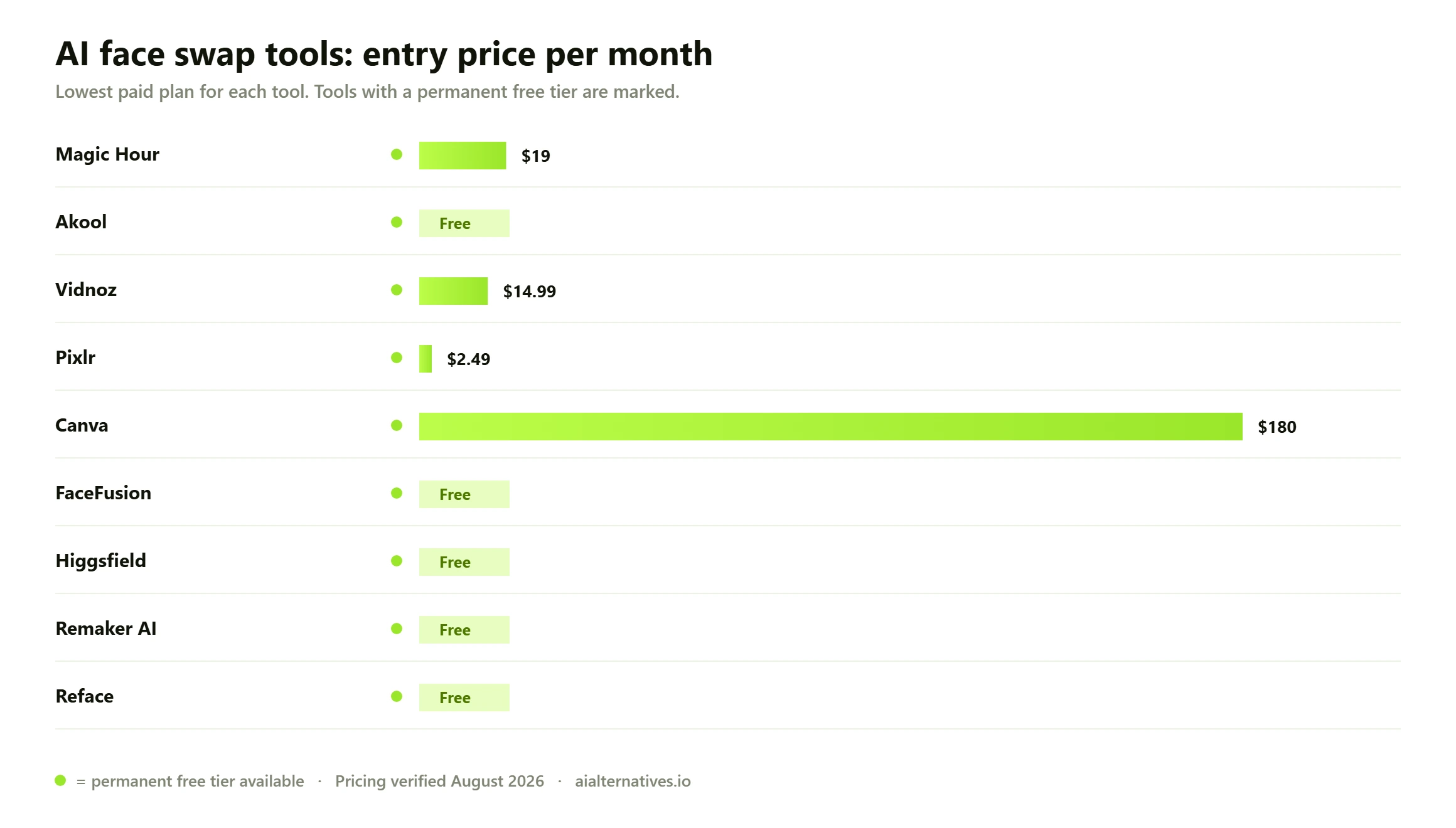
Entry monthly price for every tool on this list. Green dot marks a permanent free tier. Pricing verified August 2026.
What an AI face swap actually does
A face swap is not a cut-and-paste job, whatever the marketing implies. The tool detects a face in your source image, converts it into a compact numerical description of that person’s identity, then regenerates the face region of your target image or video conditioned on that description. The pose, lighting and expression come from the target. Only the identity comes from the source. That is why a swap into a well-lit, front-facing photo looks convincing and a swap into a dim three-quarter profile looks like a rubber mask.
Understanding that one mechanism explains almost every result you will get. If the target face is partly hidden by hair, a hand or heavy shadow, the model has less to work with and invents the difference. If the source photo is small, blurry or shot at an odd angle, the identity description is weak and the output drifts toward a generic face. Skin tone mismatch between source and target is the single most common cause of a swap that looks obviously wrong, because most consumer tools blend the new face into the old head rather than relighting it.
This also explains the ceiling on quality. Face swapping is a narrow, well-solved problem for still photos in good light, and a genuinely hard one for video, where the model has to stay consistent across hundreds of frames while the head turns. Tools that are excellent at the first are often mediocre at the second, which is why our shortlist separates them rather than pretending one winner exists.
How we verified this Pricing, credit costs, watermark rules and resolution caps on this page were read from each vendor’s own pricing page, product page or public documentation in late August 2026, not from other comparison sites. Where a vendor does not publish a figure openly, we say so rather than guessing: Akool does not display per-seat prices, Remaker’s pricing page renders only in JavaScript and did not expose tier costs to us, and Higgsfield publishes neither credit costs nor a resolution cap for its face swap. Free tiers change often and several of these vendors have altered theirs within the last year, so treat every number here as a starting point to check, not a contract.
The resolution ceiling almost no vendor mentions
Here is the most useful thing on this page, and you will not find it on a single tool landing page. The great majority of consumer face swap products, free and paid, are built on the same publicly available swapping model. That model regenerates the face at 128 by 128 pixels, and it does so regardless of how large your input image is. The documentation for one widely used implementation puts it plainly: the model reduces the resolution of the target face before generating a 128 by 128 image, so the resolution of processed faces will not exceed that, whatever the original image size.
Everything after that point is upscaling and face restoration. That is not a scandal, and restoration models have become very good, but it reframes what vendor claims mean. When a tool advertises 4K export, it is describing the canvas your swapped face is pasted back onto, not the detail the model actually generated. It is why swapped faces so often look slightly smooth, slightly waxy, and slightly out of step with the grain of the surrounding photo.
Three practical consequences follow, and they are worth more to you than any feature list:
Frame your shot so the face is not enormous. A face that fills the frame exposes the upscale. A face at natural portrait distance hides it completely.
Do not pay purely for a higher export resolution. Paying to move from 1080p to 4K raises the canvas, not the generated face detail. Pay for watermark removal, video length and commercial rights instead, because those are real differences.
Finish the image somewhere else. A pass of grain, a slight blur match and a colour correction in an AI photo editor will do more for believability than switching between any two tools on this list.
This is also the honest answer to why so many people conclude that every face swap tool is secretly the same. In terms of the core swap, many of them genuinely are. What separates them is everything wrapped around it: how much you get free, whether output is watermarked, how long a video you may process, whether you can use the result commercially, and what happens to the photo you uploaded.
Free tiers, watermarks and credits, compared honestly
Almost every tool here calls itself free. Very few mean it in the way you would assume. The common pattern is that photos are free and video is not, or that output is free but watermarked, or that a daily credit allowance quietly resets at a level just below what a real project needs. The table below records what each vendor states publicly, including the places where they state nothing at all.
Tool
What the free tier gives
Watermark on free output
Stated resolution ceiling
Magic Hour
5 photo swaps per day, no account needed
None on photos; applied to video and GIF
1024px Creator, 1472px Pro, 4K Business
Akool
5 minutes of live face swap, 30 second uploads
Full-screen watermark
720p free, 1080p Starter, 4K Pro
Vidnoz
Daily credits, videos up to 3 minutes
Yes
720p free, 1080p on paid tiers
Pixlr
Limited monthly AI credit allowance
Not stated for face swap
Not published
Canva
Up to 200 standard or 20 premium AI uses
No
Not published for face swap
FaceFusion
Unlimited, runs entirely on your machine
None
Set by the swap model, then upscaled locally
Remaker AI
Free swaps, daily limit unclear
Not published
Not published
Higgsfield
Free tier available, allowance unpublished
Not published
Not published
Reface
A limited run of free swaps
Yes
Not published
Read that last column carefully. Five of nine vendors do not publish a resolution figure for face swap at all. That is not necessarily bad faith, but it does mean the only way to know what you will get is to run one real image through and look at it at full size before you subscribe to anything.
Credits deserve the same scepticism. A credit is whatever the vendor decides it is, and the exchange rate is rarely stable across features. Vidnoz is unusually clear that standard video costs half a credit per second while expressive avatars cost two, a fourfold difference between two things that sound similar. If a tool tells you how many credits you get but not what anything costs, you cannot price your own work, and you should treat the headline number as marketing rather than information.
Photo swaps and video swaps are different products
Treat these as two separate purchases, because the engineering behind them is separate. A photo swap is one inference on one frame. A video swap is the same operation on every frame, plus the far harder job of keeping the identity stable as the head turns, the mouth moves and the light changes. Temporal flicker, where the face subtly shifts between frames, is the defining failure mode and it is what free video tiers are worst at.
The commercial consequence is that video is where every vendor puts its paywall. Magic Hour gives photos away without a watermark and watermarks video. Vidnoz allows three free minutes at 720p and charges for anything longer or cleaner. Akool caps free uploads at 30 seconds. If your work is video, the free tier is a demo, and you should evaluate it as one.
For stills and social images, start with Magic Hour or Pixlr. Both are enough for most people and neither will cost you anything to find out.
For short marketing video, Vidnoz has the most generous honest free tier and Akool the clearest published limits.
For anything longer than a couple of minutes, or client work, budget for a paid tier from the start and check the commercial-use terms before you deliver.
If you are already producing video with generative tools, see our AI video editing guide and our Runway alternatives, since a swap is usually one step in a longer pipeline rather than the whole job.
Consent, and what the law now says
Face swapping has a genuine misuse problem, and pretending otherwise would make this page useless. The same technology that lets a studio de-age an actor lets somebody paste a colleague’s face into sexual imagery. Search data makes the scale of that plain: a substantial share of the search demand around this topic is explicitly for sexual content involving real people who did not agree to it, and separate spikes cluster around the names of individual public figures. We do not cover, link to or recommend tools that market themselves for producing non-consensual or sexual imagery, and none of the nine tools above does.
The legal position has shifted faster than most people realise. Three developments matter, and between them they now cover most of the English-speaking and European internet.
United States: the TAKE IT DOWN Act
Signed on 19 May 2025, the TAKE IT DOWN Act criminalises the non-consensual publication of intimate imagery and, critically, extends that to digital forgeries, meaning AI-generated or digitally altered images of a real person. It also places an obligation on covered platforms, including social media, messaging services and image and video sharing sites, to run a removal request process and to take reported content down, along with known identical copies, within 48 hours. Platforms were given one year to build that process, and the Federal Trade Commission began enforcing the platform obligations in May 2026, with civil penalties running to tens of thousands of dollars per violation. The FTC’s business guidance on TAKE IT DOWN enforcement is the clearest short summary available.
United Kingdom: creating the image is now the offence
Britain has gone further in one specific respect. Sharing a sexual deepfake of a real person was already an offence, but section 138 of the Data (Use and Access) Act 2025, in force from 6 February 2026, criminalises creating or requesting the creation of a non-consensual intimate image. The offence can be committed even where the image is never produced or never shared. The definition of an intimate image in the Sexual Offences Act 2003 was amended to cover AI-generated and digitally manipulated content, and platforms face regulatory exposure through Ofcom for failing to deal with this material.
European Union: disclosure became mandatory in August 2026
The EU AI Act takes a transparency route rather than a purely criminal one, and its timing is directly relevant to anyone publishing this year. Article 50 applies from 2 August 2026. It requires providers of systems that generate synthetic image or video content to mark their outputs in a machine-readable format that is detectable as artificially generated, and it requires deployers who publish a deepfake to disclose that fact to viewers in a clear and distinguishable way, at first exposure at the latest, with a limited grace period on the marking obligation running to 2 December 2026. The European Commission’s official Article 50 guidance sets out what counts as adequate disclosure.
What this means in practice If you publish a face-swapped image or video of a real, identifiable person to an EU audience, you now need a visible label saying it is AI-generated, and you should not rely on an invisible watermark to satisfy that. If the person in it did not agree, you may be committing a criminal offence in the UK regardless of whether you ever post it, and in the US the platform you posted to must remove it within 48 hours of a valid request. The safe rule has not changed and is simpler than any of the statutes: swap faces of people who have said yes, label the result, and do not make sexual or defamatory content of anybody. This section is a summary for general readers written from primary sources, not legal advice, and the position in your own jurisdiction may differ.
What these tools are legitimately for
None of the above means face swapping is a disreputable technology. It is a standard part of several ordinary industries, and the legitimate applications are the reason mainstream companies like Canva build it into their products at all.
Film and television post-production. Stunt double replacement, de-aging, continuity fixes after reshoots and completing a performance when scheduling makes a pickup shot impossible. This is the oldest and least controversial use, done under contract with the performer.
Video localisation and dubbing. Matching a performer’s face to a dubbed track for another language market, so the mouth and expression fit the words the audience actually hears.
Privacy-preserving anonymisation. Research on video datasets has found that replacing faces with synthetic ones keeps footage usable for machine learning in a way that blurring or pixelation does not, while removing the identifiable individual. It is a real answer to a real data protection problem, though the research also notes a persistent trade-off between how thoroughly a face is anonymised and how natural it looks.
Marketing and brand creative. Producing regional variants of a campaign, or refreshing an asset without reshooting, using talent who signed for exactly that. Teams doing this usually want the workflow inside their existing stack, which is why Canva alternatives come up so often in this context.
Personal entertainment. Putting yourself and willing friends into a film scene or a meme. Genuinely the most common use, and completely fine when everybody involved has agreed.
What happens to the face you upload
You are handing a stranger’s server a clear photograph of a human face, which is biometric data in several jurisdictions. It is worth thirty seconds of attention. The vendors that address this at all tend to say uploads are deleted after processing or within a set window: Magic Hour states that free-tier uploads and outputs are removed after a day, and Pixlr states that uploaded photos and facial features are retained only for the duration of the swap. Those are reasonable positions, clearly stated.
The problem is the rest of the market. Many face swap sites, including some that rank extremely well, publish no retention period, no deletion commitment and no statement about whether uploads are used for model training. A tool that will not tell you how long it keeps your face is telling you something. If the photo is of somebody else, or of a child, or you are handling it in a work context with any data protection obligation attached, the only configuration that fully removes the question is local processing, which is precisely why FaceFusion earns its place on this list despite being harder to set up than everything else here.
What users consistently report Across community discussion the same handful of complaints recur, and they are consistent enough to be worth planning around. First, free tiers are smaller in practice than they appear, because daily credit allowances reset at a level calibrated to be just short of a finished project. Second, watermark policy is the most common source of surprise, particularly the pattern where photos come out clean and video does not, discovered only after the render. Third, results on group photos and on non-frontal faces disappoint people who judged a tool by its landing-page examples, which are uniformly well-lit and front-facing. Fourth, several of these products are sold on aggressive recurring subscriptions that are easier to start than to stop. These are aggregated impressions from public discussion rather than measured findings, and we present them as such.
How to choose in about two minutes
Skip the feature lists. Four questions settle it.
Photo or video? Photos are close to free everywhere. Video is where you will pay, so decide this first and evaluate nothing else until you have.
Will anyone outside your household see it? If yes, you need watermark-free output and explicit commercial rights, which means a paid tier at essentially every vendor here.
Whose face is it? If it is not yours, you need their agreement, and if the result is going anywhere public you need a visible AI-generated label. That is now a legal question in the UK, the EU and the US, not an etiquette one.
Does the photo need to leave your computer? If the answer is no, use FaceFusion and stop worrying about retention policies entirely.
One last piece of advice that will improve your results more than any purchase. A face swap is rarely the final step. Take the output into an editor, match the grain, knock back the smoothness the restoration model added, and correct the colour against the surrounding skin. Whether you use Pixlr, a Photoshop alternative or something you generate alongside it with an AI image generator, that finishing pass is what separates a swap that reads as real from one that reads as a swap.
FAQ
Questions people actually ask
Is AI face swapping legal?
Swapping your own face, or the face of someone who has agreed, is legal in the US, UK and EU. Doing it to a real person without consent is a different matter. In the UK, section 138 of the Data (Use and Access) Act 2025, in force from 6 February 2026, makes creating a non-consensual intimate image an offence even if it is never shared. In the US the TAKE IT DOWN Act of May 2025 criminalises publishing non-consensual intimate imagery including AI-generated forgeries. Non-sexual swaps can still expose you to defamation, passing-off and right-of-publicity claims. This is a summary, not legal advice.
What is the best free AI face swap with no watermark?
For photos, Magic Hour is the clearest answer: its product page states photo outputs carry no watermark on any tier, and you get five swaps a day without an account. For video, no mainstream tool gives you clean output free. Vidnoz, Akool and Reface all watermark free video, and removing it requires a paid plan. If you want unwatermarked video without paying, the only route is self-hosted software such as FaceFusion.
Can I swap faces in a video for free?
Yes, with real limits. Vidnoz allows up to three minutes at 720p with a watermark on daily credits. Akool gives you five minutes of live face swap at 720p with a full-screen watermark and 30 second uploads. Magic Hour includes video on its free tier but watermarks it. Every mainstream vendor treats free video as a demo, because video costs them far more compute than a single photo does.
Are the photos I upload to face swap sites kept?
It depends entirely on the vendor, and many will not say. Magic Hour states free-tier uploads and outputs are deleted after one day. Pixlr states uploaded photos and facial features are retained only while the swap is processed. Plenty of other sites publish no retention period at all and no statement on whether uploads are used for training. Treat a face photo as biometric data. If you cannot find a clear deletion commitment, either do not upload it or use local software so the file never leaves your machine.
Why does my face swap look blurry, smooth or waxy?
Because of a hard technical limit rather than a bad setting. Most consumer tools use a swapping model that regenerates the face at 128 by 128 pixels regardless of your input size, then upscales and restores it. That restoration pass is what produces the slightly plastic look, and it becomes visible when the face is large in frame. Use a face at natural portrait distance, and add grain and a colour match afterwards in a photo editor.
Does paying for 4K actually give me a sharper face?
Not in the way you would expect. A higher export tier raises the resolution of the overall image or video, not the detail the swap model generated for the face itself, which is fixed and then upscaled. Paying for a higher tier is worth it for watermark removal, longer videos, commercial rights and faster queues. It is a poor reason to upgrade if your only goal is a crisper face.
Do I need to sign up to use an AI face swap?
Not always. Magic Hour allows five photo swaps a day with no account, and several of the top-ranking free sites advertise no sign-up as their main draw. The trade-off is usually a queue, a daily cap, or a watermark on video. Anything involving commercial use, longer video or clean output will require an account and a card.
Can I use face swap results commercially?
Only on a paid plan at most vendors, and only with the right permissions from the people involved. Magic Hour, Akool, Vidnoz and Canva all restrict commercial use to paid tiers. Separately from the vendor terms you need a release from anyone whose face appears, and for an EU audience you need a visible AI-generated disclosure under Article 50 of the EU AI Act, which has applied since 2 August 2026.
Do I have to label a face-swapped image as AI-generated?
If it depicts a real person and your audience includes the EU, yes. Article 50 of the EU AI Act requires anyone publishing a deepfake to disclose it clearly and perceptibly, at first exposure at the latest, and requires providers to mark outputs in a machine-readable format. An invisible watermark alone does not satisfy the disclosure duty to viewers. Outside the EU, labelling is not yet universally mandatory, but it is becoming standard practice and several large platforms require it in their own policies.
What is the best AI face swap app for a phone?
Reface remains the mainstream choice for casual mobile swaps into clips and GIFs, and the Google Play face swap apps that rank for this term work similarly. Expect watermarks and a fast subscription prompt. For anything you intend to publish, a browser tool such as Magic Hour or Pixlr will give you more control and better output than a phone app designed around a template gallery.
Next step
Keep going
A face swap is usually one step in a bigger job. If you are editing the result, generating the plate, or building the video around it, these guides pick up where this one stops.