01
Adobe Express
All-round Canva replacement
Your closest like-for-like swap. You get Adobe Stock assets, Firefly AI credits, and a free plan that doesn’t nag.
Free tier: Generous: 100k+ templates, no watermarks
New this week: 6 head-to-head tests added, including Claude vs Gemini for long documents.
See what changed →Your Canva bill probably got a lot bigger. In September 2024, some Teams plans jumped from $119.99 to $500 a year. Pro crept from $12.99 to $18 a month. The reason? AI features you may never have asked for.
So you’re probably hunting for canva alternatives that respect your budget. Good news: the field is strong in 2026. Some rivals are genuinely free. Others beat Canva outright for infographics, photo editing, or team design.
We compared 9 canva alternatives below, ranked best first, to save you the digging. Every price was verified on official pricing pages in August 2026. Free tools get their own section, because free is probably where your search started.
Ranked by testing, current pricing and free-tier value. Details on every pick below the list.
All-round Canva replacement
Free / $9.99 per moTeams and product design
Free / $16 per mo full seatCheap social media graphics
Free / $10 per moAll-round Canva replacement
Your closest like-for-like swap. You get Adobe Stock assets, Firefly AI credits, and a free plan that doesn’t nag.
Free tier: Generous: 100k+ templates, no watermarks
Teams and product design
You get real design power plus Figma Buzz for marketing assets. Collab seats cost you just $3 a month.
Free tier: Starter plan, 3 design files, 2 editors
Cheap social media graphics
Pro covers up to 10 seats on your team for $10 total. Canva charges $25 per person for teams.
Free tier: 100k templates, brand kit, HD downloads
Infographics and reports
You get better charts, maps, and data visuals than Canva. It’s built for your reports, not just posts.
Free tier: Unlimited projects, 2 PNG downloads
Free Photoshop-grade editing
You get a full PSD-compatible editor right in your browser. No account, no watermark, no paywall.
Free tier: Everything free, ad-supported
Logos, merch, typography
You get advanced text effects and vector exports Canva can’t match. Popular if you sell print-on-demand.
Free tier: 5 projects, low-res exports, personal use
Fast one-off social graphics
Ruthlessly simple for you. Preset sizes, 5M+ photos, done in minutes. Team plan is $20 for 5 users.
Free tier: Full library, 3 downloads per month
Budget photo editing
You get an AI-powered photo editor at pocket-change prices. Plus tier removes ads for under $2.
Free tier: Free with ads, limited saves
Quick AI photo touch-ups
You get strong portrait retouching and one-click AI edits. The free tier watermarks your work, so budget for Pro.
Free tier: Basic tools, watermarked exports
| # | Tool | Best for | Free tier | Price |
|---|---|---|---|---|
| 01 | Adobe Express | All-round Canva replacement | Free tier | Free / $9.99 per mo |
| 02 | Figma | Teams and product design | Free tier | Free / $16 per mo full seat |
| 03 | VistaCreate | Cheap social media graphics | Free tier | Free / $10 per mo |
| 04 | Piktochart | Infographics and reports | Free tier | Free / $10 per mo annual |
| 05 | Photopea | Free Photoshop-grade editing | Free tier | Free / $5 per mo ad-free |
| 06 | Kittl | Logos, merch, typography | Free tier | Free / $10 per mo annual |
| 07 | Snappa | Fast one-off social graphics | Free tier | Free / $10 per mo annual |
| 08 | Pixlr | Budget photo editing | Free tier | Free / from $1.99 per mo |
| 09 | Fotor | Quick AI photo touch-ups | Free tier | Free / $8.99 per mo annual |
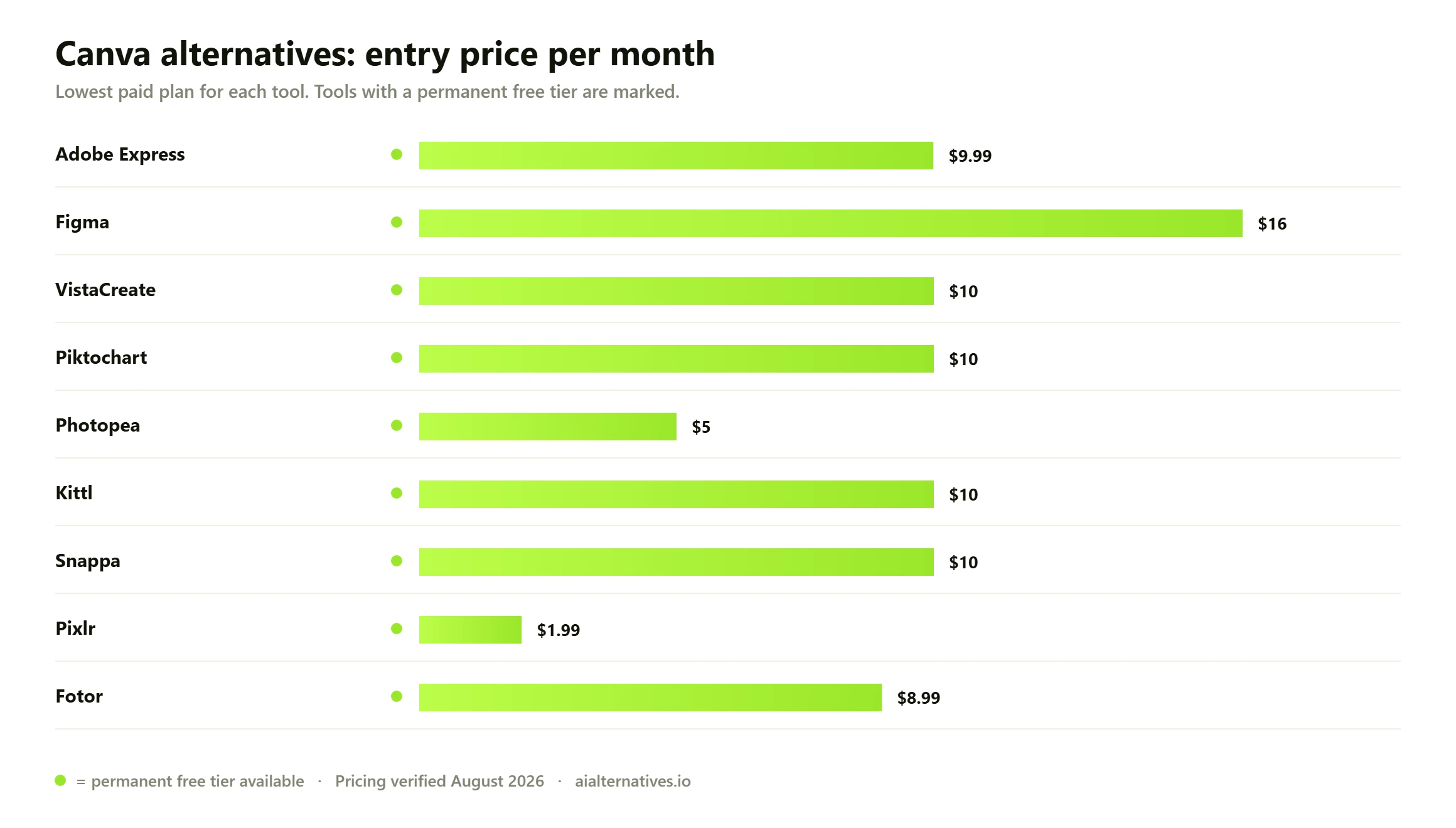
The trigger was pricing. In September 2024, Canva moved legacy Teams subscribers from $119.99 a year (5 users) to $500 — a jump of over 300%. Canva blamed the cost of its AI push, citing Magic Studio. The backlash was loud enough that Canva later published a pricing promise, letting early Teams users keep their old rate and pledging 60 days’ notice before future increases.
If you’re on an individual plan, that crept up too. Pro went from $12.99 to $15, then to $18 a month. The team tier, now called Canva Business, runs $25 per user per month. AI features are metered on every plan, with a pricey AI Pass add-on if you’re a heavy user.
Beyond price, the complaints repeat across Reddit and review sites. Print exports don’t always match what you see on the canvas. Typography and chart controls are shallow. If you’re on the free plan, you’ll keep bumping into premium assets mid-design. None of these are dealbreakers alone. Stacked on rising prices, they push people to look at alternatives to Canva.
| Tool | Best for | Starting price | Free plan |
|---|---|---|---|
| Adobe Express | All-round Canva replacement | $9.99 per mo | Yes, generous |
| Figma | Teams and product design | $16 per mo (full seat) | Yes, 3 files |
| VistaCreate | Cheap social graphics | $10 per mo (10 seats) | Yes |
| Piktochart | Infographics and reports | $10 per mo annual | Yes, 2 downloads |
| Photopea | Photoshop-grade editing | $5 per mo (ad-free) | Yes, everything free |
| Kittl | Logos, merch, typography | $10 per mo annual | Yes, personal use |
| Snappa | Fast social graphics | $10 per mo annual | Yes, 3 downloads/mo |
| Pixlr | Budget photo editing | from $1.99 per mo | Yes, with ads |
| Fotor | AI photo touch-ups | $8.99 per mo annual | Yes, watermarked |
Adobe Express is your safest switch. Templates, brand kits, background removal, scheduling — the same Canva playbook, backed by Adobe Stock and Firefly AI. The free plan gives you 100,000+ templates and no watermarks.
Premium costs $9.99 a month — half of Canva Pro’s $18 monthly rate — with 250 generative AI credits included. What it lacks: Canva’s sheer template volume and its whiteboard and docs extras. Pick it if you want the same workflow for less money.
Figma is your step up if your team outgrew drag-and-drop. Figma Buzz, launched in 2025, handles on-brand marketing assets, and every paid plan bundles it in. Collab seats cost $3 a month, so your marketers can edit templates without a $25 Canva Business seat.
The learning curve is real, and a full seat runs you $16 a month on Professional. It lacks Canva’s stock library depth. Pick it if design quality and team handoff matter more to you than speed.
VistaCreate (from VistaPrint) is your budget pick for social content. The free plan gives you 100,000 templates, a brand kit, and HD downloads. Pro is $10 a month and covers up to 10 seats — the cheapest team option on this list.
The catch: fewer integrations and a smaller ecosystem than Canva. Pick it if you’re making Instagram posts and flyers, not 60-page decks.
Piktochart beats Canva right where Canva is weakest: data. Charts, maps, and infographic layouts are deeper, and your reports export cleanly to PNG, PDF, and PowerPoint. Pro is $10 a month billed annually.
The free plan lets you build unlimited projects but only download 2 PNGs, so it’s really a trial in practice. Pick it for infographics, reports, and anything with numbers.
Photopea is your free power tool. It’s a browser-based editor that opens and saves PSD files, plus AI, SVG, PDF, and RAW formats. Every feature is free with ads; $5 a month removes them for you.
It’s an editor, not a template machine — no content calendar, no brand kit. Pick it if Canva’s photo editing feels like a toy to you and Photoshop feels like a mortgage.
Kittl wins on typography and vector art. Warped text effects, distressed textures, and true vector exports make it a favorite if you design logos, posters, or print-on-demand merch. Pro is $10 a month billed annually ($15 monthly) with commercial licensing up to 500,000 reproductions.
The free tier is personal-use only with low-res exports. Pick it if your designs sell on products, not just feeds.
Searches for free Canva alternatives spike every time Canva raises prices, and yours is probably no different. Here’s the honest breakdown of free alternatives to Canva in 2026.
One twist worth knowing: Canva itself made Affinity — its pro-grade design suite for photo, vector, and layout work — free forever on October 31, 2025. It’s desktop software with a real learning curve, and its AI extras need a paid Canva plan. But if you want professional graphic design software at $0, it’s a serious option for you, even if the money still traces back to Canva.
Match the tool to your job, not the hype.
Whatever you pick, test the free tier with a real project of yours first. Export it, print it, post it. Exports and licensing are where cheap tools show their seams.
If you pay for Canva Pro solo and use it daily, switching maybe isn’t worth it. $120 a year buys you an enormous template library, and Canva’s 60-day notice pledge reduces your surprise-hike risk. If you’re a legacy Teams user who kept grandfathered pricing, you should also probably stay put.
Switching pays off in three cases. You’re paying $25 per user on Canva Business — VistaCreate or Snappa cuts that by 60-80%. You mostly edit photos — Photopea does more for free. Or you need real typography, vectors, or data visuals — Kittl, Figma, and Piktochart each beat Canva at their specialty.
The migration cost is real but small. Templates don’t transfer, so rebuild your five most-used designs first and archive the rest as PNGs. Most people are fully moved in a weekend.
The questions people actually ask on Google, Reddit and Quora — answered with what we verified this month.
How we testPhotopea is your strongest fully free option — every feature works without paying, funded by ads. For template-based design, Adobe Express Free is the closest free Canva replacement, with 100,000+ templates and no watermarks. VistaCreate’s free plan is also solid if you’re making social graphics.
Canva said its AI features, including Magic Studio, justified higher prices. In September 2024 some legacy Teams plans rose from $119.99 to $500 a year, and Pro later climbed to $18 a month. After heavy backlash, Canva let early Teams users keep their old rates and promised you 60 days’ notice for future changes.
It’s cheaper and close in features. Premium costs you $9.99 a month versus $18 for Canva Pro, and includes Adobe Stock assets and Firefly AI credits. Canva still wins on template volume and extras like whiteboards, so heavy template users may prefer it.
VistaCreate is your pick for budget teams — Pro is $10 a month and covers up to 10 seats, versus $25 per person on Canva Business. Figma is the better pick if you’re a design-led team, with $3 collab seats and Figma Buzz for marketing assets.
Yes. Canva made the unified Affinity app (photo, vector, and layout studios) free forever on October 31, 2025. You’ll need a free Canva account to activate it, and optional AI features require a paid Canva plan. The core professional tools cost you nothing.
Mostly yes, but check each license first. Adobe Express, Photopea, Snappa, and VistaCreate allow commercial use on free or paid tiers. Kittl’s free plan is personal-use only — you’ll need Pro ($10 a month annual) for commercial rights up to 500,000 reproductions.
See how the top picks square off head to head, or browse every alternative guide we publish.