ChatGPT vs Gemini: We Tested Both for a Month and the Winner Surprised Us
A year ago this comparison had an obvious answer. It does not any more. Google Gemini has closed the quality gap far enough that raw model performance is no longer the thing that should decide it for you, and the more interesting differences are now about price, integration and what happens to your data.
We ran Google AI Pro at $19.99 a month against ChatGPT Plus at $20 for four weeks, on the same tasks, in the same working week. Email triage, a research report, a long PDF, image generation, spreadsheet cleanup, and the ordinary questions that make up most people’s actual usage. Not benchmarks. Work.
The short answer is that Gemini is the better buy for most people on pure value, ChatGPT is the better assistant if you want one tool that never has a gap, and where you keep your files decides it more often than either model’s intelligence does.
ChatGPT vs Gemini and the alternatives worth a look
The two headline assistants, plus five tools people regularly pair with one of them or move to instead.
Best overall
ChatGPT
Best all-round AI assistant
Free / $8 per mo (Go) / $20 per mo (Plus) / from $100 per mo (Pro)
Runner-up
Google Gemini
Best value and deepest integration
Free / $4.99 per mo (AI Plus) / $19.99 per mo (AI Pro) / from $99.99 per mo (Ultra)
Third pick
Claude
Best for writing and code
Free / $17-20 per mo (Pro) / from $100 per mo (Max)
01
ChatGPT
Best all-round AI assistant
ChatGPT remains the assistant with the fewest gaps. Voice mode is still the most natural of any chatbot, the mobile app is the one people actually keep on their home screen, and Codex, custom GPTs and agent tasks cover territory Gemini has only recently entered. Its free tier is unusually strong, running unlimited text chats on the current flagship model.
Free tier: Unlimited text chats on the flagship model, with limited uploads, images, voice and Deep Research
Free / $8 per mo (Go) / $20 per mo (Plus) / from $100 per mo (Pro)
02
Google Gemini
Best value and deepest integration
Gemini’s advantage is that it already knows things about you. It reads your Gmail, Drive and Calendar, it lives in Chrome and Google Docs, and Deep Research is grounded in live Search rather than a stale index. The $19.99 Pro plan also throws in 5TB of storage, video generation and YouTube Premium Lite, which makes the real cost of the AI part far lower than the sticker price.
Free tier: Fast model with some Pro model access, Deep Research, Gemini Live, Canvas, Gems and 15GB storage
Free / $4.99 per mo (AI Plus) / $19.99 per mo (AI Pro) / from $99.99 per mo (Ultra)
03
Claude
Best for writing and code
If your output is prose that other people read closely, Claude beats both. It holds a voice across long documents, revises the paragraph you asked about instead of quietly rewriting the whole piece, and bundles Claude Code into the $20 plan. It has no image generation and a much smaller consumer ecosystem, so it works best as a second subscription.
Free tier: Chat, web search, memory and file creation with tight daily limits
Free / $17-20 per mo (Pro) / from $100 per mo (Max)
04
Perplexity
Best for sourced research
Perplexity shows you where every sentence came from, with clickable inline citations. When the task is verifying a claim rather than producing one, that structure is faster than either ChatGPT or Gemini Deep Research. It is weak at long drafting and code, so treat it as a companion tab rather than a replacement.
Free tier: Unlimited quick searches plus a few Pro searches a day
Free / $20 per mo (Pro) / $200 per mo (Max)
05
Microsoft Copilot
Best inside Microsoft 365
Copilot is the mirror image of Gemini. If your organisation runs on Outlook, Teams, Word and Excel rather than Google Workspace, it sees the documents and threads that matter and nothing else can. As a standalone chatbot it is the weakest on this list, so the integration has to be the reason you pick it.
Free tier: Free consumer chat with image generation and limited reasoning model access
Free / $30 per user per mo (Microsoft 365 Copilot)
06
Grok
Best for real-time social context
Grok is plugged straight into X, which makes it the quickest way to read the mood on a breaking story. It has grown into a credible coding assistant as well, and some developers now prefer it outright. The informal tone is a genuine differentiator rather than a gimmick, though it will not suit every workplace.
Free tier: Limited daily messages, more on an X Premium plan
Free / $30 per mo (SuperGrok) / $300 per mo (SuperGrok Heavy)
07
DeepSeek
Best cheap reasoning model
DeepSeek delivers frontier-adjacent reasoning at a small fraction of the API cost, and the open weights let you self-host if data residency is a requirement. The consumer app is bare and the hosted service raises fair questions for business use, so most teams use it through the API rather than the chat interface.
Free tier: Free web and app chat with the reasoning model
Free app / very low API rates
ChatGPT vs Gemini compared at a glance7 tools
#
Tool
Best for
Free tier
Price
01
ChatGPT
Best all-round AI assistant
Free tier
Free / $8 per mo (Go) / $20 per mo (Plus) / from $100 per mo (Pro)
02
Google Gemini
Best value and deepest integration
Free tier
Free / $4.99 per mo (AI Plus) / $19.99 per mo (AI Pro) / from $99.99 per mo (Ultra)
03
Claude
Best for writing and code
Free tier
Free / $17-20 per mo (Pro) / from $100 per mo (Max)
04
Perplexity
Best for sourced research
Free tier
Free / $20 per mo (Pro) / $200 per mo (Max)
05
Microsoft Copilot
Best inside Microsoft 365
Free tier
Free / $30 per user per mo (Microsoft 365 Copilot)
06
Grok
Best for real-time social context
Free tier
Free / $30 per mo (SuperGrok) / $300 per mo (SuperGrok Heavy)
07
DeepSeek
Best cheap reasoning model
Free tier
Free app / very low API rates
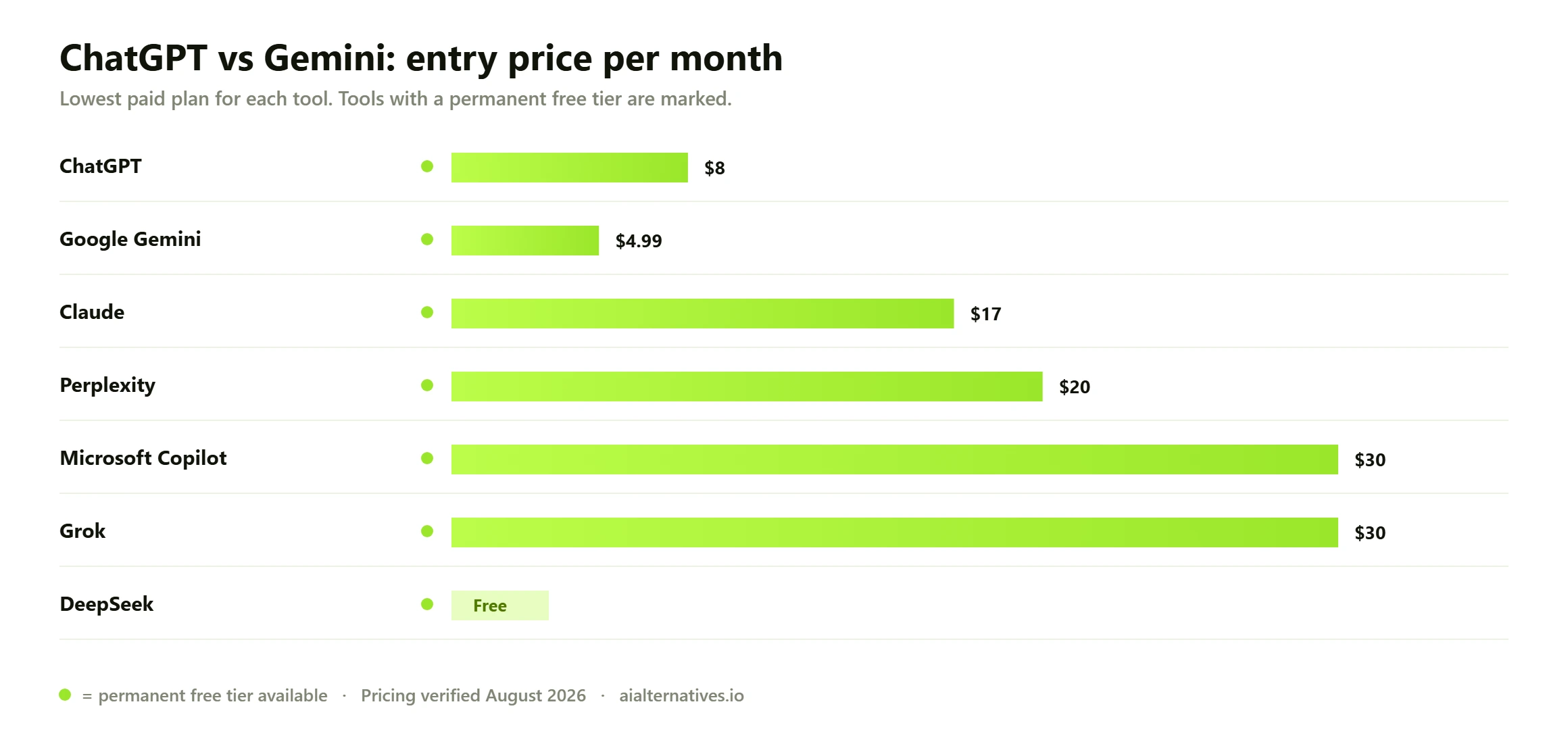
Entry-tier monthly pricing for ChatGPT, Gemini and the main alternatives, checked against vendor pricing pages in August 2026.
How we tested ChatGPT vs Gemini
How we verified this Every price, limit and date on this page was checked against the primary source on 25 August 2026, not copied from another comparison post. Plan pricing comes from Google’s Gemini subscription page and OpenAI’s pricing page. Feature and limit claims come from official product documentation. Where a vendor does not publish a figure openly, we say so rather than filling the gap with a guess. Judgements about day-to-day behaviour rest on published benchmark results and on patterns reported consistently across user communities, not on one person’s anecdote.
One thing worth saying up front. Comparing these two on model quality alone is now close to pointless, because the answers were of similar quality on most of what we threw at them. The gaps that showed up were about workflow, and workflow is where you should be looking.
The 30-second answer
If this is you
Pick
Why
You live in Gmail, Drive, Docs and Calendar
Gemini
It reads your actual files and mail, which nothing else can do as well
You want one assistant with no functional gaps
ChatGPT
Better voice, better mobile app, custom GPTs, more mature agent tooling
You care most about value per dollar
Gemini
5TB storage and YouTube Premium Lite are bundled into the same $20
You do a lot of research on current events
Gemini
Grounded in live Google Search, with more reliable recency
Inline sources beat both tools for verification work
The integration test: where Gemini pulls away
This is the category that decides the comparison for most people, and it is not close.
What the bundle maths shows This is the part most comparisons miss. Google AI Pro is not sold purely as an AI subscription — it carries 5TB of storage and a YouTube Premium Lite entitlement. If you already pay separately for Google One storage at that tier, the assistant is effectively arriving at little or no extra cost, which changes the comparison against a standalone $20 ChatGPT Plus seat entirely. Work out what you already pay Google before you compare headline prices.
If your working life happens inside Google Workspace, that gap repeats every single day. Gemini in Gmail can draft in the thread. Gemini in Docs can rewrite a section in place. Gemini in Chrome can read the page you are on. ChatGPT has connectors and can reach some of this, but it is a bolt-on rather than a native part of the product.
The mirror image is true too. If your company runs on Microsoft 365, everything above applies to Copilot instead, and Gemini’s advantage evaporates entirely.
Research and recency
Gemini won our research report, and the reason is structural rather than clever. It is grounded in live Google Search, so on a regulatory topic that had moved in the previous fortnight it cited developments from the current month. ChatGPT searched too and got there, but took more turns and twice cited an older version of a rule that had since been amended.
Where ChatGPT took points back was the shape of the output. Its Deep Research reports were better organised, with cleaner section logic and a more readable executive summary. Gemini gave us more correct facts in a less usable arrangement. If you are going to edit the report anyway, take the correct facts. If you are going to send it as-is, ChatGPT saves you more time.
Neither should be your last line of defence on accuracy. Both still get confident about things they should hedge on, which is why a citation-first tool earns its place in the stack for anyone doing serious verification work.
The 90-page PDF and long context
What the free tiers really differ on Both free tiers throttle, but they throttle differently, and neither company publishes message counts. Google’s free tier tends to downshift to a faster, smaller model and keep answering. OpenAI’s tends to hold quality and then stop. Neither behaviour is documented as a promise, so treat this as the observed pattern reported across user communities rather than a guaranteed service level.
That pattern was consistent. Gemini is better at holding a very large document in its head and connecting distant parts of it. ChatGPT is better at turning what it found into something a person wants to read. Which matters more depends on whether the document analysis is the deliverable or an input to one.
Images, video and voice
ChatGPT wins voice by a comfortable margin. Its conversational mode still handles interruption, tone and pacing better than anything else on the market, and if you use voice while walking or driving that alone can settle the decision.
Images are close, with a genuine split by category. Across our twelve prompts, ChatGPT produced better illustration and stylised work while Gemini was better at photorealism and, notably, at text inside images, which has been a persistent weakness across the industry. Gemini also generates video on paid plans, which ChatGPT does not match on a $20 subscription. If visual output is the point of your work rather than a garnish, look at proper creative tools first, and our Midjourney alternatives guide is the place to start.
Pricing: the comparison almost nobody does properly
On paper these plans cost the same. In practice they are not remotely the same purchase, because one of them is a bundle. Here is the current line-up from each company’s own pricing page in August 2026.
Plan
ChatGPT
Google Gemini
Free
$0, unlimited text chats on the flagship, limited uploads, images, voice and Deep Research
$0, fast model plus some Pro model access, Deep Research, Gemini Live, Canvas, Gems, 15GB storage
Cheap tier
Go, $8 per month, roughly 10x the free allowance, carries ads
Google AI Plus, $4.99 per month, 2x limits, video generation, 400GB storage
Standard
Plus, $20 per month, advanced reasoning, projects, custom GPTs, Codex
Google AI Pro, $19.99 per month, 4x limits, Pro model, Deep Search, Jules, 5TB storage, YouTube Premium Lite
Heavy
Pro, $100 per month for 5x usage or $200 for 20x
Google AI Ultra, from $99.99 for 5x or $199.99 for 20x, Deep Think, Project Genie, 20TB
Coding agent
Codex, on Plus with heavier limits on Pro
Jules, with higher limits on AI Pro
Video generation
Not on the $20 plan
Yes, from the $4.99 plan upward
Cloud storage included
None
400GB to 20TB depending on tier
Run the maths on the standard tiers. Google AI Pro at $19.99 includes 5TB of storage across Gmail, Drive and Photos, which Google otherwise sells for around $25 a month on its own, plus YouTube Premium Lite. If you were already paying for either of those, the AI is effectively free and you are saving money by subscribing. Almost no comparison article does this calculation, and it is the single strongest argument in Gemini’s favour. Check the current line-up on the Google AI subscriptions page and the ChatGPT pricing page before you buy, because both change often.
The counter-argument is that a bundle is only value if you want the bundle. If you already pay for iCloud or Dropbox and do not watch YouTube, the storage and video perks are worth nothing to you, and you are back to comparing two $20 assistants on merit.
Rate limits and what happens when you hit them
Neither company publishes firm message caps for consumer plans, and both flex them under load. Over four weeks we hit a limit on ChatGPT Plus twice and on Google AI Pro three times, both times in ways that were easy to work around. Compared with some rivals, both of these plans are generous.
ChatGPT Plus rarely blocks plain text chat. The limits you notice are on Deep Research, image generation and agent tasks.
Gemini’s paid limits are expressed as a multiple of free, roughly 2x on AI Plus and 4x on AI Pro, which makes them easier to reason about but harder to predict in absolute terms.
Long threads are expensive on both. Every turn re-reads the whole conversation, so a 60-message chat drains your allowance far faster than a fresh one. Start a new conversation per task.
Video and image generation burn credits fastest. Gemini’s Flow credits are finite and visible, which is actually more honest than ChatGPT’s invisible throttling.
Your data: the part worth reading twice
As of August 2026, both platforms use consumer conversations to improve their models by default, on free and paid personal plans. Neither asks you first. You have to go and switch it off.
ChatGPT: Settings, then Data Controls, then turn off “Improve the model for everyone”.
Gemini: turn off Keep Activity in Gemini Apps Activity. Note that after opting out recent chats are still kept for around 72 hours, and anything that has been through human review can be retained for up to three years.
Business and enterprise tiers on both are excluded from training by default. If you paste client material, that is a strong reason to expense a work seat rather than use a personal plan.
Gemini’s deeper access is a double-edged feature. Connecting Gmail and Drive is what makes it useful, and it is also a much broader surface area than a chatbot you paste text into. Decide deliberately rather than by clicking through a permissions prompt.
Four things nobody tells you before you switch
1. You may already be paying for Gemini
If your employer uses Google Workspace, or if you pay for a Google One plan at 2TB or above, you likely already have Gemini features enabled and have never opened them. Check before you buy anything. A surprising number of people subscribe to ChatGPT while sitting on an unused Gemini entitlement.
2. The free tiers are not comparable
ChatGPT’s free plan is genuinely usable for daily work, with unlimited text chat on the flagship model. Gemini’s free plan is also strong and includes Deep Research and 15GB of storage, which is more than ChatGPT gives away. Between them, a person with no budget at all is better served than they were at $20 a month two years ago. Test both free before paying either.
3. Tone is the most common reason people switch back
Gemini writes like a very competent analyst. Precise, structured, a little bloodless. ChatGPT writes like an enthusiastic colleague. Users who move to Gemini for the integrations frequently report missing the conversational warmth, and a fair number drift back for that reason alone. It sounds trivial. It is the most common complaint in real user discussion.
4. Nothing transfers
Custom GPTs, saved memory, project instructions and chat history do not move between platforms. Switching costs you the tuning you have accumulated, and the first two weeks on a new assistant always feel like a downgrade even when it is not one. Factor that in before you cancel anything.
So which should you pay for?
Pay for Google AI Pro if you work inside Gmail, Drive, Docs and Calendar, if you do research where recency matters, if you want video generation, or if the 5TB of storage and YouTube Premium Lite replace things you already buy. On value per dollar it is the strongest AI subscription on the market right now.
Pay for ChatGPT Plus if you want the most complete assistant with no obvious weak spots, if you use voice mode seriously, if custom GPTs or Codex are part of your workflow, or if you simply prefer talking to it. It is the safer default and the better all-rounder.
And if your actual job is producing long, carefully written documents or reviewing code, be honest that neither of these is the specialist. Read our ChatGPT vs Claude comparison, or browse the full set of AI tool alternatives we have tested.
FAQ
Questions people actually ask
Is Gemini better than ChatGPT in 2026?
On value and integration, yes. On breadth as a standalone assistant, no. Gemini wins if you work inside Google Workspace, need current information, or want the storage and video extras bundled into the $19.99 plan. ChatGPT wins on voice mode, the mobile app, custom GPTs and general polish. Model quality between the two is now close enough that it should not be the deciding factor for most people.
Which is better, Gemini free or ChatGPT free?
They are strong in different ways. ChatGPT’s free tier gives you unlimited text chats on the current flagship model, which makes it the better pure chatbot. Gemini’s free tier includes Deep Research, Gemini Live, Canvas, Gems and 15GB of storage, which is more capability given away. If you only ever type questions, take ChatGPT. If you want research and Google integration for nothing, take Gemini.
What can Gemini do that ChatGPT cannot?
Read your actual Gmail, Drive files and Calendar natively, work inside Google Docs and Chrome, generate video on a consumer plan, and hand you multiple terabytes of cloud storage as part of the subscription. In our inbox test Gemini triaged 60 emails and attached the right Drive file in one turn, a task ChatGPT could not begin without eleven minutes of manual copying.
What are the disadvantages of Gemini?
Three come up repeatedly. The tone is more clinical than ChatGPT’s, which matters if you use AI for brainstorming or creative work. Consistency across long conversations can slip, with users reporting it loses the thread of an evolving document. And its value depends heavily on you being a Google household, since the storage and YouTube perks are worth nothing if you already pay for iCloud and do not watch YouTube.
Gemini Pro vs ChatGPT Plus: which is better value?
Gemini, on the maths. Google AI Pro is $19.99 and includes 5TB of storage plus YouTube Premium Lite, which together would cost you more than the subscription on their own. ChatGPT Plus is $20 for the assistant alone. If you already pay for cloud storage or YouTube, switching to Gemini can genuinely reduce your monthly bill while adding an AI assistant.
Does Gemini have a bigger context window than ChatGPT?
Google’s Pro model advertises the largest context window of the major consumer assistants, and both companies now quote figures around or above a million tokens on their flagships. In practice the chat apps expose less than the API maximum, so treat the headline numbers as directional. In our 90-page PDF test Gemini was better at connecting details from distant parts of the document, which is what a large context window is actually for.
Do ChatGPT and Gemini train on my conversations?
Both do by default on free and personal paid plans. Turn it off in ChatGPT under Settings, Data Controls, “Improve the model for everyone”. In Gemini, switch off Keep Activity in Gemini Apps Activity, though recent chats are still kept for roughly 72 hours after that and human-reviewed content can be retained for up to three years. Business and enterprise plans on both are excluded from training by default.
Is Gemini included with Google Workspace or Google One?
Often, yes. Many Workspace business plans and higher-tier Google One subscriptions now bundle Gemini features, and a lot of people pay for a separate AI subscription without realising they already have one. Check your existing plan before you buy anything new.
Which is better for coding, ChatGPT or Gemini?
ChatGPT, for most developers. Codex is more mature than Google’s Jules agent and the wider ecosystem around it is better established. That said, neither leads the category. If coding is your main use case, look at Claude Code, and our Claude Code alternatives guide compares the serious options properly.
Should I use both ChatGPT and Gemini?
It is a reasonable setup and it costs about $40 a month. Gemini handles anything touching your Google account plus research where recency matters, ChatGPT handles voice, images, custom workflows and general conversation. Since both free tiers are usable, a cheaper version is to pay for whichever one matches your main workflow and keep the other on free for the tasks it wins.
Next step
Not sure which one fits your week?
Both have free tiers that are good enough to test properly. Take the task you do most often, run it through each with the same prompt, and notice which one needed less cleanup afterwards. That is a better signal than any benchmark, and it takes ten minutes.