The best AI note taking app in 2026: 9 tools, and what happens to your notes if you stop paying
Choosing the best AI note taking app is easy for about a week. The hard part comes eighteen months later, when you have six hundred meetings of institutional memory sitting inside a subscription you no longer want to pay for. Almost no guide to this category tells you what happens next, so that question runs through this whole page.
The second question nobody wants to answer is legal. An AI notetaker is a recording device, and recording law in the United States is not uniform. Around a dozen states require every person on the call to consent, not just you. If your job involves clients, patients or candidates, that matters more than which app writes the prettiest summary.
Below: nine tools ranked best-first, a comparison of what you can actually export from each free plan, a plain explanation of the consent rules, and the questions people genuinely ask before they install one of these things.
Ranked on note quality, honest free-tier limits, how easily you can get your data out, and whether the tool forces a bot into your meetings. Prices are vendor list prices published in August 2026.
Best overall
Granola
Best overall for meeting notes
Free / $14 per user per mo
Runner-up
Fathom
Best genuinely free meeting notes
Free / from $16 per mo billed annually
Third pick
Fireflies.ai
Best for searching across a whole team
Free / from $10 per seat per mo billed annually
01
Granola
Best overall for meeting notes
Granola takes a different approach from most rivals: instead of sending a bot to sit in your call, it listens on your machine and merges what was said with the rough notes you typed yourself. The result reads like notes a competent person took, not a transcript dump. The free plan gives you AI notes with limited history, which is enough to judge whether the hybrid approach suits you.
Free tier: Yes. AI notes, AI chat and shared folders, with limited meeting history.
Free / $14 per user per mo
02
Fathom
Best genuinely free meeting notes
Fathom’s free plan is the most generous in this category by a wide margin: unlimited recordings, unlimited transcription and instant AI summaries with no monthly minute cap. You give up action items, custom summary templates and team-wide AI search, which is a fair trade for zero. You can also choose bot-free capture rather than having a visible participant join the call.
Free tier: Yes. Unlimited recordings, transcription and AI summaries.
Free / from $16 per mo billed annually
03
Fireflies.ai
Best for searching across a whole team
Fireflies is built around the idea that the value of meeting notes is in searching them six months later. Its conversation intelligence and team analytics are the reason sales and customer teams pick it. Watch the free plan carefully: transcription and summaries are unlimited, but storage is capped at 400 minutes for the whole team, which is the real limit.
Free tier: Yes. Unlimited transcription and summaries, 400 minutes of storage per team.
Free / from $10 per seat per mo billed annually
04
Otter.ai
Best for live transcripts you read as you go
Otter remains the strongest option if you want to watch the transcript appear in real time and search it immediately, which suits interviews and lectures as much as meetings. The free plan gives you 300 transcription minutes a month across up to five workspace members. The catch worth knowing before you commit is on export, covered further down this page.
Free tier: Yes. 300 minutes per month, up to 5 workspace members, 3 lifetime file imports.
Free / from $8.33 per user per mo billed annually
05
NotebookLM
Best for studying and research
NotebookLM is not a meeting recorder. It is a tool for turning documents you already have into something you can question, summarise and revise from, which makes it the strongest free choice for students. The free tier allows 100 notebooks, 50 sources per notebook and 50 chats a day, plus a few audio overviews daily. Paid Google AI plans raise every one of those ceilings.
Free tier: Yes. 100 notebooks, 50 sources per notebook, 50 chats and 3 audio overviews per day.
Free / higher limits on paid Google AI plans
06
Obsidian
Best for owning your notes forever
Obsidian stores every note as a plain markdown file in a folder on your own disk, with no account required and no server holding your data. That single design decision solves the lock-in problem entirely: if the company vanished tomorrow, your notes would still open in any text editor. AI arrives through community plugins rather than built in, which is more setup but far more control.
Free tier: Yes. The app is free for personal use with no limits and no sign-up.
Free / Sync from $4 per mo, commercial licence $50 per user per yr
07
Notion
Best if notes live beside your documents
Notion makes sense when meeting notes need to sit next to the project doc, the task list and the database they relate to, rather than in a separate app you have to remember to open. Notion AI is present on every plan but meaningfully limited below Business. Its AI Meeting Notes transcription is still labelled beta and is trial-only on the lower tiers, with full access at Enterprise.
Free tier: Yes. A free personal plan with trial-level AI access.
Free / Plus $10, Business $20 per member per mo
08
Apple Notes
Best free option already on your phone
If you are on recent Apple hardware you may not need to buy anything. Notes records and transcribes audio directly, and with Apple Intelligence enabled on supported devices it will generate a summary. Call recording and transcription arrived for phone and FaceTime audio calls in iOS 18.1, with the recording and transcript saved into Notes. It has no meeting-bot features and no team sharing.
Free tier: Yes. Included with the device at no extra cost.
Free
09
Zoom AI Companion
Best if you already pay for Zoom
A lot of people shop for a meeting notetaker while already paying for one. Zoom includes AI Companion at no additional cost with paid Zoom user accounts, covering meeting summaries and next steps. It is weaker than the specialists at cross-meeting search and templating, but if your calls already happen in Zoom it costs nothing extra and adds no third-party bot to the room.
Free tier: Trial only. It needs a paid Zoom account, though it adds no cost on top of one.
Included with a paid Zoom plan
Best AI note taking apps compared at a glance9 tools
#
Tool
Best for
Free tier
Price
01
Granola
Best overall for meeting notes
Free tier
Free / $14 per user per mo
02
Fathom
Best genuinely free meeting notes
Free tier
Free / from $16 per mo billed annually
03
Fireflies.ai
Best for searching across a whole team
Free tier
Free / from $10 per seat per mo billed annually
04
Otter.ai
Best for live transcripts you read as you go
Free tier
Free / from $8.33 per user per mo billed annually
05
NotebookLM
Best for studying and research
Free tier
Free / higher limits on paid Google AI plans
06
Obsidian
Best for owning your notes forever
Free tier
Free / Sync from $4 per mo, commercial licence $50 per user per yr
07
Notion
Best if notes live beside your documents
Free tier
Free / Plus $10, Business $20 per member per mo
08
Apple Notes
Best free option already on your phone
Free tier
Free
09
Zoom AI Companion
Best if you already pay for Zoom
Trial only
Included with a paid Zoom plan
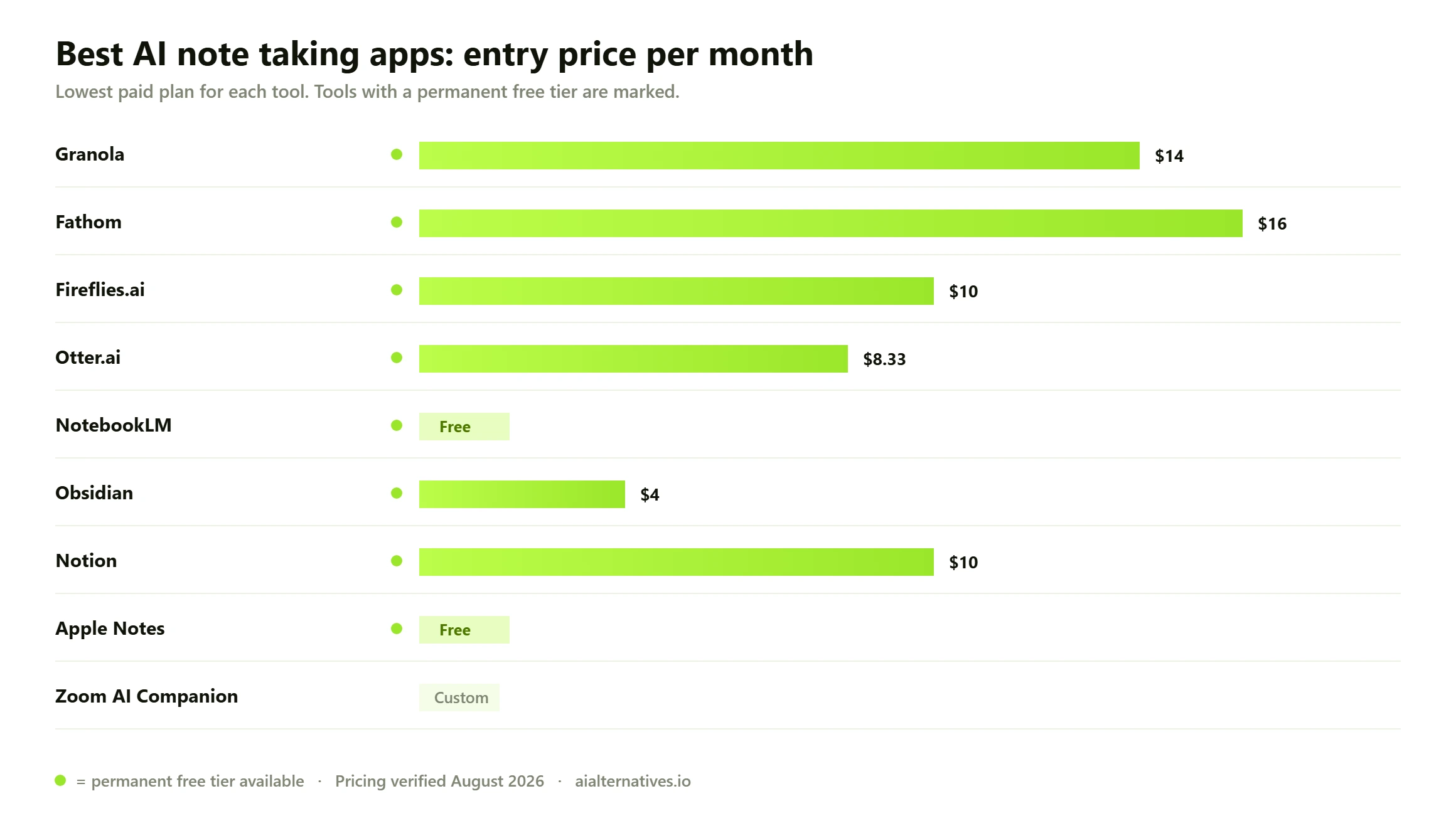
Free tier availability and entry pricing across the nine AI note taking apps reviewed, based on vendor list prices published in August 2026.
Three different tools wear the same label
“AI note taking app” is doing a lot of work as a phrase. The tools below fall into three groups that barely compete with each other, and picking from the wrong group is why people end up disappointed.
Meeting notetakers
These listen to a call and produce a summary with action items. Granola, Fathom, Fireflies, Otter and Zoom AI Companion live here. This is what most people mean by an AI note taking app for meetings, and it is the most crowded and most expensive category.
Thinking and study tools
These take documents you already have and help you understand them. NotebookLM is the standout and it is free. If you are a student searching for an AI note taking app for college, this is almost certainly what you actually want, not a meeting bot.
Knowledge bases you happen to write notes in
Obsidian and Notion are places your notes live permanently, with AI added on top. They are the right answer if the problem is that your notes are scattered rather than that you cannot keep up in meetings.
How we verified this Every price, free-tier limit and export capability described here was checked against each vendor’s own published pricing page or support documentation in August 2026, not against other comparison articles. Where a vendor does not publish something openly we say so rather than filling the gap with a guess. Legal points are drawn from published summaries of federal and state recording law and are described in general terms; they are not legal advice and the position in your state may have changed. Community and institutional observations are labelled as such rather than presented as our own testing.
The question nobody answers: what happens if you stop paying
This is the single biggest gap in every popular guide to this category. Reviewers compare summary quality and integration counts, then say nothing about whether you can walk away with your data. Since the whole value of these tools compounds over time, that omission is strange.
There are three distinct risks, and they are not the same thing. Access risk is losing the ability to open old notes. Export risk is being able to see them but not get them out in a useful format. Format risk is getting a file that technically exports but is useless anywhere else.
Tool
Where notes live
Export on the free plan
Lock-in risk
Obsidian
Plain markdown files on your own disk
Nothing to export; you already have the files
None. Works with no account at all
Apple Notes
On your device, synced through iCloud
Standard system share and export options
Low, but tied to Apple hardware
NotebookLM
Google account
Copy out notes and generated summaries
Low for source documents you already own
Notion
Notion cloud
Markdown, CSV and PDF export
Moderate. Databases and links degrade on export
Fathom
Fathom cloud
Call downloads and clips on all tiers
Moderate
Fireflies.ai
Fireflies cloud
Free storage capped at 400 minutes per team
Moderate. Old recordings age out of the cap
Otter.ai
Otter cloud
Free plan exports mp3 and txt only
Higher. PDF, DOCX and SRT need a paid plan
Granola
Granola cloud
Free history is limited
Moderate
Zoom AI Companion
Zoom cloud
Tied to your Zoom account retention settings
Moderate. Ends when the Zoom plan ends
The Otter line deserves attention because it is the clearest example of the pattern. On the free plan you can export audio and plain text, but the formats most people actually need for a handover, PDF, DOCX and SRT subtitles, are paid features. That is not a scandal, it is normal product design, but it means the moment you want to leave is the moment you may have to pay to leave properly.
The structural answer is boring and effective: if long-term ownership matters to you, keep the system of record somewhere you control and treat the AI notetaker as a feeder into it. Obsidian holding plain markdown files on your own disk is the strongest version of this, because there is nothing to export and no company that can change the terms. Several notetakers can push summaries into Notion or a folder automatically, which gives you the AI convenience without making a cloud service the only copy.
What to check before you commit Ask these five questions of any tool on this list before you let it accumulate a year of your working life. One: can you export everything in a format something else reads, on the plan you are actually on rather than a higher one? Two: how long are recordings and transcripts retained, and does that change when you downgrade? Three: is there a storage cap distinct from the transcription cap, as with Fireflies, so old material silently ages out? Four: what calendar and email permissions did you grant at sign-up, and can you revoke them independently of deleting the account? Five: can you opt out of your conversations being used to train models, and is that setting per-user or only available to an administrator?
Recording consent: the bit that can actually get you in trouble
An AI notetaker records a conversation. That makes it subject to wiretapping and eavesdropping law, which in the United States is set state by state and is not consistent. This is the part most guides skip entirely, and it is the part with legal consequences attached.
Federal law, under the relevant section of the US wiretap statute, follows a one-party consent rule: if you are part of the conversation, your own consent is generally enough. Most states follow the same approach. But roughly a dozen states require every participant to consent, and they include several of the most populous. California, Florida, Illinois, Maryland, Massachusetts, Pennsylvania and Washington are consistently on that list, with Connecticut, Delaware, Michigan, Montana and New Hampshire treated as all-party jurisdictions with various qualifications.
The complication people miss is that calls cross state lines constantly. If you are in a one-party state and the person you are recording is in an all-party state, the cautious position is to follow the stricter rule. For a general summary of each state’s position, the Reporters Committee for Freedom of the Press recording guide is the standard reference. None of this is legal advice, and if you record client, patient or candidate conversations professionally you should get advice specific to your situation.
The practical version is short. Say at the top of the call that you are recording and that AI notes are being taken. Get an audible yes. Do not rely on a bot silently appearing in the participant list as notice, because a lot of people do not read it and some genuinely do not know what it is.
What users and institutions consistently report Two patterns show up repeatedly in public discussion and in guidance published by organisations that have had to manage this at scale. First, bots turning up uninvited. Cornell University’s IT guidance warns that AI notetakers “may show up uninvited to your meetings” and explains how hosts can deny them entry, noting that the university routes external recording bots into the lobby rather than admitting them automatically. Second, over-broad permissions granted at sign-up. The same guidance cautions that creating an account can inadvertently grant a notetaking tool full access to every meeting on your calendar, and advises revoking the permission grant rather than simply deleting the app. Both are worth checking on any tool you have already installed. These are aggregated third-party observations, not our own testing.
How to choose, by what you are actually doing
Client-facing meetings where the room matters
Granola, or a bot-free capture mode. The reason is social rather than technical: a visible recording bot in a participant list changes the tone of a sales or advisory call, and clients ask about it. Tools that listen locally avoid putting a stranger in the room. You still need to disclose that you are recording.
You just want it free and unlimited
Fathom. Unlimited recordings, transcription and AI summaries on the free plan is not matched by anything else here. You lose action items and team-wide search, but for an individual tracking their own meetings it is the strongest free AI note taking app available.
A whole team that needs to search old calls
Fireflies. The searchable archive across everyone’s meetings is the actual product, and it is why revenue teams standardise on it. Budget for a paid seat from the start, because the free storage cap makes it unusable as a team archive.
Studying, revising or making sense of documents
NotebookLM, and do not pay for anything until you hit its limits. It is free, generous, and solves a different problem from meeting notetakers. If you are also using a general assistant for study, our ChatGPT alternatives and Claude alternatives guides cover the wider field.
You want to still have these notes in ten years
Obsidian as the permanent home, with whatever notetaker you like feeding into it. Plain files on your own disk is the only arrangement on this page with genuinely no lock-in. If you prefer a structured workspace to a folder of files, our Notion alternatives guide covers that middle ground.
You already pay for Zoom or Microsoft 365
Check what you are already entitled to before you buy anything. Zoom includes AI Companion at no additional cost with paid user accounts, which covers meeting summaries and next steps for many people. It is not the best tool here, but it is free to you, already approved by your IT department, and adds no third-party bot to the call.
Quick answers to the practical questions
In-person meetings. Most of these tools assume a video call. For a room, you want a phone-based recorder: Otter, Granola and Apple Notes all handle live audio without a meeting to join.
iPhone. Apple Notes records and transcribes natively at no cost, and call recording landed in iOS 18.1 with the transcript saved into Notes.
Regulated work. If you handle health or financial information, look for the specific compliance certification you need on the specific tier you are buying. HIPAA support is typically an enterprise-tier feature, not a standard one.
Accuracy. Transcription quality drops sharply with background noise, crosstalk and strong accents on every tool here. If a meeting genuinely matters, read the transcript rather than trusting the summary.
Model training. Several tools let you opt out of your conversations being used to train models, but on some the setting is administrator-controlled rather than per-user. Check which before you record anything sensitive.
FAQ
Questions people actually ask
Is using an AI note taker legal?
Recording a conversation is legal in most of the United States with one party consenting, which can be you. But roughly a dozen states, including California, Florida, Illinois, Maryland, Massachusetts, Pennsylvania and Washington, require every participant to consent. Calls that cross state lines are the common trap, and the cautious approach is to follow the stricter rule. Say you are recording at the top of the call and get a clear yes. This is general information, not legal advice.
What happens to my notes if I cancel?
It varies more than you would expect and it is rarely stated plainly. Obsidian is the clean case: your notes are already plain files on your disk, so cancelling changes nothing. Cloud tools generally keep your data accessible while the account exists but restrict what you can export. Otter is the clearest example, with the free plan limited to mp3 and txt exports while PDF, DOCX and SRT require a paid plan. Export before you downgrade, not after.
What is the best completely free AI note taking app?
Fathom for meetings, because unlimited recordings, transcription and AI summaries on a free plan is not matched elsewhere. NotebookLM for study and documents. Obsidian if you want a permanent home for notes with no account and no limits. Apple Notes if you are on Apple hardware and want something already installed. Between those four, most people never need to pay.
What AI can listen and take notes for me?
Granola, Fathom, Fireflies, Otter and Zoom AI Companion all listen to a live conversation and produce notes. They differ mainly in whether they join as a visible bot or listen locally on your device. Apple Notes will record and transcribe audio without any meeting platform involved, which is the simplest option for in-person conversations.
Can ChatGPT take notes for me?
It can summarise a transcript or a document you paste in, and its voice mode can handle a conversation, but it is not built to join a scheduled meeting, capture both sides automatically and file the result. For that you want a dedicated notetaker. Many people use both: a notetaker to capture, then a general assistant to interrogate the output afterwards.
Do these apps work for in-person meetings?
Some do. Most meeting notetakers are designed around a video call and join it as a participant. For a physical room you need a tool that records device audio directly. Otter, Granola and Apple Notes all handle this. Expect noticeably lower accuracy than a video call, because a single microphone in a room picks up crosstalk and background noise that per-participant audio streams do not.
Which AI note taking app is best for college students?
NotebookLM, and it costs nothing. It turns lecture slides, readings and your own notes into something you can question and revise from, with 100 notebooks and 50 sources per notebook on the free tier. For recording lectures themselves, Otter’s free 300 minutes a month covers a light week, and Apple Notes handles it for nothing if you have an iPhone.
Do I have to let a bot join my meeting?
No, and increasingly you should not want to. Granola listens on your own machine, and Fathom offers a bot-free capture option. Visible bots change how people behave on client calls, and many organisations now route unrecognised recording bots into the lobby by default rather than admitting them, so a bot-based tool may simply be blocked.
Is my meeting data used to train AI models?
Sometimes, and the control varies. Several tools here offer an opt-out from model training, but on some plans that setting is controlled by an administrator rather than by the individual user, and organisation-wide opt-out can be an enterprise-tier feature. If you discuss anything confidential, find the setting and confirm its state before your first recorded call rather than after.
Do I already have an AI note taker without realising?
Quite possibly. Zoom includes AI Companion at no additional cost with paid Zoom user accounts. Notion includes AI on every plan, though meaningfully limited below Business. Apple devices record and transcribe in Notes for free. Before you add another subscription, check what your existing tools already do, because for a lot of people the answer is enough.
Next step
Not sure yet?
The right choice here depends less on which app writes the best summary and more on where you want your notes to live in three years. Start from the tool you already use and work outwards.