The Best AI Chatbot in 2026: 10 Ranked on Price, Limits and Privacy
Choosing the best AI chatbot is harder now than it was two years ago, and not because the models got worse. They got closer together. On the everyday work most people actually do, drafting, summarising, explaining, answering questions, the leading assistants now land within a few points of each other on published benchmarks. Raw intelligence is no longer the thing that decides whether a subscription is worth twenty dollars a month.
What decides it is where you hit the wall. Every paid tier meters something, and the things being metered have changed. Plain message caps have quietly stopped being the binding constraint. Uploads, image generation, deep research runs and reasoning time are what run out now, and the allowances differ wildly between plans that carry identical price tags. Most round-ups skip this entirely. You will feel it in week two.
So this guide ranks ten AI chatbots on four things that actually change your day: what the free tier genuinely gets you, what the cheapest paid plan costs, what each one is meaningfully better at than the others, and what happens to your prompts afterwards. Every price was checked against the vendor’s own pricing page in August 2026, and where a vendor does not publish a number openly, we say so.
Ranked best-first for general use. These are US list prices for individual plans, checked against vendor pricing pages in August 2026. Annual billing usually knocks 15 to 20 per cent off.
Best overall
ChatGPT
Best overall for most people
Free / $20 per mo (Plus)
Runner-up
Claude
Best for long writing and code
Free / $20 per mo (Pro), $17 billed annually
Third pick
Google Gemini
Best if you live in Google Workspace
Free / $7.99 per mo (AI Plus) / $19.99 per mo (AI Pro)
01
ChatGPT
Best overall for most people
ChatGPT is still the default, and for good reason. GPT-5.6 handles everyday questions, long documents, images, voice and code without making you choose a model first, and Plus adds projects, scheduled tasks and custom GPTs. If you are only ever going to pay for one chatbot, this is the low-regret pick.
Free tier: Unlimited text chats on GPT-5.6 Luna, with metered uploads, image generation and deep research
Free / $20 per mo (Plus)
02
Claude
Best for long writing and code
Claude is the one writers and developers keep going back to. It holds a consistent voice across thousands of words and will push back on a weak draft rather than praising it, and Claude Code has become a reason to subscribe on its own. Usage runs on a rolling five-hour session window with a weekly ceiling on top, which suits long focused sessions more than all-day light chatter.
Free tier: Limited use per rolling five-hour window
Free / $20 per mo (Pro), $17 billed annually
03
Google Gemini
Best if you live in Google Workspace
Gemini earns its place through reach rather than raw cleverness. It sits inside Gmail, Docs, Sheets and Search, reads your files where they already are, and the Google AI Pro tier gives you a one-million-token context window plus Nano Banana image generation in the same subscription. The free tier is also the most generous of the big three.
Free tier: Broad free access to Gemini Flash with a smaller context window
Free / $7.99 per mo (AI Plus) / $19.99 per mo (AI Pro)
04
Perplexity
Best for sourced research
Perplexity answers with citations attached, which changes how much you have to trust it. For market checks, product research and anything you will have to defend to someone else, being able to click straight through to the source saves the verification round trip. It is a research tool first and a conversationalist second.
Free tier: Unlimited standard searches, a few Pro searches a day
Free / $20 per mo (Pro)
05
Microsoft Copilot
Best for Microsoft 365 shops
Copilot is the pragmatic choice when your work already lives in Outlook, Teams, Word and Excel. It reads your tenant data with your existing permissions, which is the part rival chatbots cannot replicate without you pasting things around. Judged purely as a chatbot it trails ChatGPT and Claude, but that is rarely the whole job.
Free tier: Free consumer tier with daily limits on advanced models
Free / $19.99 per mo (Microsoft 365 Premium)
06
Grok
Best for real-time and news
Grok has live access to the X firehose, so it is unusually good at telling you what people are saying about something right now. That immediacy is genuinely useful for monitoring a story as it breaks. It is also the most opinionated assistant here, which you will either want or actively avoid.
Free tier: Limited free access to the current Grok model
Free / $30 per mo (SuperGrok)
07
DeepSeek
Best free heavyweight
DeepSeek gives away reasoning quality that used to cost twenty dollars a month, and publishes open weights so others can host it. For maths, logic and code it is competitive with paid tiers at no cost. The trade-off is where your data goes, so read the retention terms before you feed it anything sensitive.
Free tier: Free chat access with no paid consumer tier required
Free / pay-as-you-go API
08
Mistral Le Chat
Best for EU data residency
Le Chat is the strongest option if your compliance team cares which jurisdiction your prompts sit in. Mistral is French, hosts in Europe, and is explicit about it in a way the US labs are not. Answer quality is a step behind the leaders, but for regulated European teams that is often the wrong thing to optimise for.
Free tier: Free tier with generous daily message allowance
Free / $14.99 per mo (Pro)
09
Poe
Best for trying many models at once
Poe is a front end that puts ChatGPT, Claude, Gemini, Grok and dozens of smaller models behind one subscription and one credit pool. If you genuinely cannot decide, a month of Poe will tell you which model you actually reach for. Power users eventually leave for the native app of whichever one wins.
Free tier: Free daily credit allowance across models
Free / $19.99 per mo
10
Meta AI
Best for casual everyday questions
Meta AI is free, fast and already inside WhatsApp, Instagram and Messenger, which is why it has enormous casual reach. For quick factual questions and image doodles it is perfectly adequate. It is not where you take a contract or a codebase.
Free tier: Free across Meta apps with no paid consumer tier
Free
Best AI chatbots compared at a glance10 tools
#
Tool
Best for
Free tier
Price
01
ChatGPT
Best overall for most people
Free tier
Free / $20 per mo (Plus)
02
Claude
Best for long writing and code
Free tier
Free / $20 per mo (Pro), $17 billed annually
03
Google Gemini
Best if you live in Google Workspace
Free tier
Free / $7.99 per mo (AI Plus) / $19.99 per mo (AI Pro)
04
Perplexity
Best for sourced research
Free tier
Free / $20 per mo (Pro)
05
Microsoft Copilot
Best for Microsoft 365 shops
Free tier
Free / $19.99 per mo (Microsoft 365 Premium)
06
Grok
Best for real-time and news
Free tier
Free / $30 per mo (SuperGrok)
07
DeepSeek
Best free heavyweight
Free tier
Free / pay-as-you-go API
08
Mistral Le Chat
Best for EU data residency
Free tier
Free / $14.99 per mo (Pro)
09
Poe
Best for trying many models at once
Free tier
Free / $19.99 per mo
10
Meta AI
Best for casual everyday questions
Free tier
Free
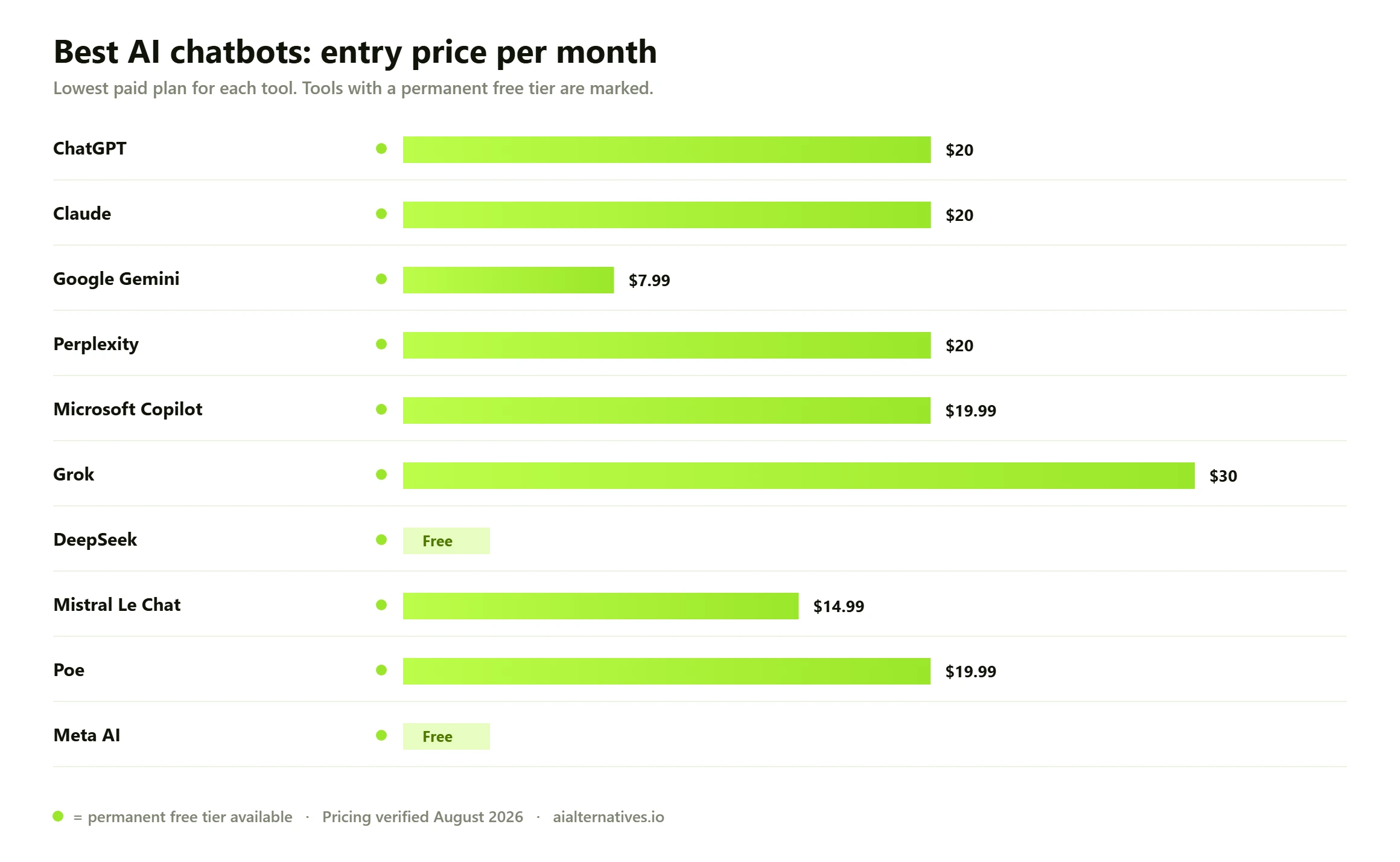
Entry monthly price for each chatbot’s cheapest paid plan. Almost every tool here also has a permanent free tier, so the figure below is what you pay to lift the metered limits rather than what you pay to get in the door.
How to choose the best AI chatbot for you
There is no single winner, and any guide that hands you one is selling something. The honest answer is that three or four of these are excellent, and the right one depends on where you work, what you do most, and how much you care about where your text ends up. Work through the three questions below in order and the shortlist collapses fast.
Start with where your work already lives
This is the most underrated filter and it decides more subscriptions than benchmark scores do. If your documents, email and spreadsheets sit in Google Workspace, Gemini reads them in place and you skip the copy-paste tax entirely. If you are a Microsoft 365 organisation, Copilot inherits your existing permissions and can see tenant data no rival can touch without you pasting it across. If your work is scattered across the open web and local files, ChatGPT and Claude are both excellent neutral choices with no ecosystem pull at all.
The friction of moving text between a chatbot and the place you actually work is small per instance and enormous across a month. Optimise for it early.
Then work out what will get metered
Here is the shift almost nobody has updated their advice for. Two years ago you paid to stop running out of messages. In 2026 the big providers hand out effectively unlimited plain text chat even on free tiers, and ration the expensive things instead: file and image uploads, image generation, long-context reads, agentic browsing, and extended reasoning runs. Two plans can both cost twenty dollars and differ by an order of magnitude in how many deep research runs you get.
So the useful question is not how many messages you send. It is which of these you lean on. Someone who uploads forty PDFs a week and someone who writes prose all day should not buy the same plan, even though the sticker price is identical.
What actually limits you in 2026 Usage models now differ in kind, not just size. ChatGPT gives unlimited text chat on its free tier and meters uploads, image generation and deep research. Claude runs a rolling five-hour session window with a weekly ceiling stacked on top, so heavy bursts hit walls that steady use never touches. Google prices in tiers of multiplied access rather than fixed counts. Grok pools one weekly allowance across all of its products. This means the same person can find one plan generous and another suffocating at the same price. Before subscribing, spend a week on the free tier and notice which specific thing you run out of first, then buy the plan that lifts that particular ceiling.
Then check what happens to your prompts
This is where the mainstream round-ups are weakest, and it is the question that matters most if you paste anything from work into a chat box. Consumer tiers and business tiers have genuinely different defaults, and free tiers are usually the most permissive of all. Before you commit, confirm each of the following in the vendor’s own documentation rather than a third-party summary:
Training default. Is your conversation used to improve the model unless you turn that off, and is the toggle account-wide or per-chat?
Retention window. How long are deleted conversations actually kept, and does deleting a chat remove it from training data already collected?
Tier differences. Business, Team and Enterprise plans almost always exclude your data from training by default. Individual paid plans frequently do not.
Jurisdiction. Where is the data physically processed? This is the whole argument for Mistral Le Chat over a US provider if you are bound by European rules.
Connector scope. Once you link Gmail, Drive or a code repository, what exactly can the assistant read, and can you revoke it cleanly?
Export. Can you get your conversation history out in a usable format if you leave? Assume you will switch at least once.
What the benchmark evidence shows
What the benchmark evidence shows Independent evaluation suites now score the major assistants on composite indices built from reasoning, coding, long-context and knowledge tests rather than a single number. On those published composites the frontier consumer tiers from OpenAI, Anthropic and Google cluster tightly, typically within single-digit points of each other, while separate feature scores covering media generation, memory, tool use and connectors spread much more widely. The practical reading is that capability differences between the top three are now smaller than feature and integration differences. Treat every gap as directional and short-lived: these numbers move with each model release, and a ranking that was accurate in spring will be stale by autumn. If a specific benchmark result is load-bearing for your decision, check the current figure yourself rather than trusting any article, including this one.
That has a practical consequence worth stating plainly. If you are choosing between ChatGPT, Claude and Gemini for general work, you are not choosing between a smart one and a dim one. You are choosing between three very capable assistants with different personalities, different integrations and different metering. Try two on their free tiers for a week each. Your own reaction will be more informative than any leaderboard.
Free versus paid: what twenty dollars a month actually buys
The free tiers have become genuinely good, which makes the upgrade decision harder rather than easier. For a lot of people, a free tier plus occasional patience is enough. The table below sets out what you get for nothing and what the money unlocks, so you can work out whether you are actually the customer for a paid plan.
Chatbot
What the free tier gives you
Entry paid price
What the money mainly unlocks
ChatGPT
Unlimited text chat on the standard model, metered uploads and images
$20 per mo (Plus)
Advanced reasoning models, projects, scheduled tasks, custom GPTs, far more deep research
Claude
Limited use per rolling five-hour window
$20 per mo (Pro)
Roughly five times the usage per session, all model tiers, Claude Code access
Google Gemini
Broad free access with a smaller context window
$7.99 per mo (AI Plus)
Multiplied access, bigger context, image and video generation, Drive storage
Perplexity
Unlimited standard searches, a handful of Pro searches daily
$20 per mo (Pro)
Hundreds of Pro searches, model choice, file analysis
Microsoft Copilot
Free consumer chat with daily caps on advanced models
$19.99 per mo
Copilot inside Word, Excel, Outlook and Teams with your tenant data
Grok
Limited access to the current model
$30 per mo (SuperGrok)
A much larger weekly allowance pooled across all Grok products
DeepSeek
Full chat access at no cost
No consumer paid tier
Nothing, which is the point; pay only if you use the API
Mistral Le Chat
Generous daily allowance
$14.99 per mo (Pro)
Higher limits and priority access, with European data processing
Poe
Daily credit allowance across many models
$19.99 per mo
One credit pool spanning ChatGPT, Claude, Gemini, Grok and dozens more
Meta AI
Free across WhatsApp, Instagram and Messenger
No paid tier
Not applicable
Two patterns are worth pulling out. First, the cheapest useful paid tier is no longer twenty dollars: Google’s entry plan undercuts everyone at $7.99 and Mistral sits at $14.99. Second, if you are torn between two of the big names, a month of Poe is a cheaper experiment than two parallel subscriptions. You can check the current figures yourself on the ChatGPT pricing page and the Claude pricing page, both of which are updated more often than any comparison article.
The best AI chatbot for specific jobs
General rankings only get you so far. Once you know what you will spend most of your time doing, the shortlist usually narrows to one or two obvious answers.
For writing and editing
Claude first, ChatGPT second. Claude holds a consistent register across long pieces and is noticeably more willing to tell you a paragraph is not working, which is the useful behaviour in an editor. ChatGPT is more eager to please, which makes it a better brainstorming partner and a slightly worse critic. If you write for a living, the difference shows up within a day. Our ChatGPT versus Claude comparison goes deeper on where each one pulls ahead.
For coding
Claude, comfortably, and it is not especially close for agentic work in a real repository. ChatGPT is strong on isolated problems and explanation, and Gemini is competitive on very large codebases thanks to its enormous context window. The practical test is whether the assistant can hold your whole project in mind or only the file in front of it.
For research you have to defend
Perplexity, because the citations are the product. When you will have to show someone where a claim came from, a chatbot that hands you the source alongside the answer removes an entire verification step. ChatGPT and Gemini both have capable deep research modes now, but they are slower and their sourcing is less consistently clickable. If you mainly need sourced answers, look at our Perplexity alternatives before committing.
For business, support and customer service
None of the ten above, and this is where a lot of searches go wrong. A general assistant is not a customer service platform. If you want a chatbot that answers your customers on your website, you need something that ingests your help centre, hands off to human agents, respects a fallback path and reports on deflection rates. That is a different product category with different pricing, usually per resolution or per seat. Use a general assistant for internal drafting and analysis, and buy a purpose-built support platform for the front door.
For privacy-sensitive work
Mistral Le Chat if the constraint is European jurisdiction, or a locally run open-weight model if the constraint is that nothing may leave your machine at all. DeepSeek publishes open weights, so it can be self-hosted, though the hosted consumer app is a very different proposition from the weights and should be assessed separately.
What users consistently report
What users consistently report Across public community threads and forum discussions, three complaints recur far more than any others, and none of them are about intelligence. The first is unpredictable limits: people describe hitting a ceiling without warning mid-task, particularly on session-window and pooled-allowance models where there is no visible counter. The second is version churn, where a model update changes tone or behaviour and long-standing prompts and workflows silently stop producing what they used to. The third is sycophancy, the tendency of an assistant to agree with a bad idea rather than challenge it, which people notice most when using a chatbot for editing or decision support. These are aggregated impressions from public discussion, not measured findings, and they should be read as signals about what tends to annoy people rather than as verdicts on any product.
Two of those three are worth designing around. Keep any prompt you rely on saved outside the tool so a model update does not take it with it, and get in the habit of asking your assistant to argue the opposite case explicitly, because most of them will not volunteer it.
What to check before you commit
What to check before you commit Run this list before any annual plan. One: cancel and refund policy, since annual billing on a fast-moving category locks you into a decision the market may invalidate in three months. Two: whether the plan you are buying excludes your prompts from model training by default, and whether that changes if you downgrade. Three: whether the specific limit you care about is published as a number or described only as more, because vague multipliers are impossible to budget against. Four: export, so you can leave with your history. Five: seat mechanics if anyone else will use it, because individual plans usually forbid sharing and team plans often carry minimum seat counts. Finally, prices and limits in this category change frequently. Everything here was verified in August 2026, and you should confirm the current figure on the vendor’s own page before you pay.
One last piece of advice that will save you money. Do not buy annually in this category. The monthly premium is small, the pace of change is not, and being free to switch in thirty days is worth more than a fifteen per cent discount on a product that may be superseded before your renewal date. If you want to see how these tools compare against narrower specialists, our best AI tools directory and head-to-head comparisons are the place to start.
FAQ
Questions people actually ask
What is the best AI chatbot right now?
For general use, ChatGPT remains the best single choice because it is strong at everything and requires the least thought to use well. Claude is the better pick if most of your work is long-form writing or code, and Gemini wins if your files already live in Google Workspace. On published benchmark composites the three are close enough that integration and metering matter more than capability.
Is ChatGPT still the best AI chatbot?
It is still the best default, but the gap has narrowed to the point where calling it the best outright is misleading. Claude beats it for sustained writing and agentic coding. Perplexity beats it for sourced research. Gemini beats it on price and on Google integration. ChatGPT wins on breadth: it is the one that is never a bad answer, which is a real advantage if you only want one subscription.
Are there better AI chatbots than ChatGPT?
For specific jobs, yes. Claude is better for long documents and code, Perplexity for research with citations, Copilot for work inside Microsoft 365, and Le Chat for European data residency. For general-purpose use across everything, nothing has clearly overtaken ChatGPT yet. The honest framing is that it is the best all-rounder rather than the best at anything in particular.
What is the best free AI chatbot?
DeepSeek offers the most capability with no paid tier at all, and it is genuinely strong on reasoning, maths and code. If you want a free tier from a major provider, Gemini is the most generous of the big three, and ChatGPT gives unlimited plain text chat for free while metering uploads and image generation. Meta AI is the easiest to reach because it is already inside apps you have. Check the data terms on any free tier, because free tiers are usually the most permissive about using your conversations for training.
Do I actually need to pay for an AI chatbot?
Many people do not. Free tiers now cover casual questions, drafting and light research perfectly well. You should pay when a specific ceiling starts costing you time: heavy file uploads, long-context document work, extended reasoning runs, or coding agents. Spend a week on a free tier first and notice which limit you hit. Then buy the plan that lifts that one, rather than the most expensive plan available.
What is the most realistic AI chatbot?
If you mean the most natural to talk to, ChatGPT and Claude both hold conversation convincingly, and Claude tends to sound less like it is performing enthusiasm. If you mean character or roleplay chatbots, that is a separate category with its own products, different safety settings and very different data practices, and a general assistant is not the right tool for it.
Which AI chatbot is best for writing?
Claude, for most writers. It maintains a consistent voice across long pieces and will push back on weak reasoning instead of agreeing with it, which is what you want from an editor. ChatGPT is the better ideation partner because it is more generative and more agreeable, so a common working pattern is to draft with one and edit with the other.
Can I use one of these as a customer service chatbot on my website?
Not directly, and this is a common and expensive mistake. General assistants have no concept of your help centre, no human handoff, no conversation routing and no deflection reporting. For customer-facing support you want a purpose-built platform that ingests your documentation and escalates properly. Use a general assistant internally for drafting replies and analysing tickets instead.
Are my conversations used to train the model?
It depends on the tier and the vendor, and the default is often yes on free and individual paid plans. Business, Team and Enterprise plans typically exclude your data from training by default. Every major provider offers a way to opt out, but it is frequently buried in settings rather than offered at signup. If you paste anything confidential, check the setting first and verify it in the vendor’s own documentation rather than a summary.
How often does the best AI chatbot ranking change?
Meaningfully, every few months. Major model releases have been arriving several times a year from each of the top labs, and pricing tiers get restructured almost as often. Any ranking older than about six months should be treated as a starting point rather than an answer. That is also the strongest argument for monthly rather than annual billing.
Next step
Not sure which one to pay for?
The fastest way to decide is to compare the two you are actually torn between, head to head, on the things you do every day. We keep detailed breakdowns of the major matchups and of what to use instead when a tool is not quite right.