The Best AI Image Generator in 2026: 9 Ranked on Quality, Price and Licensing
Most guides to the best AI image generator rank tools on how pretty the pictures are. That is the easy part, and by 2026 it is also close to a solved problem. Half a dozen models now produce work good enough for client-facing use, and the differences that remain are matters of taste more than capability.
The hard part, the part that will actually cost you if you get it wrong, is licensing. Whether you may use an image commercially varies by tool, by plan, and in at least two cases by your own company’s revenue. One popular generator’s free tier does not give you the image at all; the vendor keeps ownership. Another requires a higher-priced plan once your business passes a million dollars in annual revenue. These terms are published, but they are almost never mentioned in round-ups.
So this guide does both jobs. It ranks nine generators on output quality, price and what each is genuinely best at, and then it works through commercial use, ownership and copyright properly, including what the US Copyright Office has actually said about who owns an AI-generated image. Every price and licensing term below was checked against the vendor’s own pages in August 2026.
Ranked best-first for general creative work. US list prices for individual plans, checked against vendor pricing pages in August 2026. Read the licensing section below before using any of these commercially.
Best overall
Midjourney
Best raw image quality
$10 per mo (Basic) to $120 per mo (Mega)
Runner-up
Google Gemini
Best all-rounder for most people
Free / $7.99 per mo (AI Plus) / $19.99 per mo (AI Pro)
Third pick
ChatGPT
Best for conversational editing
Free / $20 per mo (Plus)
01
Midjourney
Best raw image quality
Midjourney still produces the most consistently beautiful images of anything here, and V8 has closed much of its old gap on prompt accuracy and text rendering. The catch is that it has never had a free tier, and its commercial licence is tied to your plan rather than being uniform. Read the plan terms before you use output in paid work.
Free tier: No permanent free tier; a paid plan is required from the first image
$10 per mo (Basic) to $120 per mo (Mega)
02
Google Gemini
Best all-rounder for most people
Google’s Nano Banana models have become the default recommendation for general use, and the newest release is unusually good at legible text, real-world accuracy and keeping several subjects consistent across images. It is bundled into Gemini rather than sold separately, so it arrives alongside a capable chatbot. Google also applies SynthID provenance marking to output.
Free tier: Free image generation inside the Gemini app with daily caps
Free / $7.99 per mo (AI Plus) / $19.99 per mo (AI Pro)
03
ChatGPT
Best for conversational editing
ChatGPT is the easiest way to iterate, because you refine an image by talking rather than by rewriting a prompt from scratch. Ask it to move the logo, warm the lighting or lose the third person and it usually understands. Pure image fidelity trails Midjourney and Nano Banana, but the editing loop is the most forgiving here.
Free tier: Limited free image generation, metered per day
Free / $20 per mo (Plus)
04
Adobe Firefly
Best for commercially safe output
Firefly is the answer when legal risk matters more than the last five per cent of image quality. Adobe trained it on licensed and public domain material rather than a scrape of the open web, and it offers IP indemnification on business plans, which no rival here matches. It also plugs straight into Photoshop and Illustrator.
Free tier: Free monthly generative credits, with paid plans from 2,000 credits
$9.99 per mo (Standard) to $199.99 per mo (Premium)
05
Ideogram
Best for text inside images
If you need words rendered correctly in a poster, logo mock-up or social graphic, Ideogram remains the specialist worth knowing. It was built around typography and still handles longer strings more reliably than most general models. Ideogram does not claim ownership of your generations, but free-tier images are public by default.
Free tier: Free weekly credits, with generations public rather than private
Free / $15 per mo (Plus) / $42 per mo (Pro)
06
Recraft
Best for vectors and brand consistency
Recraft is the rare generator that outputs true scalable vectors rather than pixels pretending to be logos, and its custom style feature keeps a brand look consistent across a whole set. That makes it genuinely useful for design systems. Be careful with the free tier, because its licensing terms differ sharply from the paid plans.
Free tier: Free tier available, but images generated on it are owned by Recraft and are not licensed for commercial use
$12 per mo (Basic) to $160 per mo (Pro)
07
FLUX
Best for developers and pipelines
Black Forest Labs sells FLUX as pay-as-you-go generation with no seats and no subscription, and publishes open weights under tiered licences. If you are building image generation into a product rather than clicking buttons, this is the pragmatic choice. Licence tier determines your commercial and fine-tuning rights, so match the tier to the use case.
Free tier: No consumer free tier; pay only for what you generate
Pay-as-you-go, from fractions of a cent per image
08
Canva Magic Studio
Best for non-designers
Canva wins on everything that happens after the image exists. Generation is merely good, but you land in an editor where you can drop the image into a deck, a post or a poster and finish the job. For marketing teams without a designer, that end-to-end path beats a better generator with no layout tools.
Free tier: Free plan includes a monthly allowance of standard and premium AI uses
Free / $180 per yr (Pro) / $250 per yr per person (Business)
09
Stable Diffusion
Best for full local control
Running Stable Diffusion on your own hardware costs nothing per image, keeps everything off someone else’s servers and lets you fine-tune on your own material. The trade-off is real setup effort and a capable GPU. For privacy-bound work or high-volume generation, the economics eventually become impossible to argue with.
Free tier: Free and open weights, self-hosted
Free (self-hosted) / hosted API pricing varies
Best AI image generators compared at a glance9 tools
#
Tool
Best for
Free tier
Price
01
Midjourney
Best raw image quality
Trial only
$10 per mo (Basic) to $120 per mo (Mega)
02
Google Gemini
Best all-rounder for most people
Free tier
Free / $7.99 per mo (AI Plus) / $19.99 per mo (AI Pro)
03
ChatGPT
Best for conversational editing
Free tier
Free / $20 per mo (Plus)
04
Adobe Firefly
Best for commercially safe output
Free tier
$9.99 per mo (Standard) to $199.99 per mo (Premium)
05
Ideogram
Best for text inside images
Free tier
Free / $15 per mo (Plus) / $42 per mo (Pro)
06
Recraft
Best for vectors and brand consistency
Free tier
$12 per mo (Basic) to $160 per mo (Pro)
07
FLUX
Best for developers and pipelines
Trial only
Pay-as-you-go, from fractions of a cent per image
08
Canva Magic Studio
Best for non-designers
Free tier
Free / $180 per yr (Pro) / $250 per yr per person (Business)
09
Stable Diffusion
Best for full local control
Free tier
Free (self-hosted) / hosted API pricing varies
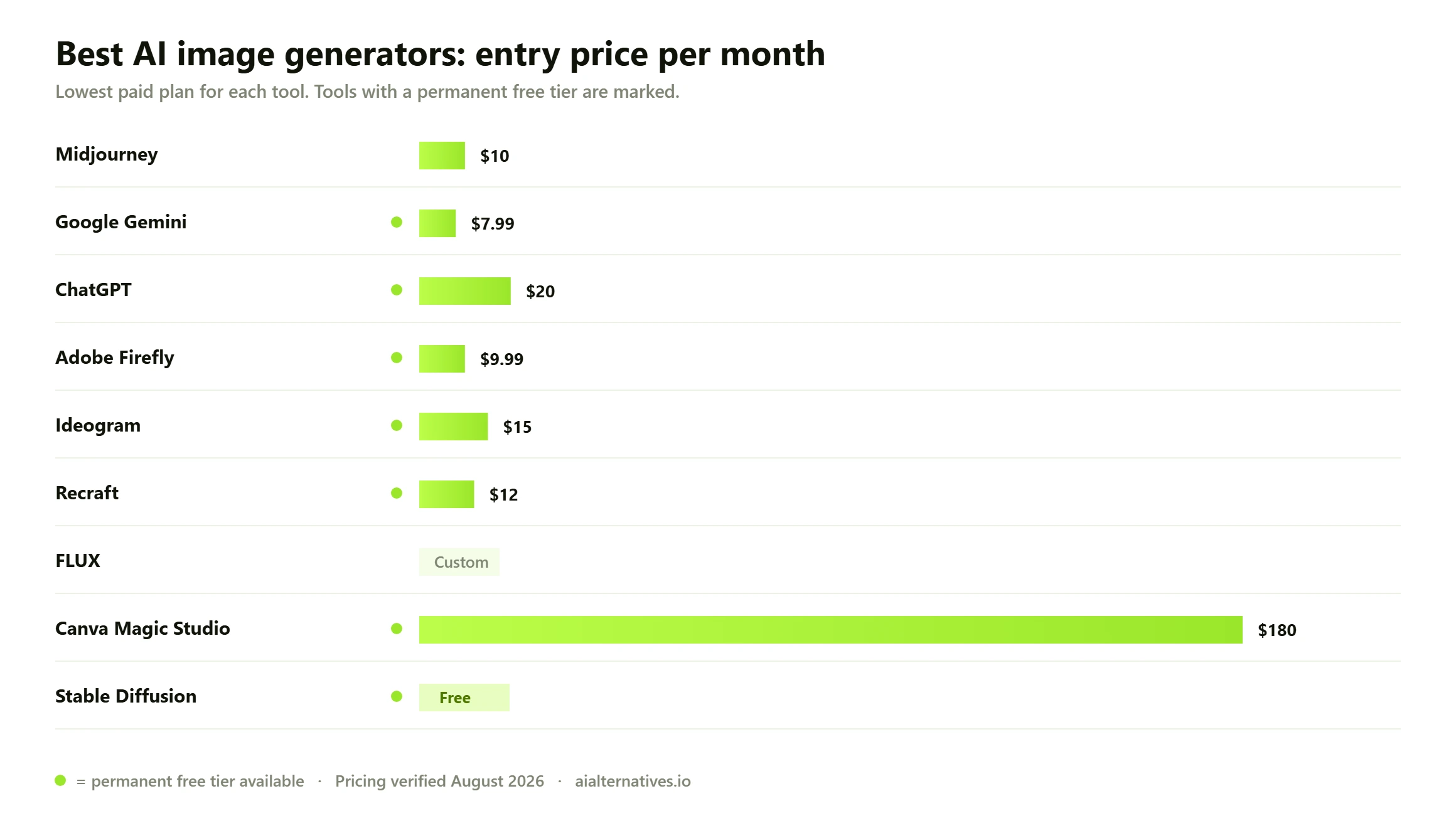
Entry monthly price for each generator’s cheapest paid plan. Note that a low entry price often buys a small credit allowance, and that on several tools the cheapest plan is not the one that grants full commercial rights.
Commercial use and ownership: the part everyone skips
If you are generating images for a client, a product, a book cover or an ad, there are three separate questions hiding inside the phrase can I use this commercially. Almost every guide answers only the first one. Getting the other two wrong is what turns a ten dollar subscription into a legal problem.
One: does the vendor’s licence permit commercial use?
This is contract law between you and the tool, and it is the easiest to check because it is written down. The good news is that most major generators now grant broad commercial rights on paid plans and explicitly disclaim ownership of your output. The bad news is that the conditions attached vary more than you would expect, and two of them are genuinely surprising.
Midjourney ties commercial licensing to your plan tier and to your company’s size: businesses above one million dollars in gross annual revenue are required to subscribe to its higher Pro or Mega plans rather than the entry tier. If you are a freelancer that is irrelevant. If you are an agency generating assets for a large client, it is the single most important sentence on this page.
Recraft goes further in the other direction. Images generated on its free plan are owned by Recraft, appear in its community gallery, and do not carry a commercial licence. Full ownership and commercial rights apply to images made while you hold a paid subscription, and those rights survive if you later cancel. It is a perfectly reasonable business model, clearly stated in Recraft’s own documentation, and it will still catch out anyone who assumed a free tier works the way free tiers usually do.
Two: can you actually own the copyright?
This is a different question, governed by law rather than by the vendor’s terms, and a licence to use an image is not the same thing as a copyright you can enforce against someone who copies it. The United States Copyright Office has been unusually clear here. Its position is that outputs of generative AI can be protected by copyright only where a human author has determined sufficient expressive elements, and that supplying a prompt alone is not enough to make you the author.
The practical consequence is that a striking image you produced by typing a sentence may be something you are permitted to sell but not something you can stop a competitor from reusing. The Office also confirmed that using AI as a tool does not poison the whole work: if you generate elements and then arrange, edit and combine them with genuine creative input, the human-authored contribution remains protectable. You can read the Office’s own summary of its conclusions in its NewsNet announcement on the copyrightability report.
If exclusivity matters to your business, plan around this. Use generation for exploration and components, then do enough human work on top that there is real authorship to point at, and keep a record of what you contributed. Jurisdictions outside the US differ, so check local advice if you operate elsewhere.
Three: does your free tier grant either of those?
Usually less than the paid tier does, and sometimes nothing at all. Across the tools here, free plans commonly restrict you in one of three ways: your generations are public by default rather than private, output carries lower resolution or a visible mark, or, as with Recraft, ownership simply does not transfer to you. If you are producing anything client-facing, the free tier is for testing the tool, not for making the deliverable.
How we verified this Every price, credit allowance and licensing term on this page was checked against the vendor’s own pricing page, documentation or terms of service during August 2026, not against other comparison articles. Where a vendor renders prices only after sign-in or shows them client-side, we say the figure is unpublished rather than guessing. Adobe Firefly plan prices and credit allowances came from Adobe’s Firefly plans page; Recraft’s ownership terms come from Recraft’s own pricing and billing documentation; the copyright position is quoted from the US Copyright Office. Licensing terms change without announcement and are the thing most likely to be out of date in any guide, including this one. Read the current terms yourself before you ship commercial work, and if the stakes are high, take actual legal advice rather than relying on a comparison page.
Commercial use at a glance
Generator
Commercial use on a paid plan
Commercial use on the free tier
The condition to watch
Midjourney
Yes
No free tier exists
Businesses over $1m gross annual revenue must be on Pro or Mega; private generation is Pro and Mega only
Google Gemini
Yes
Yes, subject to Google terms
SynthID provenance marking is applied to generated output
ChatGPT
Yes
Yes
Ownership of output passes to you subject to OpenAI terms and content policy
Adobe Firefly
Yes
Yes, within free credits
Trained on licensed and public domain material; IP indemnification is offered on business plans
Ideogram
Yes
Yes, but generations are public
Private generation requires a paid plan
Recraft
Yes, and rights survive cancellation
No; free-tier images are owned by Recraft
Ownership transfers only for images made while a paid plan is active
FLUX
Depends on licence tier
No consumer free tier
Open-weight licence tier governs commercial and fine-tuning rights
Canva
Yes
Yes, within the AI allowance
Some stock and template elements carry their own separate licence
Stable Diffusion
Yes, per model licence
Yes
Licence differs by model version; check the specific weights you run
One clarification, because it causes real confusion: none of the major vendors here claims ownership of images you generate on a paid plan. The variation is in what the free tiers grant, what conditions attach at scale, and whether your generations are private. Those three, not ownership, are where the traps are.
How to choose an AI image generator
With licensing settled, the remaining choice is mostly about what you make and how you like to work. Three filters get you to an answer quickly.
Match the tool to the actual job
Generators have specialised more than their marketing suggests. Midjourney is the aesthetic one. Nano Banana inside Gemini is the accurate, knowledgeable one. Ideogram handles typography. Recraft makes real vectors. Firefly is the low-risk one. Canva is the one that finishes the job rather than just starting it. If you know which of those sentences describes your week, you have your shortlist.
Understand credits before you compare prices
Sticker prices are close to meaningless across this category because the unit of consumption differs at every vendor. Midjourney sells fast GPU time by the hour and adds unlimited slower generation on its middle tiers. Adobe sells generative credits, from 2,000 a month at the entry plan up to 50,000 at the top. Recraft sells credits in blocks. Canva sells an allowance where a premium generation eats more of it than a standard one. Google sells multiplied access rather than a countable number at all.
So convert everything to cost per finished image you would actually use, not per generation. Most people discard four or five images for every one they keep, which means a plan that looks generous at fifty cents a generation is really costing two or three dollars per usable asset. Do that arithmetic once and the cheap-looking plans often stop looking cheap.
Check whether your generations are private
On several tools, including Ideogram’s free plan and Midjourney’s entry tiers, your prompts and images are visible to other users by default. If you are working on an unannounced product, a client pitch or anything under an NDA, private or stealth generation is not a nice-to-have, and on Midjourney it is only available on the two most expensive plans.
What to check before you commit Five things, in this order. One: does the plan you are about to buy grant commercial rights, or does that start a tier higher? Two: are your generations private, and if not, which plan makes them private? Three: what is the real cost per usable image once you account for the ones you throw away? Four: can you export at the resolution and file type you need, since some plans cap resolution or withhold vector and transparent-background export? Five: what happens to images you already made if you cancel, because policies differ and at least one vendor ties ownership to having been subscribed at the time of generation. Prices and terms in this category move quickly, so treat every figure here as verified in August 2026 and confirm it before you pay.
Which generator is best for what
Photorealism
Midjourney and Nano Banana, with the choice coming down to whether you want beautiful or accurate. Midjourney has a house style that flatters everything, which is wonderful for concept work and occasionally wrong for product photography. Google’s model is more literal and better at real-world detail, which is what you usually want when the image has to represent something that exists.
Text inside an image
Ideogram remains the reliable specialist, though the gap has narrowed sharply. Google’s newest image model renders legible text well enough for marketing mock-ups and greeting cards, and handles translation of on-image text. If typography is central to what you make, test both on your own copy before choosing.
Logos, icons and vectors
Recraft, and it is not close, because it produces genuine scalable vector output rather than a raster image that will fall apart at print size. Everything else here gives you pixels. If you need an SVG, this is the answer.
Consistent characters across a set
Nano Banana holds subject resemblance across multiple images and keeps several distinct subjects and objects consistent within a scene, which is the hard part of illustrating a story or building a campaign. Midjourney’s character reference features are also strong. Anything requiring a recurring face across dozens of images will still need iteration.
Editing photographs you already have
Adobe Firefly inside Photoshop, or ChatGPT if you want to describe the change in words rather than select a region. Firefly wins on precision and on integration with an actual editing workflow. ChatGPT wins on speed and on not needing to know how Photoshop works. Our Photoshop alternatives guide covers the wider editing category.
Watermarks, provenance and disclosure
Two different things get called watermarking and it is worth separating them. Visible marks are branding, usually applied on free tiers and removed when you pay. Invisible provenance marking is something else: Google embeds SynthID signals into its generated images so they can later be identified as AI-generated, and industry work on C2PA content credentials aims to attach tamper-evident origin metadata to files.
This matters commercially for two reasons. Some platforms, marketplaces and stock libraries now require AI-generated content to be labelled, and some advertising and editorial contexts prohibit it outright. Check the rules of the place your image is going, not just the rules of the tool that made it. Provenance signals are designed to survive ordinary editing, so stripping them is not a reliable plan even where it is technically possible.
What users consistently report
What users consistently report Across public community discussion, three frustrations dominate and none of them concern image quality. The first is credit anxiety: people describe running out of an allowance mid-project with no clear warning, and disliking systems where different features silently consume different amounts. The second is inconsistency between generations, where a prompt that produced something excellent yesterday produces something subtly wrong today after a model update. The third is the gap between demo output and real briefs, particularly hands, reflections, product labels and anything requiring an exact brand colour. These are aggregated impressions from public threads rather than measured results, and they are best read as a guide to what tends to frustrate people rather than as a verdict on any product. The practical response to all three is the same: keep prompts and seeds saved outside the tool, and budget for iteration rather than assuming first-pass success.
If you want to compare specific tools side by side rather than browse a ranking, our head-to-head comparisons and the wider alternatives directory break down individual matchups in more detail.
FAQ
Questions people actually ask
What is the best AI image generator right now?
For general creative work, Midjourney still produces the most consistently beautiful output, and Google’s Nano Banana model inside Gemini is the best all-rounder because it combines strong image quality with real-world accuracy and legible text. If commercial safety matters more than the last few per cent of quality, Adobe Firefly is the better choice. There is no single winner, which is why the shortlist above is organised by what each tool is genuinely best at.
What is the best free AI image generator?
Google Gemini gives the most capable free image generation from a major provider, and Canva’s free plan is the most useful if you also need to place the image into a design. ChatGPT includes limited free generation too. Be careful with free tiers though: on some tools free generations are public by default, and on Recraft the free tier does not transfer ownership to you at all. Free tiers are for testing, not for client deliverables.
Is ChatGPT the best AI for image generation?
No, but it is the easiest. ChatGPT’s strength is the conversational editing loop, where you refine an image by describing the change instead of rewriting the prompt. On pure output quality it sits behind Midjourney and Google’s Nano Banana models. If you value iteration speed over maximum fidelity, it is a very reasonable default, especially if you already pay for it.
Can I use AI-generated images commercially?
On the paid plans of every major generator listed here, yes, and none of them claims ownership of what you make. The conditions are what vary. Midjourney requires businesses over one million dollars in gross annual revenue to use its higher tiers. Recraft’s free tier does not grant commercial rights at all. Some plans keep your generations public unless you upgrade. Always check the current terms of the specific plan you are on rather than assuming category norms.
Do I own the copyright to an AI-generated image?
Not automatically, and this is different from whether you are allowed to use it. The US Copyright Office has concluded that AI outputs are protectable by copyright only where a human has determined sufficient expressive elements, and that writing a prompt alone does not make you the author. So you may have a licence to sell an image while lacking an enforceable copyright to stop others copying it. Substantial human editing and arrangement on top of generated material can be protected. Rules differ outside the US.
Which AI image generator is best for realistic photos?
Google’s Nano Banana models for accuracy, Midjourney for beauty. The distinction matters more than it sounds. Midjourney applies a flattering house aesthetic that is superb for concept work but can subtly misrepresent a real product. Google’s model is more literal and pulls on real-world knowledge, which is usually what you want when the image has to depict something that actually exists. Firefly is the safest option if the photo will run in paid advertising.
Which generator handles text inside images best?
Ideogram was built around typography and remains the most reliable for longer strings, though Google’s newest image model has closed much of the gap and handles marketing mock-ups and greeting cards well. If words are central to your output, generate the same headline in both before subscribing to either. Text rendering is the fastest-improving weakness in this category, so test rather than trust an older recommendation.
Do AI-generated images have watermarks?
Two kinds. Visible watermarks appear on some free tiers and disappear when you pay. Invisible provenance marking is separate and increasingly standard: Google embeds SynthID signals into generated images so they can later be identified as AI-made, and C2PA content credentials attach tamper-evident origin data. Provenance marking is designed to survive normal editing, so plan on your images being identifiable as AI-generated.
Can I sell AI images on stock sites or print-on-demand?
Sometimes, and the platform’s rules matter more than the generator’s. Several stock libraries restrict or prohibit AI-generated submissions, others require explicit labelling, and print-on-demand marketplaces vary widely. The vendor licence tells you whether you may use the image at all; the destination platform tells you whether it will accept it. Check both, and remember that limited copyright protection makes AI-generated designs harder to defend against copycats.
What is the best AI image generator on a phone?
Gemini and ChatGPT both have capable mobile apps with image generation built in, and Canva’s mobile app is the strongest if you want to generate and then lay out in one place. Midjourney is usable on mobile through its web app but is really designed for a larger screen and an iterative desktop workflow. For quick generation on the move, the assistant apps win comfortably.
Next step
Working out which one to pay for?
If you already use one of these and it is not quite right, the fastest route is a direct comparison against the obvious alternative. We break down individual tools, their closest rivals and what each plan actually includes.