The 10 Best Runway Alternatives in 2026 (Free, Paid and Local)
Runway free plan gives you 125 credits. A five-second Gen-4.5 clip costs 60 of them, and they never refresh. So that is two clips, ever — and every other guide calls it a free tier.
We have done the credit maths instead, on Runway and on all ten alternatives, so you can see what a clip you would actually publish really costs. You will also find the free tiers that renew every day, the open-weight models you can run on your own GPU, and one correction the whole first page of Google still has not made.
That correction: Sora is gone. OpenAI shut it down in April 2026 and the API closes on 24 September. If you have been waiting for it, stop waiting.
Ranked on quality per dollar, with the free tiers that genuinely renew marked clearly.
Best overall
Kling AI
Free every day, and the motion holds up
Free daily credits / from $10 per mo
Runner-up
Google Veo (via Flow)
It comes with sound
Free / from $4.99 per mo
Third pick
Wan 2.2 (Alibaba)
Free forever on your own GPU
Free (Apache 2.0)
01
Kling AI
Free every day, and the motion holds up
A credit allowance that refreshes daily, and motion that stays coherent better than Runway at the same clip length. For most people reading this, start here.
Free tier: Daily free credits that reset every 24 hours.
Free daily credits / from $10 per mo
02
Google Veo (via Flow)
It comes with sound
Generates audio with the video rather than leaving you to add it, and prompt adherence is the best here. Bundled into Google AI plans you may already be paying for.
Free tier: Limited Veo generations on a free Google account.
Free / from $4.99 per mo
03
Wan 2.2 (Alibaba)
Free forever on your own GPU
Apache 2.0 open weights. No watermark, no credits, no queue, nothing uploaded anywhere. The smaller TI2V-5B variant runs on a single high-end consumer card.
Free tier: Free and open source. You supply the GPU.
Free (Apache 2.0)
04
HunyuanVideo 1.5 (Tencent)
Local video on a normal PC
Around 14GB of VRAM with offloading, which puts local generation within reach of a gaming machine rather than a datacentre. Check the licence — it is Tencent own, not standard open source.
Free tier: Free to download and run locally.
Free (custom licence)
05
Adobe Firefly Video
Free daily credits, and legally clean
The only major vendor giving you recurring free video generations with no plan at all, trained on licensed content with Content Credentials attached to the output.
Free tier: Free daily generations, no subscription needed.
Free / from $9.99 per mo
06
Hailuo (MiniMax)
Faces and characters on a budget
Expressive movement at the cheapest paid entry in the category. The free tier is watermarked and capped at short clips, but it is enough to judge the quality.
Fast iteration and big credit bundles at the top tiers. One correction: there is no free plan on the current pricing page, whatever older roundups tell you.
Free tier: No free tier listed.
From $25 per mo (annual)
08
Pika
Effects and short-form
Playful effects and frame controls built for social video. The free tier is 480p and image-to-video only, which is limiting — unless image-to-video is exactly what you wanted.
Free tier: Free tier: 480p, image-to-video only.
Free / from $8 per mo (annual)
09
LTX Studio
Storyboard through to sequence
Built around telling a story rather than making one clip. Watch the licence before a client sees anything: free and Lite are personal use only, commercial rights start at Standard.
Free tier: 800 one-time credits.
From $12 per mo (annual)
10
Descript
If you already have footage
Be honest about whether you need to generate video or just cut it. If it is the latter, this beats every generator here — text-based editing, transcription and screen recording.
Free tier: 60 minutes of media a month plus 100 one-time AI credits.
Free / from $16 per mo (annual)
Runway alternatives compared at a glance10 tools
#
Tool
Best for
Free tier
Price
01
Kling AI
Free every day, and the motion holds up
Free tier
Free daily credits / from $10 per mo
02
Google Veo (via Flow)
It comes with sound
Free tier
Free / from $4.99 per mo
03
Wan 2.2 (Alibaba)
Free forever on your own GPU
Free tier
Free (Apache 2.0)
04
HunyuanVideo 1.5 (Tencent)
Local video on a normal PC
Free tier
Free (custom licence)
05
Adobe Firefly Video
Free daily credits, and legally clean
Free tier
Free / from $9.99 per mo
06
Hailuo (MiniMax)
Faces and characters on a budget
Free tier
Free / from around $8 per mo
07
Luma Ray
Speed and volume
Trial only
From $25 per mo (annual)
08
Pika
Effects and short-form
Free tier
Free / from $8 per mo (annual)
09
LTX Studio
Storyboard through to sequence
Free tier
From $12 per mo (annual)
10
Descript
If you already have footage
Free tier
Free / from $16 per mo (annual)
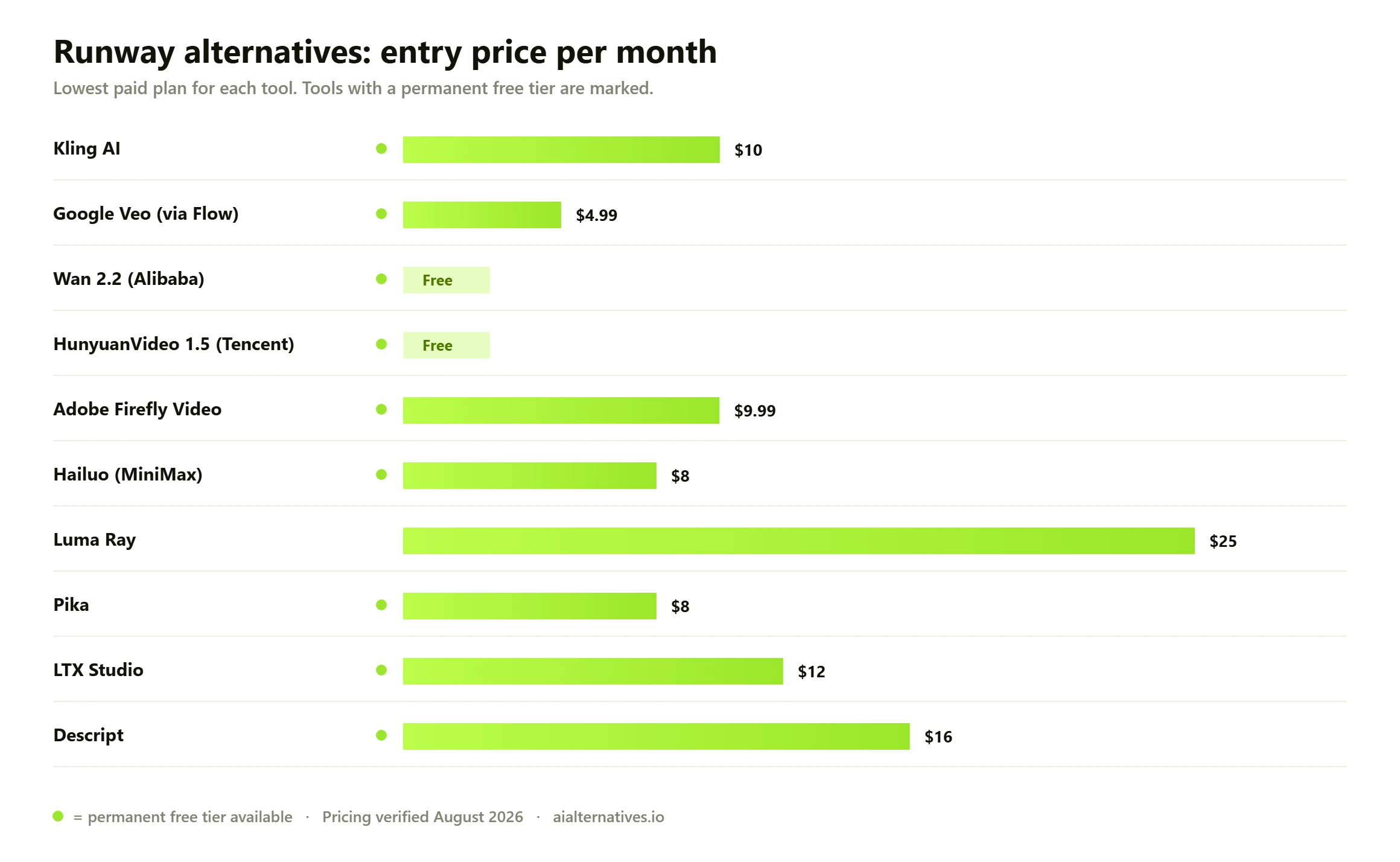
Entry monthly price across every Runway alternative we tested. Green dot marks a permanent free tier. Pricing verified August 2026.
Why people leave Runway in 2026
Runway is not a bad product, and you should not switch because a blog told you to. Gen-4.5, released in December 2025, is genuinely competitive, and the company raised $315 million at a $5.3 billion valuation in February 2026. People leave for three reasons, and two of them are arithmetic you can check yourself.
1. The free plan is not a free tier
Runway gives new accounts 125 credits. They do not refresh, ever. Gen-4.5 costs 12 credits a second, so a five-second clip costs 60. That is two clips and you are finished.
Now compare that with Kling, whose allowance resets every day, or Adobe Firefly, which gives you free daily video generations with no subscription at all. When a roundup lists all three as having free plans, it is comparing a sample to a supply.
2. Credit burn versus what you actually publish
Here is the honest version of Runway pricing, from its own page in August 2026.
Plan
Billed annually
Billed monthly
Credits a month
5-second Gen-4.5 clips
Free
$0
$0
125 one-time
2, ever
Standard
$12
$15
625
10
Pro
$28
$35
2,250
37
Max
$76
$95
9,500
158
So $1.15 a clip on Standard, $0.75 on Pro, $0.48 on Max. Those are the numbers everyone quotes. Now apply your own experience of generative video: how often does the first attempt come out usable? Reviewers routinely report three or four goes before one works, and every failed generation bills in full. Add an extension and a 4K upscale and a single finished twenty-second sequence can eat several hundred credits.
On Standard 625 credits, that is realistically one or two publishable clips a month for $12. Runway is transparent about its model pricing — Gen-4.5 and Gen-4 at 12 credits a second, Gen-4 Turbo at 5, Aleph at 15, Aleph 2.0 at 28 — but nobody puts the retry tax in the table, and it is the number that decides whether the plan works for you.
3. Runway is becoming a different company
Runway shipped its first world model in December 2025 and has been explicit that the $315 million is for pre-training the next generation of them, aimed at robotics, gaming and simulation. It has an equity relationship with Lionsgate and a partnership with AMC Networks.
None of that is bad news, and none of it breaks your workflow tomorrow. But creator-facing video generation is no longer the centre of the company, and that is worth weighing before you build a process around it.
What about Sora?
Skip it. OpenAI discontinued the Sora app and web access on 26 April 2026, and the API shuts down on 24 September 2026. Every article currently ranking for Runway alternatives still lists it as a live recommendation, which is a useful signal about how carefully those pages are maintained. If you were holding out for Sora, the decision has been made for you.
Runway alternatives compared at a glance
Prices read from each vendor own page in August 2026 unless marked. Free tier here means recurring, not a one-time credit grant — and after the section above, you will understand why we keep making that distinction.
Tool
Best for
Entry price
Recurring free tier
Kling AI
Free daily output, motion
From $10 per mo
Yes, daily credits
Google Veo / Flow
Native synced audio
From $4.99 per mo
Yes, limited
Wan 2.2
Free local generation
Free
Yes, open weights
HunyuanVideo 1.5
Local on modest hardware
Free
Yes, open weights
Adobe Firefly Video
Commercial safety
$9.99 per mo
Yes, daily generations
Hailuo (MiniMax)
Character motion, budget
From ~$8 per mo
Yes, watermarked
Luma Ray
Speed and volume
$25 per mo (annual)
No
Pika
Effects, short-form
$8 per mo (annual)
Yes, 480p image-to-video
LTX Studio
Storyboard to sequence
$12 per mo (annual)
800 one-time credits
Descript
Editing real footage
$16 per mo (annual)
Yes, 60 min a month
Runway
All-round generation and editing
$12 per mo (annual)
No — 125 one-time credits
Free Runway alternatives that do not expire
This is the most-searched thing about this topic, so here is the precise ranking rather than a list.
Wan 2.2 or HunyuanVideo, locally — genuinely unlimited. No watermark, no queue, nothing uploaded. You need a GPU, and you are capped at roughly five-second clips at 480p to 720p.
Kling — a daily allowance that resets every 24 hours. A couple of short clips a day, indefinitely. The best option if you do not want to install anything.
Adobe Firefly — free daily generations across image, video and audio with no plan required, and the output is the commercially safest here.
Hailuo — a few short watermarked clips a day.
Google Veo via Flow — limited free generations on a normal Google account, and the audio makes them feel finished rather than like tests.
Pika — 480p and image-to-video only. A real limitation, and also exactly what a lot of people want.
Set your expectations honestly: free tiers are watermarked, queued, short and lower-resolution. What they are genuinely good for is finding out which model understands the kind of prompt you write, before you give anyone money.
Best free alternatives for image-to-video
Image-to-video is where most real work happens. You have a product shot, a character or a still frame, and you want motion — not a whole world invented from a sentence.
Kling and Hailuo lead on quality per credit, and both animate a still more coherently than they generate from text alone. Pika free tier is image-to-video only, which makes it the cheapest way to try the workflow at all. Locally, Wan 2.2 TI2V variant is built for exactly this and costs nothing per clip.
And if you are staying on Runway, here is the easy saving: use Gen-4 Turbo at 5 credits a second instead of Gen-4.5 at 12. For simple motion on a strong source image, the quality gap is much smaller than the price gap.
Run it yourself: local video generation
Two open-weight models make this genuinely practical in 2026.
Wan 2.2 from Alibaba is Apache 2.0 — properly open, commercially usable, no strings attached. The full A14B model wants datacentre memory, but the TI2V-5B variant runs on a single high-end consumer GPU and handles both text-to-video and image-to-video at 480p and 720p.
HunyuanVideo 1.5 from Tencent is 8.3 billion parameters and runs in around 14GB of VRAM with offloading, with super-resolution up to 1080p. Check the licence before commercial use — it is Tencent own community licence rather than a standard open-source one, and that distinction may matter to whoever signs off your work.
The trade is quality and length: expect roughly five-second clips at lower resolution than Veo or Kling. What you get back is unlimited generation, nothing leaving your machine, and no anxiety about credits while you experiment. If your process involves a lot of trial and error, that last one is worth more than a resolution bump.
What to check before you switch
Commercial rights. LTX Studio free and Lite tiers are personal use only, and several other free tiers say the same. Check before a client sees the output, not after.
Provenance. Content Credentials under the C2PA standard are becoming expected in professional pipelines — the Content Authenticity Initiative passed 6,000 members in January 2026. Adobe output carries them and Google applies SynthID watermarking to Veo.
Training-data litigation. Runway faces claims over training data, as do several competitors. The allegations are untested. If your legal team cares, Firefly licensed-content position is the cleanest answer available.
Credit expiry. Most plans do not roll credits over. Runway Max tier rolls one month; Luma expire monthly. If your work comes in bursts, buy for the peak or you will pay for months you never used.
How to choose
You want free output every day — Kling, then Adobe Firefly.
You need sound — Google Veo. Nothing else here generates synced audio natively.
You generate constantly — go local with Wan or HunyuanVideo. The GPU pays for itself.
Client work with legal review — Adobe Firefly.
Characters and faces — Hailuo.
You are telling a story, not making a clip — LTX Studio.
You already have footage — Descript. Most people asking about AI video actually want an editor.
Is switching worth it?
Stay on Runway if you use Aleph for video-to-video editing, you are on Pro or Max where the per-clip cost is reasonable, and you value having generation, editing and upscaling in one place. Nothing here replaces that whole toolkit at once, and stitching three tools together has its own cost.
Switch if you are on Standard and burning 625 credits in a week, if you need a free tier that actually renews, if you want sound, or if you generate enough that your own GPU would be cheaper by the quarter.
The zero-cost test takes a week: run the same source image through Kling daily free credits, Firefly free generations and Veo free tier. You will know within three prompts which one understands what you are asking for — and that tells you more than any spec sheet. Our AI video generators guide ranks the category, and AI video editing covers the tools that cut real footage.
Questions
Runway alternatives FAQs
The questions you are actually asking on Google and Quora — answered with what we verified this month.
Yes, and it matters more here than usual, because Runway has no recurring free tier — its 125 credits are one-time. Kling gives you daily credits that reset, Adobe Firefly gives free daily generations with no plan at all, and Hailuo gives a small daily allowance. Wan 2.2 and HunyuanVideo are free forever if you have a GPU.
02 How much does Runway actually cost per video?
Gen-4.5 costs 12 credits a second, so a five-second clip is 60 credits. That works out at roughly $1.15 a clip on Standard, $0.75 on Pro and $0.48 on Max — before retries, which in practice multiply the real cost three or four times.
03 Is Runway’s free plan actually free?
It is free but it does not renew. You get 125 credits once and that is your lot — about ten seconds of Gen-4.5 video in total. Treat it as a demo rather than a tier, and do not plan any work around it.
04 What is better than Runway for AI video?
Depends what you are making. Veo for native synced audio and prompt adherence. Kling for motion realism, longer clips and a free tier that renews. Wan or HunyuanVideo for cost and privacy. Descript if what you actually need is editing rather than generating.
05 Can I run an AI video generator locally?
Yes. HunyuanVideo 1.5 runs on roughly 14GB of VRAM with offloading, and Wan 2.2 smaller TI2V-5B variant runs on a high-end consumer card. You get unlimited watermark-free generation at 480p to 720p in around five-second clips, and nothing you make leaves your machine.
06 What happened to Sora — can I still use it?
No. OpenAI discontinued the Sora app and web access on 26 April 2026, and the API shuts down on 24 September 2026. Any guide still recommending it as a Runway alternative was written against a product that no longer exists — which tells you something about how carefully it was updated.
07 Why do my Runway credits disappear so fast?
Because failed and off-prompt generations cost exactly the same as good ones, and extensions plus upscaling stack on top. A clip you would actually publish usually takes three or four attempts, so budget three to four times the list price per finished second.
08 Which Runway alternative is best for image-to-video?
Kling and Hailuo lead on quality per dollar, and both animate a still more coherently than they generate from text. Pika free tier is image-to-video only, which makes it the cheapest way to test the workflow. If you are staying on Runway, Gen-4 Turbo at 5 credits a second costs less than half of Gen-4.5.
Updated monthly · No paid placements
Still deciding?
See the head-to-head video tests, or browse every media and video tool alternative we publish.