The 8 Best DocuSign Alternatives for 2026 (Verified Pricing)
Docusign probably works fine for you. It’s the bill that hurts. Standard costs you $30 per user per month on annual billing, and that buys 100 envelopes per user per year. Send envelope 101 and you’re paying extra.
Most DocuSign alternatives price the problem differently than you’re used to. Some remove the cap entirely. Some charge per document. Some are free. We compared 8 of them for you, and verified every price in August 2026.
Below, you’ll find real per-envelope math, an honest look at free tools, and the legal rules that decide whether free is good enough for what you need.
Ranked by testing, current pricing and free-tier value. Details on every pick below the list.
Best overall
Dropbox Sign
Straight swap for Docusign
Free / from $15 per user/mo
Runner-up
SignNow
Cheapest per-seat team pricing
From $8 per user/mo (annual)
Third pick
Zoho Sign
Best free plan, Zoho users
Free / from $10 per user/mo
01
Dropbox Sign
Straight swap for Docusign
This is the old HelloSign, now offering you unlimited signature requests on every paid plan. It has the cleanest interface of the bunch, and there’s no annual envelope cap for you to track.
Free tier: 3 signature requests a month, one user
Free / from $15 per user/mo
02
SignNow
Cheapest per-seat team pricing
You’ll pay a quarter of Docusign’s seat price here, with the same 100-invite yearly cap. The difference shows up in overage: $0.96 per extra invite instead of roughly $3.
Free tier: No free plan, trial only
From $8 per user/mo (annual)
03
Zoho Sign
Best free plan, Zoho users
Professional at $16 per user/month removes your envelope limits completely. It plugs straight into Zoho CRM, Books and WorkDrive if you already live there.
Free tier: 5 envelopes a month, single user, forever
Free / from $10 per user/mo
04
PandaDoc
Proposals, quotes and signing
You get signing plus a real document builder, pricing tables and analytics. It’s overkill if you only need signatures, but ideal if you’re sending sales proposals.
Free tier: 5 signed docs a month, 60 docs a year
Free / from $19 per user/mo
05
eSignatures.com
Pay per document, no seats
You pay no subscription, no seats, no monthly fee, and your credits never expire. Buy in bulk and the rate drops as low as $0.20 per contract.
Free tier: No free plan, trial credits only
$0.49 per contract
06
Documenso
Open source and self-hosting
This is open-source signing you can run on your own servers, so your documents never leave your infrastructure. Hosted Teams runs $40/month, including 5 users.
Free tier: 5 documents a month on hosted free tier
Free / from $25 per mo
07
Adobe Acrobat Sign
PDF-heavy document work
It’s bundled with Acrobat Standard for teams, so you get full PDF editing alongside signing. It’s your best value if your team already pays for Acrobat.
Free tier: Free self-signing in Acrobat Reader
From $16.99 per license/mo
08
Signaturely
Simple unlimited signing
Business at $50 per user/month gives you unlimited requests and templates with almost no setup on your end. Just know the free tier is too thin for real use.
Free tier: 1 document a month
Free / from $25 per mo
DocuSign alternatives compared at a glance8 tools
#
Tool
Best for
Free tier
Price
01
Dropbox Sign
Straight swap for Docusign
Free tier
Free / from $15 per user/mo
02
SignNow
Cheapest per-seat team pricing
Trial only
From $8 per user/mo (annual)
03
Zoho Sign
Best free plan, Zoho users
Free tier
Free / from $10 per user/mo
04
PandaDoc
Proposals, quotes and signing
Free tier
Free / from $19 per user/mo
05
eSignatures.com
Pay per document, no seats
Trial only
$0.49 per contract
06
Documenso
Open source and self-hosting
Free tier
Free / from $25 per mo
07
Adobe Acrobat Sign
PDF-heavy document work
Free tier
From $16.99 per license/mo
08
Signaturely
Simple unlimited signing
Free tier
Free / from $25 per mo
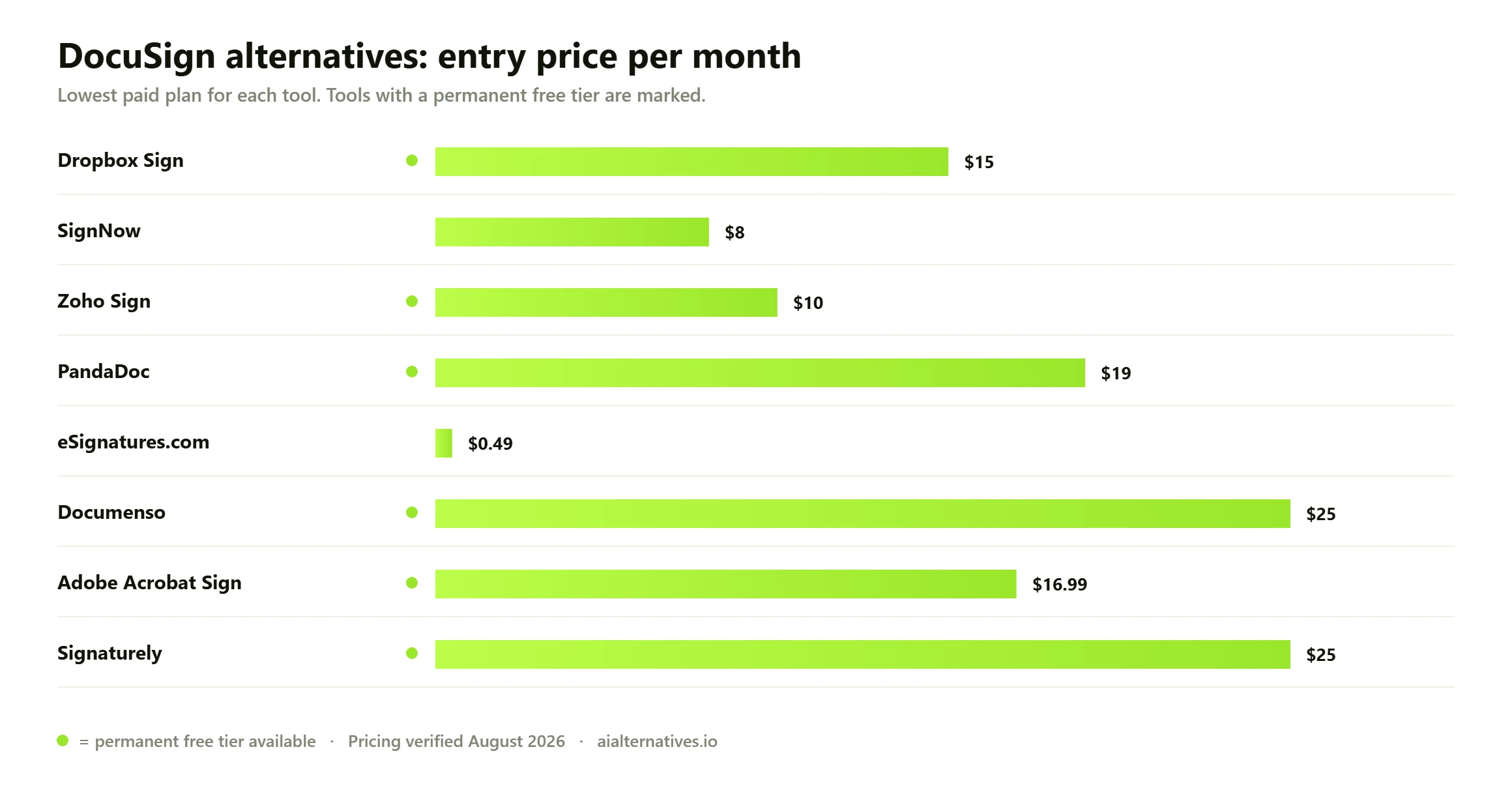
Entry monthly price across every DocuSign alternative we tested. Green dot marks a permanent free tier. Pricing verified August 2026.
Why people are leaving Docusign
It comes down to two numbers you need to watch: the seat price and the envelope cap. Docusign Standard runs $30 per user per month billed annually, or $360 a year. That includes 100 envelope sends per user per year. Business Pro is $45 per user per month, or $540 a year, and includes the same 100 envelopes.
The Personal plan is worse for you if you have any real volume. It’s $11 a month billed annually and caps you at 5 envelopes per month. One busy week and you’re stuck.
The unlimited option costs a lot more
Docusign does sell you unlimited envelopes, but only through its Intelligent Agreement Management tiers. IAM Standard is $50 per user per month with a 3-user minimum, so that’s $1,800 a year before you send a single document. IAM Professional is $80 per user per month, also with a 3-seat floor.
That push is deliberate, and it’s aimed at you. In its FY2026 results on 17 March 2026, Docusign said IAM had grown to 10.8% of total ARR, up from 2.3% a year earlier. By the Q1 FY2027 release on 4 June 2026, IAM was 12.6% of ARR with 40,000 customers on it. The AI platform is where the company wants you, and the envelope caps on eSignature plans are the nudge to get you there.
Overages, not features, are the complaint
Docusign doesn’t publish a public overage rate for you to check. Its own support community puts it at roughly $3 per envelope on a Standard annual plan, derived from the plan cost divided by the included allowance. Blow through your cap in month eight, and you’re billed at retail for the rest of the year.
The real cost per envelope
Seat price is the wrong metric. What matters is what one signed document actually costs you. Here’s the annual cost of 300 signature requests from a single sender, using verified August 2026 list prices.
Plan
Year-one cost for 300 sends
Effective per envelope
Docusign Business Pro
~$1,620
~$5.40
Docusign Standard
~$960
~$3.20
Documenso Individual
$300
$1.00
SignNow Business
$288
$0.96
PandaDoc Starter
$228
$0.76
Zoho Sign Professional
$192
$0.64
Dropbox Sign Essentials
$180
$0.60
eSignatures.com
$147
$0.49
Docusign figures assume you buy extra envelopes at the rate its support team cites. Everything below Documenso either has no annual cap or charges per document. At 300 sends a year, the gap is five to ten times.
One caveat worth knowing: SignNow also caps you at 100 signature invites per user per year, and unused invites don’t roll over. It’s cheap because overage is $0.96 per invite on Business, not because the cap is gone.
Best DocuSign alternatives compared
Tool
Best for
Starting price
Free plan
Dropbox Sign
Straight swap for Docusign
From $15 per user/mo
Yes, 3 requests/mo
SignNow
Cheapest per-seat team pricing
From $8 per user/mo
No, trial only
Zoho Sign
Best free plan, Zoho users
From $10 per user/mo
Yes, 5 envelopes/mo
PandaDoc
Proposals, quotes and signing
From $19 per user/mo
Yes, 5 signed docs/mo
eSignatures.com
Pay per document, no seats
$0.49 per contract
No, trial credits
Documenso
Open source and self-hosting
From $25/mo
Yes, 5 docs/mo
Adobe Acrobat Sign
PDF-heavy document work
From $16.99 per license/mo
Free self-signing only
Signaturely
Simple unlimited signing
From $25/mo
Yes, 1 document/mo
The best DocuSign alternatives, reviewed
1. Dropbox Sign
Formerly HelloSign, and your closest like-for-like replacement. Essentials runs $15 per user/month on annual billing ($180 a year) with unlimited signature requests. No envelope counter, and no overage invoice showing up in month nine.
What it lacks: Standard at $25 per user/month has a 2-user minimum, so if you’re solo and want branding and bulk send, you’re paying $600 a year. Advanced routing is thinner than Docusign’s. Pick it if you want Docusign’s workflow without the cap.
2. SignNow
This is the cheapest real seat you’ll find on this list, at $8 per user/month billed annually. Business Premium adds bulk send and reminders for $15; Enterprise runs $30.
What it lacks: the same 100-invite annual ceiling Docusign has, which most listicles forget to mention. The saving grace for you is overage pricing at $0.96 per extra invite on Business. Pick it if your volume is genuinely low and predictable.
3. Zoho Sign
You’ll find the most generous forever-free tier here: 5 envelopes a month, one user, with audit trail and cloud-storage integrations. Standard is $10 per user/month annually with 25 envelopes per user per month. Professional at $16 removes your limits entirely.
What it lacks: SMS authentication and bulk send run on a separate credit system, so the sticker price isn’t the whole cost you’ll pay. Pick it if you already use Zoho CRM or Books.
4. PandaDoc
This isn’t really a signing tool for you. It’s a document builder with signing attached: templates, pricing tables, content library, open-rate analytics. Starter is $19 per user/month with unlimited documents and unlimited eSignatures.
What it lacks: it’s heavier and pricier than a pure e-signature app for you, and Business jumps to $49 per user/month. Pick it if sales proposals are the documents you’re sending.
5. eSignatures.com
This is the pure pay-as-you-go option for you, at $0.49 per contract. No seats, no monthly fee, and your credits never expire. Buy in bulk and the rate drops toward $0.20, and non-profits get 40% off.
What it lacks: no free plan, and a plainer interface than the subscription tools. Pick it if your volume is spiky, or if you send 50 contracts one month and none the next.
6. Documenso
This is open-source signing you can self-host yourself, which means your signed contracts never touch a third-party server. The hosted free tier covers 5 documents a month; Individual is $25/month for unlimited, and Teams is $40/month with 5 users included and $8 for each extra.
What it lacks: fewer integrations, and self-hosting means you own the uptime, backups and updates yourself. Pick it if data residency or vendor lock-in is a genuine concern for you.
Two more alternatives to Docusign worth a look
Adobe Acrobat Sign
Signing comes bundled into Acrobat here, starting at $16.99 per license/month for Acrobat Standard for teams on an annual commitment. Acrobat Pro for teams is $23.99. If your team already edits PDFs all day, the signing is close to free at the margin for you.
Watch the contract terms before you sign up: monthly-billed annual plans carry a cancellation fee of half the remaining commitment after 14 days.
Signaturely
This is the simplest tool here for you. Business is $50 per user/month (or $480 a year) for unlimited requests and templates, with Google Drive, Dropbox, OneDrive and Box built in.
The free plan allows you one document a month, which is really a demo rather than a plan. Personal at $25/month caps you at 5 requests. Pick it only if simplicity beats price for you.
Free DocuSign alternatives that actually work
Looking for a DocuSign alternative that’s free of any subscription? Several exist, and if your volume is low, they’re legitimately enough for you.
Zoho Sign Free — 5 envelopes a month, one user, with audit trail. It’s the strongest free tier you’ll find here.
Dropbox Sign Free — 3 signature requests a month for you, plus unlimited self-signing that doesn’t count against the limit.
PandaDoc Free eSign — 5 signed documents a month for you, 60 a year.
Documenso Free — 5 documents a month hosted, or unlimited if you self-host the open-source version.
Adobe Acrobat Reader — Fill & Sign is free forever if you’re just signing documents yourself. It just can’t request signatures from others for you.
Google Workspace eSignature is worth flagging for you because it’s often misdescribed as free. It’s included in Business Standard and above, Enterprise tiers and Workspace Individual, but it’s not available on a free personal Google account.
Here’s the honest limit on free plans: they cap your monthly sends, restrict you to one user, and rarely include bulk send, SMS verification or custom branding. Free works if you’re a freelancer signing a handful of client agreements. It falls apart the moment two people need to send from the same account.
Are e-signatures legally binding? ESIGN, UETA and eIDAS
Yes, in almost every ordinary business context, and this is why cheap tools hold up. In the US, the federal E-Sign Act, enacted 30 June 2000, provides a general rule of validity for electronic records and signatures in interstate commerce. UETA does the same at state level and has been adopted in nearly every state. Neither law requires you to use a particular vendor.
What matters for you is intent to sign, consent to do business electronically, association of the signature with the record, and a retrievable audit trail. Any tool on this list gives you that. Docusign has no legal advantage a $0.49 contract doesn’t also have.
Europe is where the tiers matter
Under eIDAS, the EU recognises three levels you should know about. A simple electronic signature can be as basic as typing your name. An advanced electronic signature (AdES) must uniquely identify the signer, stay under their control, and detect any later change to the document. A qualified electronic signature (QES) adds a qualified signature creation device and a certificate from a provider on an EU member state’s trusted list.
Only QES carries legal effect equivalent to a handwritten signature across every member state, per the European Commission’s eSignature guidance. Most EU commercial contracts don’t need it. Some property, employment and public-sector documents do. If yours might, check before you pick a budget tool, because QES support is usually an enterprise add-on.
This is general information, not legal advice for your situation. For regulated documents, wills, or anything jurisdiction-specific, ask a lawyer.
How to choose
Under 5 documents a month: use a free plan. Zoho Sign gives you 5 envelopes with an audit trail and costs you nothing. Don’t pay $360 a year for this.
Unpredictable volume: go per-document. eSignatures.com at $0.49 means a quiet quarter costs you nothing at all. Seats punish you for not sending.
A small team sending steadily: Dropbox Sign Essentials at $15 per user/month is your safest cheap DocuSign alternative, because unlimited means unlimited. SignNow is cheaper up front but reintroduces the 100-invite cap you’re trying to escape.
Sales documents: PandaDoc. You’re buying the proposal builder and analytics, and the signing comes free with it.
Regulated data or strict residency rules: Documenso, self-hosted. Nothing leaves your servers.
Already paying for Acrobat: Adobe Acrobat Sign. You may already own it.
Is switching worth it?
For most small teams like yours, yes, and the math isn’t close. A three-person team on Docusign Standard pays $1,080 a year for 300 envelopes. That same team on Dropbox Sign Essentials pays $540 with no cap. On Zoho Sign Professional it’s $576 for unlimited.
Switching costs you very little. Templates take an afternoon to rebuild, and signed documents you already have stay valid regardless of who you sign with next. Export your completed PDFs and audit trails before you cancel.
When to stay
Stay put if Docusign is embedded in your Salesforce, Workday or an ERP with a live integration nobody wants to rebuild. Stay if you need Docusign’s identity verification and qualified signature support for EU or regulated work. Stay if you’re already on an IAM plan and actually use the workflow automation, because that’s a different product from signing.
Otherwise, here’s the honest verdict: Docusign’s premium buys you brand recognition and a deep enterprise feature set most teams never touch. If you send fewer than a few hundred documents a year, you’re paying for capability you don’t use.
Questions
DocuSign alternatives FAQs
The questions people actually ask on Google, Reddit and Quora — answered with what we verified this month.
No. Docusign offers you a free trial, but there’s no permanent free tier. Its cheapest paid plan is Personal at $11 a month billed annually, capped at 5 envelopes per month. If you want a genuinely free option, Zoho Sign gives you 5 envelopes a month indefinitely and Dropbox Sign gives you 3.
02 How many envelopes does Docusign actually include?
Standard and Business Pro both include 100 envelope sends per user per year for you. Personal is limited to 5 envelopes per month. Only the IAM tiers offer you unlimited envelopes through the web app, starting at $50 per user per month with a 3-user minimum.
03 Are free e-signature tools legally binding?
Yes, in ordinary US and EU business contexts. The E-Sign Act and UETA validate your electronic signatures without requiring a specific vendor, and every tool here produces an audit trail for you. The exception is EU documents requiring a qualified electronic signature under eIDAS, which free tiers generally don’t provide.
04 What’s the cheapest DocuSign alternative for a small team?
SignNow at $8 per user/month billed annually gives you the lowest seat price, but it caps you at 100 signature invites per user per year with $0.96 per extra invite. If you send more than that, Dropbox Sign Essentials at $15 per user/month works out cheaper for you because it has no cap.
05 Can I self-host a Docusign alternative?
Yes. Documenso is open source and can run on your own infrastructure, so signed documents never reach a third-party server. Its hosted plans start free at 5 documents a month, with self-hosted enterprise licensing available on request. You take on uptime, backups and updates in exchange.
06 What happens if I exceed my Docusign envelope allowance?
You’ll buy additional envelopes from the Plans and Billing section of your account settings, and you can send immediately after. Docusign doesn’t publish a public rate, but its support community cites roughly $3 per envelope on a Standard annual plan. Unused envelopes don’t carry over to your next year.
Updated monthly · No paid placements
Still comparing?
See how the top picks square off head to head, or browse every alternative guide we publish.