pricing and usage limits verified 1 September 2026
The Best AI Agents in 2026: What Actually Runs Without You
Two questions decide whether an AI agent is worth buying, and almost no comparison answers either. Can it finish a job while you are asleep? And what does one finished job actually cost?
Everything else is marketing. Gartner reckons only around 130 of the thousands of vendors claiming to sell agentic AI are genuinely agentic, and predicts more than 40% of agentic AI projects will be cancelled by the end of 2027 on escalating costs, unclear business value and inadequate risk controls. That is not a reason to skip the category. It is a reason to buy carefully.
This guide splits the best AI agents into the three things the phrase actually means: consumer agents that do errands in a browser, coding agents that ship work in a repository, and platforms for building agents on top of your own systems. Mixing them is why so many shortlists are useless. Prices, limits and capability claims below come from each vendor’s own pricing page, documentation or help centre, read on 1 September 2026.
The ten agents worth your money, and what each one is really for
Ranked best-first by how much genuine work they complete without supervision, with the category labelled so you do not buy a coding agent when you needed a workflow platform.
Best overall
Claude Code
Coding agent. The most capable long-running agent you can point at a real repository
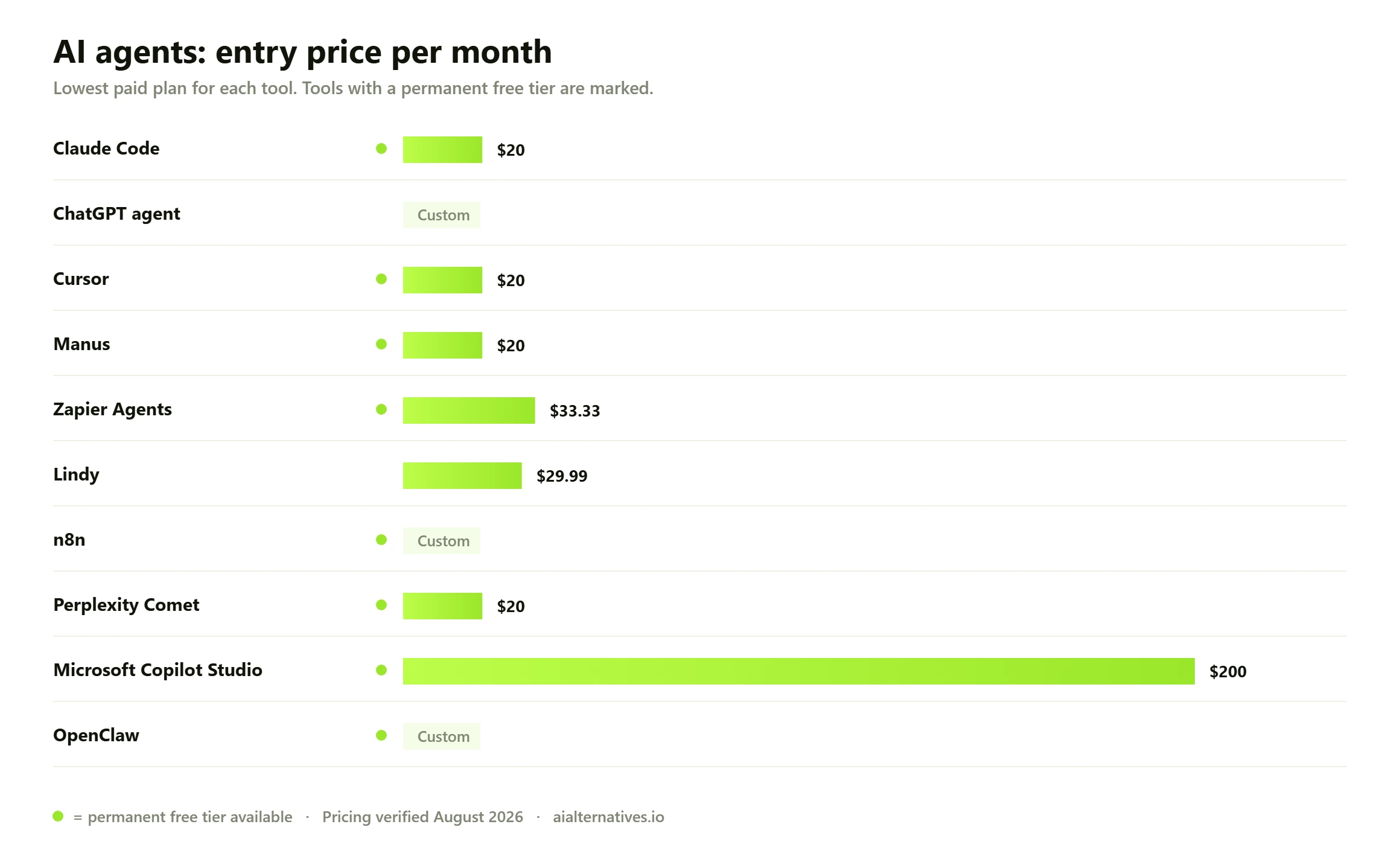
Pro $20/month or $17 annual. Max from $100/month. Team $20/seat annual. API from $1 per million input tokens
Runner-up
ChatGPT agent
Consumer agent. The safest starting point if you have never delegated to one
Included with Plus, Pro, Business, Enterprise and Edu. Plus gets 40 agent messages a month, Pro 400
Third pick
Cursor
Coding agent. Best if you want the agent inside the editor you already live in
Pro $20/month. Teams Standard $40/user/month. Pro+ and Ultra prices not published
01
Claude Code
Coding agent. The most capable long-running agent you can point at a real repository
Claude Code is the clearest example of an agent that finishes things. It reads a codebase, plans, edits across many files, runs tests, reads the failures and tries again. That loop, not raw model quality, is what separates an agent from a chatbot with tools bolted on.
Pricing is unusually legible. Claude Pro is $20 a month, or $17 billed annually, and includes Claude Code. Max starts at $100 for 5x or 20x Pro’s usage. Team seats are $20 a month billed annually, premium seats $100. Per unit, the API lists Opus 5 at $5 per million input tokens and $25 per million output, Sonnet 5 at $2 and $10, Haiku 4.5 at $1 and $5, with batch processing at half price and managed agents at $0.08 per session-hour.
Where it still needs you: scoping. Give it a vague objective and it will confidently build the wrong thing at full token price. Give it a tightly specified task with a test that defines done, and it genuinely runs unattended for a long stretch. Our Claude Code alternatives guide covers the direct rivals.
Free tier: Claude has a free tier for chat; Claude Code needs a paid plan
Pro $20/month or $17 annual. Max from $100/month. Team $20/seat annual. API from $1 per million input tokens
02
ChatGPT agent
Consumer agent. The safest starting point if you have never delegated to one
ChatGPT agent is the most approachable autonomous mode on the market. You describe an outcome, it browses, clicks buttons, fills forms, reads your connected apps and can run the same job on a daily, weekly or monthly schedule. OpenAI’s own documentation notes it needs no technical skill and can be guided or interrupted mid-task.
The limits are the honest part of the story. OpenAI publishes them: 40 agent messages a month on Plus, 400 on Pro, 40 on Business and Enterprise with flexible pricing at 30 credits per message. Only your initial request counts, so mid-task clarifications are free.
It is also candid about supervision. High-impact actions require your confirmation, prompt injection is actively monitored, certain sites trigger a watch mode that demands you supervise, and sensitive logins force a takeover mode where you type the password yourself. OpenAI states plainly that these measures do not eliminate all risks. Treat it as a fast assistant with a leash, not a replacement employee.
Free tier: No. Agent mode requires a paid plan
Included with Plus, Pro, Business, Enterprise and Edu. Plus gets 40 agent messages a month, Pro 400
03
Cursor
Coding agent. Best if you want the agent inside the editor you already live in
Cursor put agentic editing into an IDE and made it feel normal. Composer handles multi-file changes, cloud agents run work off your machine, and Bugbot reviews code on a usage-based charge. MCP support, skills and hooks let you wire it into your own tooling.
The plan ladder is built entirely around agent volume. Hobby is free with limited agent requests. Pro is $20 a month with extended limits and cloud agents. Pro+ triples Pro’s agent limits and Ultra multiplies them twentyfold, though Cursor does not publish either price. Teams Standard is $40 per user with shared context, agentic code reviews and SSO; Premium adds 5x Standard’s limits.
Cursor is better when you want to watch the work and steer it. Claude Code is better when you want to hand over a task and come back later.
Free tier: Yes. Hobby tier with limited agent requests
Pro $20/month. Teams Standard $40/user/month. Pro+ and Ultra prices not published
04
Manus
Consumer agent. The most genuinely autonomous general-purpose runner
Manus goes further unsupervised than almost anything else aimed at non-developers. Give it a research brief, a data task or a small app to build and it works through it in a sandbox, then hands back a finished artefact rather than a plan.
The credit model is the useful part, because it exposes what a task costs. Free gives 300 daily refresh credits and 5 concurrent tasks. Standard is $20 a month for 4,000 credits plus the daily refresh and 20 concurrent tasks, Customizable $40 for 8,000, Extended $200 for 40,000, with 17% off annually. Published guidance puts simple queries at 10 to 50 credits and complex research at 500 to 900, which on Standard is roughly $2.50 to $4.50 for a deep research run.
That is the honest price of autonomy, and it is why unlimited-sounding subscriptions elsewhere quietly meter you.
Standard $20/month for 4,000 credits, Customizable $40 for 8,000, Extended $200 for 40,000. Prices from a secondary source, see notes
05
Zapier Agents
Agent platform. Best if your work already lives in a stack Zapier connects to
The reason to choose Zapier Agents is not the intelligence. It is the connectors. If a job means reading a form response, checking a CRM, deciding something and writing to three systems, the deciding is the easy part and the plumbing is the expensive part. Zapier has already built the plumbing.
Agents is priced separately from the main Zapier plans, on activity rather than seats. Free allows up to 400 activities a month. Agents Pro is $33.33 a month billed annually at $400 for 1,500 activities. Enterprise is custom, with configurable limits and org-wide sharing. Zapier defines an activity as any action the agent takes in behaviours or chat, browsing the web, or looking up information from attached knowledge.
Read that definition twice before you budget. One business task can easily be five or ten activities, so 1,500 activities is not 1,500 tasks. It might be 200.
Free tier: Yes. Up to 400 activities a month
Agents Pro $33.33/month billed annually at $400 for 1,500 activities. Core Zapier plans from $19.99/month separately
06
Lindy
Agent platform. The most transparent pricing in the category, by some distance
Lindy builds agents that handle inboxes, meeting notes, lead triage and recurring operational work. What earns it a high place here is that it publishes what different classes of work cost, which nobody else does properly.
Plus is $29.99 per user a month for 3,000 credits, Pro $99.99 for 15,000, Max $199.99 for 35,000, Enterprise custom. Lindy bands the work: everyday asks such as summaries, lookups and replies at 2 to 250 credits, deep work such as research, queue triage and report writing at 250 to 1,000, and big builds such as dashboards and internal tools at 1,000 to 2,500. Credits pool across the team, are only consumed during active work, and do not roll over. If the pool empties, Lindy pauses credit-consuming actions rather than billing you more.
Do the arithmetic before you commit. On Plus, one big build can consume most of your month. That is not Lindy being expensive; it is Lindy telling you the truth about what agent work costs.
Free tier: No published free tier
Plus $29.99/user/month for 3,000 credits. Pro $99.99 for 15,000. Max $199.99 for 35,000
07
n8n
Agent platform. Best when the data cannot leave your infrastructure
n8n is a workflow builder that grew agent nodes, which turns out to be the right order to do it in. You get deterministic control flow with model calls inside it, rather than a model improvising the control flow, and that is a meaningful reliability difference on anything you intend to run every day.
Cloud pricing is by execution, not by step: Starter EUR 20 a month billed annually for 2,500 executions and 5 concurrent, Pro EUR 50 for 10,000 and 20 concurrent, Business EUR 667 for 40,000 with self-hosting available, Enterprise custom. Every tier includes unlimited users, unlimited workflows and every integration. A Community Edition is on GitHub for self-hosting at no licence cost.
Budget for one thing the pricing page does not cover: model tokens are on top. An execution costs you fractions of a cent in n8n and potentially dollars at your LLM provider.
Free tier: Yes, via the self-hosted Community Edition on GitHub
Starter EUR 20/month annual for 2,500 executions. Pro EUR 50 for 10,000. Business EUR 667 for 40,000
08
Perplexity Comet
Consumer agent. The best research agent, and honest about where it stops
Comet is a Chromium browser with an assistant that reads the page you are on. The distinction that matters is between the assistant, which explains what you are looking at and is free, and the agent, which fills forms and completes bookings and consumes credits.
Perplexity Pro is $20 a month with multi-model access and file uploads. Comet Plus is $5 for premium publisher content. Max is $200 and is the tier that unlocks Background Assistants, which execute tasks independently, plus a large monthly allowance of Perplexity Computer credits. Enterprise Pro is $40 a seat, Enterprise Max $325.
For gathering, comparing and citing it is excellent and genuinely saves hours. For transacting on your behalf, published reviews describe reliability as still mixed. Use it to decide, not to buy.
Free tier: Yes. The browser and basic assistant are free, no account required
Pro $20/month, Max $200/month for Background Assistants, Enterprise Pro $40/seat. Prices from a secondary source, see notes
09
Microsoft Copilot Studio
Agent platform. The default if your data and identity already sit in Microsoft 365
Copilot Studio is where most large organisations will end up, for reasons that have nothing to do with model quality. Identity, permissions, audit and data residency are already solved, which removes the hardest part of putting an agent near real company data.
Billing is credit-based. Microsoft sells Copilot Credit packs of 25,000 credits at $200 per pack per month, with discounts of up to 20% for larger upfront commitments, or pure pay-as-you-go with identical features and no commitment. Actions and responses consume a varying number of credits depending on usage, and a triggered action is billed once rather than counted as several transactions.
The honest warning is that credit consumption per action is not fixed, so pilot with pay-as-you-go and measure your own rate before you commit to packs. Anyone comparing wider options should start with our AI chatbot guide.
Free tier: Trial access via Microsoft 365 tenancy
Copilot Credit packs of 25,000 credits at $200 per pack per month, or pay-as-you-go
10
OpenClaw
Consumer agent. Free, self-hosted and remarkable, with a security bill attached
OpenClaw is the most interesting thing to happen to personal agents in years. Free, open source, runs on your own machine, talks to whichever model you point it at, and you reach it through Signal, Telegram, Discord or WhatsApp. Capabilities come from a skills system of directories holding metadata and tool-use instructions, and it keeps history locally so it adapts to you.
The trajectory is extraordinary. Released as Warelay in November 2025 by Austrian developer Peter Steinberger, renamed Moltbot in January 2026 after a trademark complaint, then OpenClaw days later, it reached roughly 247,000 GitHub stars by early March 2026.
The risks are equally real and are why it ranks last rather than first. It wants access to email, calendars and messaging, a wide blast radius if misconfigured. It is exposed to prompt injection through the data it reads. Cisco’s security team found a third-party skill performing unauthorised data exfiltration. In March 2026 China restricted its use by state agencies and banks. Run it in a container, on a throwaway account, with skills you have read.
Free tier: Yes. Free and open source; you pay only for model tokens
No licence cost. Budget for your own model API spend and hosting
AI agents compared at a glance10 tools
#
Tool
Best for
Free tier
Price
01
Claude Code
Coding agent. The most capable long-running agent you can point at a real repository
Free tier
Pro $20/month or $17 annual. Max from $100/month. Team $20/seat annual. API from $1 per million input tokens
02
ChatGPT agent
Consumer agent. The safest starting point if you have never delegated to one
Trial only
Included with Plus, Pro, Business, Enterprise and Edu. Plus gets 40 agent messages a month, Pro 400
03
Cursor
Coding agent. Best if you want the agent inside the editor you already live in
Free tier
Pro $20/month. Teams Standard $40/user/month. Pro+ and Ultra prices not published
04
Manus
Consumer agent. The most genuinely autonomous general-purpose runner
Free tier
Standard $20/month for 4,000 credits, Customizable $40 for 8,000, Extended $200 for 40,000. Prices from a secondary source, see notes
05
Zapier Agents
Agent platform. Best if your work already lives in a stack Zapier connects to
Free tier
Agents Pro $33.33/month billed annually at $400 for 1,500 activities. Core Zapier plans from $19.99/month separately
06
Lindy
Agent platform. The most transparent pricing in the category, by some distance
Trial only
Plus $29.99/user/month for 3,000 credits. Pro $99.99 for 15,000. Max $199.99 for 35,000
07
n8n
Agent platform. Best when the data cannot leave your infrastructure
Free tier
Starter EUR 20/month annual for 2,500 executions. Pro EUR 50 for 10,000. Business EUR 667 for 40,000
08
Perplexity Comet
Consumer agent. The best research agent, and honest about where it stops
Free tier
Pro $20/month, Max $200/month for Background Assistants, Enterprise Pro $40/seat. Prices from a secondary source, see notes
09
Microsoft Copilot Studio
Agent platform. The default if your data and identity already sit in Microsoft 365
Free tier
Copilot Credit packs of 25,000 credits at $200 per pack per month, or pay-as-you-go
10
OpenClaw
Consumer agent. Free, self-hosted and remarkable, with a security bill attached
Free tier
No licence cost. Budget for your own model API spend and hosting
Cost per completed task, not cost per month. The subscription price tells you almost nothing about what an agent costs to run, because every serious platform meters the work underneath.
Three different products share one name
Most confusion in this category comes from putting three unrelated things on one list. Separate them and the choice gets easy.
Consumer agents do errands. They browse, click, fill forms, book things and summarise what they found. ChatGPT agent, Manus, Comet and OpenClaw live here. They are judged on how far they get before they ask you something.
Coding agents change files in a repository and prove the change works by running it. Claude Code, Cursor and Devin live here. They are the most autonomous agents in existence right now, for one structural reason: code has tests. An agent that can run a test suite has a built-in verifier, so it can tell whether it succeeded without asking you. Almost no other domain gives you that for free.
Agent platforms and frameworks let you build agents against your own systems. Zapier Agents, Lindy, n8n and Copilot Studio are the commercial end; CrewAI and LangGraph the code-first end, with CrewAI free at 50 workflow executions a month and open source on GitHub. Judge these on connectors, governance and how predictably they behave on run number 400.
Buying across categories is the classic mistake. A marketing team that buys a coding agent because it topped a benchmark ends up with an expensive editor nobody opens. Our ChatGPT alternatives and Claude alternatives guides cover the assistant layer underneath all three.
What genuinely runs unattended in 2026
Here is the uncomfortable summary: agents are reliable in proportion to how cheaply a machine can check their work.
Where verification is automatic and cheap, autonomy is real. A coding agent runs the tests. A data pipeline agent gets a schema error. A scraping agent gets a 404. The agent sees the failure without you and retries. Where verification requires human judgement, the agent stalls at exactly the point where being wrong is expensive, which is why every serious vendor builds in confirmation gates. OpenAI requires your confirmation for high-impact actions and forces a takeover mode for sensitive logins.
Academic work backs this up. Princeton researchers examining agent reliability found that reliability gains lag behind capability progress: accuracy rose steadily across benchmarks over 18 months of model releases while reliability improved only modestly. Their catalogue of real failures includes a coding assistant deleting a production database despite explicit restrictions, and an agent making unauthorised purchases in spite of confirmation safeguards.
Plan around that and the decision becomes practical rather than philosophical.
Job
Runs unattended?
Best pick
What still needs a human
Well-specified code change with tests
Yes, for long stretches
Claude Code
Writing the spec and reviewing the diff
Refactor across an unfamiliar codebase
Partly
Cursor
Steering it away from the wrong abstraction
Multi-source research with a written output
Mostly
Manus or Perplexity Comet
Judging source quality and final claims
Triaging an inbox or support queue
Yes, with rules
Lindy
The escalation cases it flags
Moving data between SaaS tools on a trigger
Yes
Zapier Agents or n8n
Nothing routine. Watch the error queue
Booking, buying or anything that spends money
No
ChatGPT agent with confirmations
Every confirmation, deliberately
Anything touching regulated or customer data
No
Copilot Studio or self-hosted n8n
Access review before it runs at all
Personal errands across your own accounts
Partly
OpenClaw, sandboxed
Reading every skill you install
How we verified this
Prices, plan names, usage limits and capability claims were read from each vendor’s own pricing page, product page, documentation or help centre on 1 September 2026. Where a vendor does not publish a figure openly, such as Cursor’s Pro+ and Ultra prices or Stability-style enterprise quotes, we say so rather than repeating a number from another comparison site. Market forecasts come from Gartner’s published press release, reliability findings from a Princeton preprint on agent reliability, and OpenClaw’s history and adoption figures from its encyclopaedia entry and published security reporting. This page contains no first-hand benchmarks or usage tests of our own, and none are presented as such.
The number buyers get wrong: cost per finished task
Agents burn tokens in loops. That is the entire mechanism. A chatbot answers once; an agent reads, plans, acts, reads the result and goes round again, often ten or fifty times, carrying a growing context each pass. Two agents on the same monthly price can differ tenfold in what they cost you to run.
So convert every plan into cost per finished task before you compare anything. The published numbers make this possible for once.
Tool
Metered unit
Published rate
Rough cost per real task
Claude Code
Tokens, plus managed agent time
Opus 5 at $5 in / $25 out per million tokens; managed agents $0.08 per session-hour
Subscription covers most solo use; API costs scale with context size
ChatGPT agent
Agent messages
40 a month on Plus, 400 on Pro
About one task per message, since clarifications are free
Manus
Credits
$20 for 4,000 credits; complex research 500-900 credits
Roughly $2.50 to $4.50 per deep research run
Lindy
Credits
$29.99 for 3,000; deep work 250-1,000, big builds 1,000-2,500
Around $2.50 to $10 for deep work, up to $25 for a big build
Zapier Agents
Activities
1,500 activities for $33.33 a month
About 2 cents an activity, but one task is often 5-10 activities
n8n
Workflow executions
EUR 20 for 2,500 executions
Under a cent per execution, plus your model tokens on top
Copilot Studio
Copilot credits
25,000 credits for $200 per pack per month
Varies by action; measure on pay-as-you-go before committing
OpenClaw
Your own model tokens
No licence fee
Whatever your provider charges, plus hosting
Two traps hide in that table. The first is the difference between an activity and a task: Zapier counts every lookup, browse and behaviour separately, so a 1,500 activity allowance might be 200 real jobs. The second is context growth. A long agent run re-sends its accumulated history on every step, so cost per step climbs as the task goes on. A job that takes fifty steps does not cost five times a ten-step job. It usually costs considerably more.
Why so many agent projects get cancelled
Gartner’s June 2025 prediction has aged into a decent diagnostic. More than 40% of agentic AI projects will be cancelled by the end of 2027, driven by escalating costs, unclear business value and inadequate risk controls, and the firm estimates only around 130 of thousands of vendors are genuinely agentic. Its analyst Anushree Verma described most current projects as early stage experiments or proofs of concept mostly driven by hype.
All three failure modes are visible before you sign. Escalating costs come from picking a plan on sticker price without a cost-per-task figure. Unclear business value comes from automating a task nobody was measuring, so you cannot prove the saving afterwards. Inadequate risk controls come from granting broad credentials because narrowing them was fiddly.
Agent washing is the fourth, and it is the easiest to detect. Ask a vendor one question: what does your product do when it fails halfway through? A real agent describes retries, verification and a stopping condition. A rebranded chatbot describes a support ticket.
What to check before you commit
Five questions, all answerable from public documentation before you spend anything. One: what is the metered unit, and what does one of your real tasks consume? Two: what happens when the allowance runs out – does it stop, like Lindy, or bill you, like most pay-as-you-go plans? Three: which actions require human confirmation, and can you configure that list? Four: can it run in your own infrastructure if the data is sensitive, which n8n and OpenClaw allow and most hosted agents do not? Five: what is the audit trail – can you reconstruct why the agent did something three weeks later? If a vendor cannot answer the fifth question, it is not ready for anything that matters.
The security cost nobody puts in the budget
An agent is a piece of software that reads untrusted text and then takes actions with your credentials. That sentence should make anyone in security sit up, and it is the real reason enterprise adoption lags the demos.
Prompt injection is the core problem: instructions hidden in a web page, an email or a document can redirect an agent that was doing something else. OpenAI monitors for it and admits the measures do not eliminate all risks. The supply chain is the second problem. OpenClaw’s skills system is exactly what attackers target, and Cisco’s security team found a third-party skill performing unauthorised data exfiltration. In March 2026 China restricted the software’s use by state agencies and banks.
None of this means avoid agents. It means give each agent the narrowest credentials that let it do its job, run anything self-hosted in a container, and read every third-party skill or connector before you install it. The cost of an agent includes the review time, and budgets that omit it are the ones that get cancelled.
What users consistently report
Across public community discussion through 2026, three themes recur. People are consistently surprised by cost: an agent left to loop on an ambiguous task can spend a month’s allowance in an afternoon, which is why hard stops and spend caps get requested more than any feature. Coding agents draw the most genuine praise, and the praise is specific – well-scoped tasks with tests, rather than open-ended building. And the most common cause of disappointment is scope: an agent given a vague objective produces confident, expensive, wrong work. These are aggregated impressions from public discussion, not measured findings.
How to pilot one without burning your budget
Pick one task you already do weekly, that you can describe in writing, and that has an obvious right answer. Weekly matters because you need repetition to see variance. An obvious right answer matters because it gives the agent, and you, a verifier.
Run it ten times on the cheapest plan that supports it and record three things: how many runs finished without you, what each run consumed in the vendor’s metered unit, and how the failures failed. Loud failures are fine; you can catch those. Quiet, plausible, wrong output is what kills projects, and you only see it by running the same job repeatedly.
Then multiply the median cost by your real monthly volume and compare it to the hours saved at a real hourly rate. If the answer is not obviously positive at ten runs, it will not become positive at a thousand. Move on to a different task rather than a different vendor.
For the primary sources, OpenAI publishes ChatGPT agent’s limits and safeguards in its help centre article, and Gartner’s cancellation forecast and agent washing estimate are in its June 2025 press release. If you are still choosing the model underneath, compare options in our head-to-head comparisons.
FAQ
Questions people actually ask
What is the best AI agent in 2026?
For work that can be verified automatically, Claude Code, because a coding agent that runs your test suite can tell whether it succeeded without asking you. For general errands with no technical setup, ChatGPT agent is the safest starting point, with 40 agent messages a month on Plus and 400 on Pro. For business workflows across existing SaaS tools, Zapier Agents or n8n. There is no single winner across all three categories.
What is the difference between an AI agent and a chatbot?
A chatbot answers and stops. An agent loops: it plans, takes an action, reads the result, and decides what to do next until it reaches a stopping condition. That loop is why agents can finish multi-step jobs and also why they cost far more per task. A useful test for any vendor is to ask what their product does when it fails halfway through. Retries and verification mean it is an agent; a support ticket means it is not.
How much do AI agents actually cost to run?
Far more per task than a chat message, because every step re-sends a growing context. Published rates give a real range: Manus puts complex research at 500 to 900 credits, roughly $2.50 to $4.50 on its $20 plan. Lindy bands deep work at 250 to 1,000 credits and big builds at 1,000 to 2,500, so a big build can cost around $25 on the $29.99 tier. Anthropic lists managed agents at $0.08 per session-hour on top of tokens. Convert every subscription into cost per finished task.
Can AI agents work completely unattended?
Only where a machine can check the result cheaply. Code with tests, data jobs with schemas and scraping with HTTP status codes all give an agent automatic feedback, so it can retry without you. Judgement calls, spending money and anything touching customer data still need confirmation gates, and every serious vendor builds them in. OpenAI requires user confirmation for high-impact actions and states directly that its safeguards do not eliminate all risks.
Are AI agents reliable enough for production?
For narrow, well-specified tasks with a verifier, yes. Beyond that, treat claims carefully. Princeton researchers studying agent reliability found that reliability gains lag capability gains, with accuracy climbing steadily across benchmarks while reliability improved only modestly, and they catalogue real failures including a coding assistant deleting a production database despite explicit restrictions. Consistency across repeated runs is a separate property from accuracy and needs testing separately.
What is OpenClaw and is it safe to use?
OpenClaw is a free, open-source personal agent that runs on your own machine, connects to whichever model you choose, and is reached through Signal, Telegram, Discord or WhatsApp. It grew from a November 2025 release to roughly 247,000 GitHub stars by March 2026. It is powerful and genuinely risky: it wants broad access to email, calendars and messaging, it is exposed to prompt injection, and Cisco’s security team found a third-party skill performing unauthorised data exfiltration. Run it containerised, on limited accounts, with skills you have read.
Which AI agent is best for coding?
Claude Code for delegated work you come back to later, and Cursor if you want the agent inside your editor where you can steer it in real time. Cursor is free on Hobby, $20 a month on Pro and $40 per user on Teams Standard. Claude Code comes with Claude Pro at $20 a month or $17 annually, with Max from $100 for far higher usage. Devin is worth a look for background engineering, at $20 a month on Pro and $200 on Max.
Do I need a coding background to use AI agents?
No. ChatGPT agent, Manus and Comet require none at all, and OpenAI states explicitly that agent mode needs no technical skill. Zapier Agents and Lindy are no-code and aimed at operations teams. You reach the technical end only with n8n’s more advanced workflows, self-hosting, and frameworks such as CrewAI and LangGraph, where you are writing the orchestration yourself.
Why do so many AI agent projects fail?
Gartner predicts more than 40% of agentic AI projects will be cancelled by the end of 2027, citing escalating costs, unclear business value and inadequate risk controls, and estimates only around 130 of thousands of vendors are genuinely agentic. In practice the three causes are buying on sticker price without a cost-per-task figure, automating something nobody was measuring so the saving cannot be proven, and granting broad credentials because narrowing them was fiddly.
What should I check before buying an agent platform?
Five things, all answerable from public documentation. What is the metered unit and what does one of your real tasks consume? What happens when the allowance runs out, stop or bill? Which actions require human confirmation, and is that list configurable? Can it run in your own infrastructure if the data is sensitive? And can you reconstruct why the agent did something three weeks later? The last one separates a production tool from a demo.
Next step
Pick the layer before you pick the tool
An agent is only as good as the model and the systems underneath it. Start with the assistant layer, then choose the agent that fits the job you can actually describe in writing.