pricing and billing units verified 1 September 2026
Zapier Alternatives in 2026: What Each One Actually Costs at Volume
Almost nobody leaves Zapier because of a missing feature. They leave because the invoice grew faster than the work did.
That is a pricing-model problem, not a feature problem, and it is why most comparison pages are useless. They line up integration counts and starting prices, then stop. The starting price is the least interesting number on the page. What matters is the billing unit: whether the platform charges you for every step in a workflow, for the workflow as a whole, for the seconds it ran, or for nothing at all because you host it yourself.
Change the unit and the same automation can cost forty thousand billable events a month or ten thousand. This guide ranks ten Zapier alternatives, then does the arithmetic that decides which one you should actually buy. Every price, plan name and counting rule below comes from the vendor’s own pricing page or documentation, read on 1 September 2026.
The ten Zapier alternatives worth your time, and how each one bills you
Ranked best-first for a business already paying Zapier and looking at the bill. The billing unit is stated up front for each one, because that is the number that decides what you pay.
Best overall
Make
The closest like-for-like swap, and the one most Zapier refugees land on
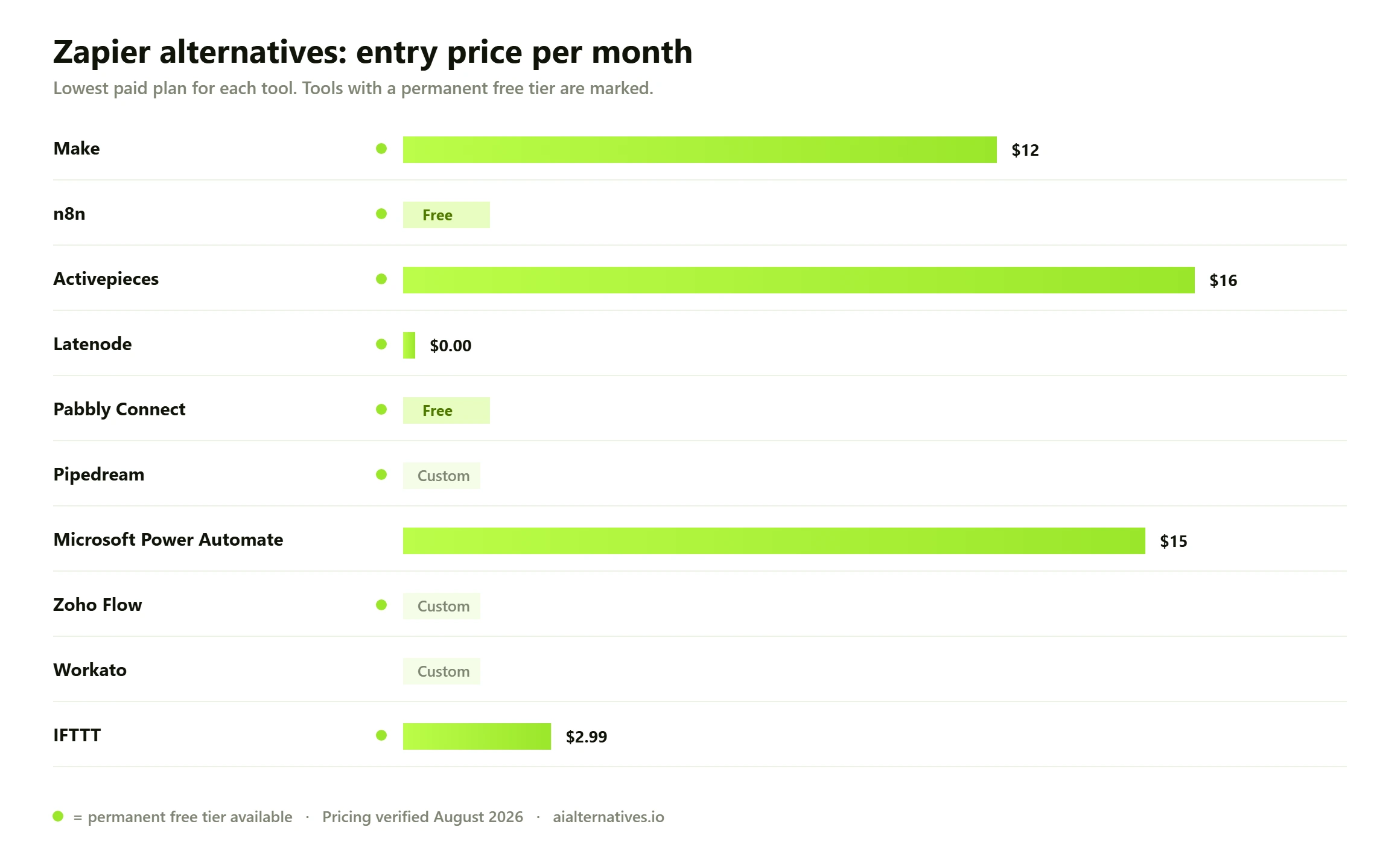
Core $12/month for 10,000 credits, Pro $21, Teams $38, Enterprise quoted. 15%+ off annual
Runner-up
n8n
One execution is one billable unit, however many steps are in it. That changes everything
Cloud Starter €20/month (2,500 executions), Pro €50 (10,000), Business €667 (40,000). Self-hosted free under the Sustainable Use License
Third pick
Activepieces
MIT licensed, per-run credits, and the only genuinely unrestricted self-hosted option here
Plus $16/month billed yearly (10,000 credits), Team $166/month yearly (50,000), overage $0.007 per credit, Embed from $36k/year
01
Make
The closest like-for-like swap, and the one most Zapier refugees land on
Make is the natural first stop. Comparable app catalogue, a visual builder that is genuinely more powerful than Zapier’s linear editor, and a much gentler price curve at the low end. Core is $12 a month for 10,000 credits, with annual billing knocking off 15% or more. The free tier gives 1,000 credits a month with no time limit.
The catch is the counting. Make bills per module action. Its pricing page puts it plainly: each module action in your scenario, like adding a Google Sheet row or fetching Gmail account data, counts as one credit. Reading, searching, creating, updating, deleting, transforming and iterating all count. Routers and error handlers do not. So a chunky six-module scenario burns roughly five credits every time it fires, which is the same multiplier problem you left Zapier over, at a lower unit price.
Free-tier limits are worth knowing before you build: two active scenarios, a 15-minute minimum interval between runs, a five-minute execution limit and a 5MB file cap. Above 10,000 credits the pricing page switches to a slider running to eight million, and those figures are not published as a list.
Buy Make if you want a drop-in replacement with better logic and a lower unit cost, and your workflows are short. If they are long, keep reading.
Free tier: Yes, 1,000 credits a month, two active scenarios, 15-minute minimum interval
Core $12/month for 10,000 credits, Pro $21, Teams $38, Enterprise quoted. 15%+ off annual
02
n8n
One execution is one billable unit, however many steps are in it. That changes everything
n8n is the answer to the multiplier problem. Its documentation defines an execution as a single run of your entire workflow, and states outright that it does not matter how many steps are in the workflow or how much data it processes. A two-step workflow and a forty-step workflow cost exactly the same to run.
Cloud pricing is listed in euros: Starter at EUR 20 a month for 2,500 executions, Pro at EUR 50 for 10,000, Business at EUR 667 for 40,000, Enterprise quoted. That looks unremarkable until you convert your own workload. Ten thousand runs of a six-step automation is 10,000 executions here and roughly 40,000 chargeable actions on Zapier.
Self-hosting is where it gets interesting, with a caveat. n8n is not open source and says so: because the Open Source Initiative holds that open source licences cannot limit use, n8n calls itself fair-code instead. The Sustainable Use License is generous about internal business use, permitting you to sync company data between your own systems, build nodes, run it on internal servers and charge clients for consulting on it. It prohibits white-labelling n8n and selling it, or hosting it and charging people for access.
The trade is that Community Edition leaves the governance layer behind. SSO, SAML and LDAP, Git-based version control, external secret stores, extended execution history and higher concurrency sit behind licence keys.
Free tier: Yes, Community Edition self-hosted with no run cap. Cloud has a trial, not a free tier
Cloud Starter €20/month (2,500 executions), Pro €50 (10,000), Business €667 (40,000). Self-hosted free under the Sustainable Use License
03
Activepieces
MIT licensed, per-run credits, and the only genuinely unrestricted self-hosted option here
Activepieces does the same per-run billing as n8n and goes further on licensing. The project is MIT licensed, and its pricing page describes the Community Edition as open source, free forever, with no cap on runs, users or flows. There is no fair-code asterisk to read.
On cloud, running a flow costs one credit however many steps are in it. AI steps cost between 2 and 20 depending on the model, or one credit if you bring your own API key. Free cloud is 100 credits a day. Plus is $16 a month billed yearly for 10,000 credits, Team $166 a month yearly for 50,000, and overage runs at $0.007 per extra credit, one of the very few published overage rates in this category.
Community Edition is missing a defined list rather than a vague one: Agents and Chat, Projects, API access, and the whole administrative layer of SSO, user roles, audit logs, secret managers, branding and Git Sync. Support is community forums. For a small business automating its own systems, none of that blocks you. For a regulated company that needs audit logs, it is the whole decision. The app catalogue is also smaller than Zapier’s, so check your two or three critical integrations exist first.
Free tier: Yes, twice over. Cloud free at 100 credits a day, and unrestricted self-hosted Community Edition
Plus $16/month billed yearly (10,000 credits), Team $166/month yearly (50,000), overage $0.007 per credit, Embed from $36k/year
04
Latenode
Bills for runtime in CPU seconds, so adding steps does not multiply the bill
Latenode charges for compute time rather than for steps or runs. Its pricing page states that you pay for runtime, runs multiplied by seconds, and that step or task count does not multiply the bill by itself. Adding nodes, branches and filters costs nothing unless they take longer to execute.
Free gives 10,000 CPU seconds a month, five active workflows and one parallel worker. Pay as you go has no base fee, keeps the first 10,000 CPU seconds free each month, then charges on a sliding scale: $0.00012 per second from 10,001 to 100,000, $0.00011 to 200,000, and down to $0.00005 above five million.
This suits a specific shape of work. Many short cheap runs, and runtime billing is very hard to beat. Headless browser jobs or long AI calls that sit there for thirty seconds each, and the maths flips to per-run billing. Work out which shape you have first. Watch the free tier’s three-minute execution limit and three days of run history, both of which lift on paid plans.
Free tier: Yes, 10,000 CPU seconds a month, five active workflows, one parallel worker
Pay as you go with no base fee. 10,000 CPU seconds free monthly, then from $0.00012 per CPU second, falling to $0.00005 above 5M
05
Pabbly Connect
Does not charge for the plumbing steps, and sells lifetime licences that genuinely are lifetime
Pabbly Connect is the value pick, and the reason is in its counting rules rather than its headline price. Only action steps consume tasks. Triggers are free, and so is the internal plumbing: filters, routers, text and number formatters, date and time formatters, iterators, schedulers, email parsers and JSON extractors all run without charge.
That matters more than it sounds. A large share of any real workflow is glue. On a platform that bills every module, you pay to reformat a phone number. Here you do not, so a workflow of the same shape often lands in a lower task bracket than anywhere else on this list that bills per step.
Pabbly also sells one-time lifetime plans alongside monthly subscriptions, sold by permanent monthly task allowance rather than by feature set. Two honest caveats: the interface is dated next to Make and n8n, and the app catalogue is narrower than Zapier’s. Pricing pages are also localised, so read yours from your own country before you budget.
Free tier: Yes, 100 tasks a month
Free 100 tasks. Paid subscription and one-time lifetime plans sold by monthly task allowance. Prices are shown in local currency by region
06
Pipedream
For teams who would rather write twelve lines of code than fight a visual builder
Pipedream is what you pick when the constraint is expressiveness, not price. Workflows are code-first: you drop into Node, Python, Go or Bash wherever the no-code steps run out, which is usually the point a visual builder starts generating spaghetti.
Billing is by credit, and the definition is unusually literal. Pipedream’s documentation defines a credit as 30 seconds of compute time at 256MB of memory, the default configuration, and notes that raising the memory allocation raises consumption proportionally. A run that finishes in two seconds and one that takes twenty-five both cost one credit, which is generous for integration work that is mostly waiting on APIs. Source executions from Pipedream’s public registry trigger workflows at no credit cost, even on the free plan.
Choose Pipedream if you have developers. It is not a tool you hand to an operations manager, and it does not pretend to be.
Free tier: Yes, a free plan with a daily credit allowance and limited active workflows
Credit-based, where one credit is 30 seconds of compute at 256MB. Plan prices are rendered client-side and were not readable from the page
07
Microsoft Power Automate
The right answer if your company already pays Microsoft for everything else
Power Automate is the only tool here that does not meter your runs at all on the standard plans. You buy seats and bots, and the automations run. Premium is $15 per user per month paid yearly, covering cloud flows plus attended desktop flows and process mining. Unattended automation is licensed separately at $150 per bot per month, and Hosted Process is $215 per bot per month including a Microsoft-managed virtual machine on Azure. A 30-day trial covers UI-based cloud flows and standard connectors.
The distinction that catches people is the connector split. The trial gives standard connectors only. Paid plans unlock standard, premium and custom, and premium is where most interesting non-Microsoft integrations live. If your workflow touches Salesforce or a SQL database, assume you need a paid seat.
It wins inside a Microsoft estate, where the hooks into SharePoint, Teams, Outlook, Dataverse and Excel plus data loss prevention policies make it the path of least resistance. It loses everywhere else, on learning curve and on the sheer work of building against non-Microsoft SaaS.
Free tier: 30-day trial with standard connectors. No permanent free tier on the paid plans
Premium $15 per user/month paid yearly. Process $150 per bot/month. Hosted Process $215 per bot/month
08
Zoho Flow
Cheap, competent, and obvious if you already live in the Zoho suite
Zoho Flow is a straightforward per-task tool with a free plan of 100 tasks a month across five flows. Its documentation defines a task exactly as Zapier does: a successful execution of an action in a flow, so a flow with one trigger and two actions running once equals two tasks. Triggers are free.
Standard starts at 5,000 tasks a month and Professional at 10,000, both with sliders running to five million, and annual billing saves over 15%. The free plan includes logic features some competitors gate: Decision, Delay, Set Variables and Send Mail all work without paying.
The case for it is ecosystem gravity. If you already run Zoho CRM, Books, Desk or Projects, Flow is the cheapest sane way to wire them together under one admin console. Our Mailchimp alternatives guide covers the marketing end of the same problem. One thing to check yourself: the pricing page did not render dollar figures alongside the task tiers when we read it, only the tier structure and the annual discount.
Free tier: Yes, 100 tasks a month across five flows, with logic steps included
Standard from 5,000 tasks/month, Professional from 10,000, tiers to 5M. Over 15% off annual. USD figures were not readable on the pricing page
09
Workato
Enterprise integration platform. Powerful, governed, and quote-only
Workato is where you end up when automation stops being an operations convenience and becomes infrastructure that finance and security both care about. It is built for governed, high-volume integration across enterprise systems, with recipe versioning, environment separation and access controls to match.
Pricing is not published. Its pricing page describes a model that is flexible, predictable and transparent, then routes you to a demo. No listed tiers, no per-recipe cost, no per-connection figure. Treat any number you see quoted for Workato elsewhere as unverified, because the vendor does not publish one.
If you are a ten-person business comparing Zapier plans, this is not your tool. If you are integrating an ERP with a CRM with a warehouse under audit requirements, it belongs on the shortlist. Budget for implementation as well as licence: platforms in this class arrive with a services engagement attached, and that usually costs more than the first year of software.
Free tier: No free plan. Demo and trial arranged through sales
Quote only. Workato does not publish list pricing
10
IFTTT
Not a business tool. Genuinely the best one for smart home and personal automation
IFTTT is here because a real slice of people searching for Zapier alternatives are not running a business process at all. They want their lights to react to sunset, their posts to land in a Google Sheet, or their car to text someone when it arrives.
Pricing is the simplest on this page. Free gives two applets. Pro is $2.99 a month, or $35.88 a year, for 20 applets. Pro+ is $8.99 a month, or $107.88 a year, for unlimited applets, with annual saving 40% against monthly. It bills per applet, not per run, which for consumer automation is exactly right: a trigger that fires two hundred times a day costs the same as one that fires twice.
Do not run a company on it. Multi-step logic, error handling, data transformation and observability are thin or absent, and there is no meaningful audit trail. For the job it is designed for, nothing else here is close on price or ease.
Free tier: Yes, two applets
Pro $2.99/month or $35.88/year (20 applets). Pro+ $8.99/month or $107.88/year (unlimited applets)
Zapier alternatives compared at a glance10 tools
#
Tool
Best for
Free tier
Price
01
Make
The closest like-for-like swap, and the one most Zapier refugees land on
Free tier
Core $12/month for 10,000 credits, Pro $21, Teams $38, Enterprise quoted. 15%+ off annual
02
n8n
One execution is one billable unit, however many steps are in it. That changes everything
Free tier
Cloud Starter €20/month (2,500 executions), Pro €50 (10,000), Business €667 (40,000). Self-hosted free under the Sustainable Use License
03
Activepieces
MIT licensed, per-run credits, and the only genuinely unrestricted self-hosted option here
Free tier
Plus $16/month billed yearly (10,000 credits), Team $166/month yearly (50,000), overage $0.007 per credit, Embed from $36k/year
04
Latenode
Bills for runtime in CPU seconds, so adding steps does not multiply the bill
Free tier
Pay as you go with no base fee. 10,000 CPU seconds free monthly, then from $0.00012 per CPU second, falling to $0.00005 above 5M
05
Pabbly Connect
Does not charge for the plumbing steps, and sells lifetime licences that genuinely are lifetime
Free tier
Free 100 tasks. Paid subscription and one-time lifetime plans sold by monthly task allowance. Prices are shown in local currency by region
06
Pipedream
For teams who would rather write twelve lines of code than fight a visual builder
Free tier
Credit-based, where one credit is 30 seconds of compute at 256MB. Plan prices are rendered client-side and were not readable from the page
07
Microsoft Power Automate
The right answer if your company already pays Microsoft for everything else
Trial only
Premium $15 per user/month paid yearly. Process $150 per bot/month. Hosted Process $215 per bot/month
08
Zoho Flow
Cheap, competent, and obvious if you already live in the Zoho suite
Free tier
Standard from 5,000 tasks/month, Professional from 10,000, tiers to 5M. Over 15% off annual. USD figures were not readable on the pricing page
09
Workato
Enterprise integration platform. Powerful, governed, and quote-only
Trial only
Quote only. Workato does not publish list pricing
10
IFTTT
Not a business tool. Genuinely the best one for smart home and personal automation
Free tier
Pro $2.99/month or $35.88/year (20 applets). Pro+ $8.99/month or $107.88/year (unlimited applets)
Billable units for the same workload, not headline plan prices. The unit is what compounds, which is why two platforms with near-identical sticker prices can produce invoices that differ by a factor of four.
Why your Zapier bill grew faster than your automation did
Zapier bills per task, and its help centre is precise about what that means. A task is any successful action that runs in Zapier. Only successful actions count.
Plenty does not count, and this is the part people get wrong in both directions. Triggers are free, including polling checks. Filter and Paths steps are free. So are Formatter, Delay, Looping, Digest, Storage and Zapier Manager steps, failed and halted actions, Tables and Forms. Zapier Agents draw on a separate activity quota entirely. Some things cost more than one task: Lead Router charges five per routed lead, Zapier MCP charges two per tool call, Code by Zapier can consume one or more, and AI by Zapier varies by model. Steps inside error handler paths count, and so does every step re-run during a full Zap replay.
So the multiplier is not your step count, it is your successful action count. A workflow with a trigger, a filter, a formatter and four real actions costs four tasks per run, not seven. Run it 10,000 times and you have used 40,000 tasks. On a platform that charges once per run, the same workload is 10,000 units. Same work, same result, a quarter of the meter. That is the entire argument for switching, and it has nothing to do with which tool has more integrations.
There is one more structural thing worth knowing. Zapier does not publish the price of the tier most businesses end up on. The Professional plan starts from $19.99 a month and Team from $69, and beyond that you pick a task tier from a slider: 750, 1.5K, 2K, 5K, 10K, 20K, 50K, 100K and upward to 2M. The prices attached to those tiers are not listed as static figures on the pricing page. You have to configure it to find out. Keep that in mind when a comparison page quotes you a confident number for Zapier at 100,000 tasks.
The same workload, priced on every billing model
Here is the comparison that decides your invoice. Take one workflow with six steps, four of them billable actions on a per-action platform, and run it 10,000 times a month. That is a modest real-world load, roughly 330 runs a day.
Platform
What one billable unit is
Units per run of a 6-step workflow
Units for 10,000 runs a month
Cheapest published plan that covers it
Zapier
One successful action step. Triggers, filters, paths and Formatter are free
4
40,000 tasks
Professional, from $19.99. The price at the 50K tier is set by a slider Zapier does not publish
Make
One module action. Routers and error handlers are free
About 5
About 50,000 credits
Above the 10,000-credit Core tier at $12. Higher tiers are slider-quoted
n8n Cloud
One workflow execution, whatever the step count
1
10,000 executions
Pro, EUR 50 a month, which includes exactly 10,000
n8n self-hosted
Nothing. Community Edition has no run cap
0
0
Your own server, under the Sustainable Use License
Activepieces Cloud
One flow run, whatever the step count. AI steps cost 2 to 20
1
10,000 credits
Plus, $16 a month billed yearly, which includes exactly 10,000
Activepieces self-hosted
Nothing. Community Edition has no cap on runs, users or flows
0
0
Your own server, MIT licensed
Pabbly Connect
One action step. Filters, routers, formatters and parsers are free
4
40,000 tasks
The Unlimited tier removes the task ceiling entirely
Latenode
One CPU second of actual runtime
Runtime, not steps
Depends on how long each run takes
Pay as you go. 10,000 CPU seconds free, then from $0.00012 per second
Pipedream
One credit is 30 seconds of compute at 256MB
1 if the run finishes inside 30 seconds
About 10,000 credits
Plan prices are rendered client-side and were not readable
Power Automate
Nothing per run. You buy seats and bots
Not metered
Not metered
Premium at $15 per user a month, paid yearly
What the table assumes, and what it does not
The unit counts assume a workflow of one trigger, one filter and four chargeable actions, which is roughly what a real notify-enrich-record-post automation looks like. Your own shape will differ, and that is the point: the exercise takes ten minutes with your actual Zap history and it is the single most useful thing you can do before switching. Every counting rule in the table is quoted from the vendor’s own documentation or pricing page. Where a vendor does not publish a figure, such as Zapier’s slider tiers or Workato’s list price, we say so rather than repeating a number from a comparison site.
Two things fall out of that immediately. Per-run billing is worth roughly four times per-action billing on a typical workflow, and the gap widens as workflows lengthen, so if your automations are five steps or more this is the largest single lever you have. And the free self-hosted options are not a rounding error: 10,000 runs a month on your own n8n or Activepieces instance costs whatever a small VPS costs. That is a different category of answer, which is why licensing deserves its own section.
Free, fair-code and open core are three different things
The phrase open source Zapier alternative gets used loosely, and the difference between the licences matters if you are betting a business process on it.
n8n is source-available, not open source, and is refreshingly direct about it. Its licence documentation explains that the Open Source Initiative holds that open source licences cannot include limitations on use, so n8n does not call itself open source and uses fair-code instead. The Sustainable Use License permits internal business use freely: syncing your CRM to your own database, building nodes and integrations, running it on internal servers, even charging clients for consulting on it. What it forbids is white-labelling n8n and selling it to your customers, or hosting it and charging people for access.
Activepieces is MIT licensed, which is a genuine OSI open source licence with none of those restrictions. Its pricing page describes the Community Edition as open source, free forever, with no cap on runs, users or flows.
But both are open core, and the paywalled parts are the parts an IT department cares about. Here is what each one actually withholds.
Tool
Licence
Self-host free?
What the free version leaves out
n8n
Sustainable Use License, described by n8n as fair-code, not OSI open source
Yes, Community Edition, no run cap
SSO, SAML and LDAP, Git version control, external secret stores, extended execution history, higher concurrency, SLA support
Activepieces
MIT
Yes, no cap on runs, users or flows
Agents and Chat, Projects, API access, SSO, SCIM, custom roles, audit logs, event streaming, private pieces, branding, Git Sync
Make
Proprietary
No
Free cloud tier only: 1,000 credits, two active scenarios, 15-minute minimum interval, five-minute execution limit
Zapier
Proprietary
No
Free tier only: 100 tasks a month and two-step Zaps
Latenode
Proprietary
No
Free tier only: 10,000 CPU seconds, five workflows, one parallel worker, three-minute execution limit, three-day history
Power Automate
Proprietary
No
Trial gives standard connectors only. Premium and custom connectors need a paid seat
One caution before you reach for the free column. Free software is not free operations. Self-hosting means you own uptime, backups, upgrades, credential storage and the pager at 3am when a workflow silently stops firing. For a business running a handful of internal automations, that is a fair trade for removing a four-figure annual bill. For a business whose revenue depends on those automations, price the hours honestly before you count the saving.
Migration: what carries across and what does not
There is no import tool that turns a Zap into a Make scenario or an n8n workflow. Every platform models triggers, data mapping and error handling differently, so a migration is a rebuild. What you can carry is the thinking: the trigger conditions, the field mappings, the edge cases you have already found in production.
Three things save real time. Export your Zap list and sort by task consumption, because a handful of Zaps almost always account for most of the meter and those are the only ones worth moving first. Reconnect authentication before you rebuild logic, since a missing OAuth scope or an unsupported app is the failure that kills a migration and you want it in the first hour. And run both platforms in parallel for one full billing cycle with the new one writing to a test destination, so you compare outputs rather than hope.
Budget a day per complex workflow and an hour per simple one. If you have thirty Zaps and three of them matter, this is a week of part-time work, not a quarter. If all thirty matter, reconsider whether the saving justifies it, or move only the expensive ones and leave the rest on Zapier’s free tier.
What users consistently report
These are aggregated impressions from public discussion, not measured findings. Across the community threads that rank for this query on Reddit’s automation and self-hosted forums, and the questions Google surfaces alongside them, the same themes repeat: surprise at how quickly multi-step Zaps consume a task allowance, satisfaction with n8n’s per-execution model from people who moved for cost reasons, and frustration with the maintenance burden that self-hosting brings once it is running in production. Treat all of it as signal about what to check, not as evidence about your own workload. We could not fetch the Reddit threads directly through our proxy, so we have not quoted anyone.
How to choose in ten minutes
Open your Zapier task history and answer four questions.
How many billable actions does your average workflow have? One or two, and per-action billing is fine, so Make is your cheapest sane move. Five or more, and you want per-run billing: n8n or Activepieces.
Do you have somewhere to run a server, and someone to look after it? Yes, and self-hosted Activepieces or n8n makes your bill approximately zero. No, and stay on cloud without guilt.
Does anyone need SSO, audit logs or Git-based version control? If yes, the open core free tiers are out, and you are comparing paid plans across the board rather than free versus paid.
Are your runs long or short? Short and numerous favours Latenode’s CPU-second model. Long-running AI or browser jobs favour per-run billing, where a thirty-second call and a one-second call cost the same.
That is the whole decision. Integration counts and interface screenshots are tie-breakers. If you are reviewing the wider stack at the same time, our alternatives library and head-to-head comparisons cover the tools these automations usually connect, and the Notion alternatives guide is a good companion if your workflows write into a knowledge base.
How we verified this
Plan names, prices, billing units and counting rules were read from each vendor’s own pricing page or documentation on 1 September 2026: zapier.com/pricing and Zapier’s help centre article on task usage, make.com/en/pricing, n8n.io/pricing and the n8n licence documentation, activepieces.com/pricing, latenode.com/pricing, pabbly.com/connect, pipedream.com documentation, Microsoft’s Power Automate pricing page, zoho.com/flow/pricing.html, workato.com/pricing and ifttt.com/plans. Where a figure is not published, we say so rather than estimating: Zapier’s per-tier prices, Make’s tiers above 10,000 credits, Workato’s list price, Zoho Flow’s USD figures and Pipedream’s plan prices all fall into that group. Search volume and difficulty figures come from Ahrefs. This page contains no first-hand benchmarks and no claim to have run these platforms ourselves.
FAQ
Questions people actually ask
What is the best free Zapier alternative?
It depends on whether you mean free cloud or free software. For free cloud, Activepieces gives you 100 credits a day and Make gives 1,000 credits a month, which is more generous than Zapier’s 100 tasks. For free software, self-hosted Activepieces Community Edition is the strongest answer: MIT licensed, with no cap on runs, users or flows. Self-hosted n8n is equally uncapped but sits under the Sustainable Use License rather than a true open source licence.
Is n8n better than Zapier?
For cost at volume, structurally yes. n8n bills one unit per workflow execution regardless of step count, so a six-step workflow costs the same as a two-step one. Zapier bills per successful action. On the same workload that is often a fourfold difference. For ease of setup and breadth of ready-made integrations, Zapier is still ahead, and a non-technical team will get a working automation faster on Zapier. Pick n8n when the bill hurts or when you want to self-host.
Is Pabbly better than Zapier?
On price mechanics, Pabbly Connect is more forgiving. It charges only for action steps and explicitly does not charge for triggers, filters, routers, formatters, iterators, schedulers, email parsers or JSON extractors, so the plumbing in your workflow is free. It also sells one-time lifetime plans, which nobody else here does. Zapier wins on app catalogue, polish and support. If your automations are heavy on formatting and light on exotic integrations, Pabbly will be cheaper.
Is there a genuinely open source Zapier alternative I can self-host?
Activepieces is MIT licensed, which is genuine OSI open source, and its Community Edition self-hosts with no cap on runs, users or flows. n8n is source-available under the Sustainable Use License and says openly that it does not call itself open source, because the Open Source Initiative holds that open source licences cannot restrict use. Both are open core: the enterprise governance features, SSO, audit logs, Git Sync and the rest, are paid in each case.
Is Power Automate a good alternative to Zapier?
If you already pay Microsoft, yes. Power Automate does not meter runs on the standard plans, so you buy Premium at $15 per user a month paid yearly and stop counting tasks. The catch is connectors: the trial gives standard connectors only, and premium connectors, which cover most non-Microsoft SaaS, need a paid plan. If your stack is not Microsoft-centred, the learning curve and licensing complexity are hard to justify against Make or n8n.
Is there a HIPAA-compliant Zapier alternative?
Self-hosting is the most reliable route, because compliance follows where the data sits. Running n8n or Activepieces on infrastructure you control means protected health information never passes through a third-party automation vendor at all. If you need a hosted platform instead, ask each vendor directly for a business associate agreement in writing and confirm it covers the specific plan you are buying. Do not rely on a compliance badge on a marketing page, and do not rely on this page: verify it with the vendor.
What is the cheapest Zapier alternative at high volume?
Self-hosted Activepieces or n8n, by a wide margin, because neither charges per run at all and your cost is server plus maintenance time. Among cloud options, per-run billing beats per-action billing as workflows lengthen, so n8n Cloud and Activepieces cloud scale better than Make or Zapier on multi-step automations. Latenode can be cheapest of all if your runs are short, since it bills CPU seconds and gives 10,000 free every month.
Are lifetime deals on Zapier alternatives worth it?
Sometimes, with two caveats. Pabbly Connect’s lifetime plans are sold by permanent monthly task allowance, so the value depends on whether that allowance still fits you in three years. And a lifetime licence is only as long-lived as the vendor, which is a real risk with smaller automation companies. Buy one when the payback against your current subscription is under about eighteen months and the task ceiling has headroom.
Will my Zaps transfer to another platform automatically?
No. There is no converter that turns a Zap into a Make scenario or an n8n workflow, because each platform models triggers, mapping and error handling differently. Migration is a rebuild. Move the handful of Zaps that consume most of your tasks first, reconnect authentication before rebuilding logic, and run both platforms in parallel for one billing cycle so you can compare outputs rather than hope.
What are the top automation tools if I am not technical?
Make is the friendliest genuine Zapier replacement, with a visual builder and a large app catalogue. Zoho Flow is simpler still if your tools are Zoho ones, and includes logic steps free. IFTTT is easiest of all but built for personal and smart-home automation, not business process. Avoid n8n, self-hosted Activepieces and Pipedream unless someone on the team is comfortable with servers or code.
Next step
Work out your billing unit before you pick a tool
Ten minutes with your task history tells you more than any comparison table. Then look at what the automations connect to, because the rest of your stack usually has the same problem hiding in it.