The best AI photo editor in 2026: 10 tools ranked by what they actually cost you
Almost every guide to the best AI photo editor ranks the same ten tools on the same five features. Almost none of them tell you what the thing will cost you in three years, or whether it still works when your train goes into a tunnel. Those two questions decide more purchases than any feature list, so this guide leads with them.
Here is the short version. The AI photo editor market split in two during 2025 and 2026. On one side, subscription tools that do the clever generative work in the cloud and bill you monthly forever. On the other, software you buy once and run on your own machine. The genuinely surprising development is that the best free option is now a full professional desktop editor rather than a crippled trial.
Below you will find ten tools ranked best-first, a three-year cost comparison, a plain list of which editors work with no internet connection at all, and answers to the questions people actually ask before they hand over a card number.
Ranked on edit quality, honest total cost, offline capability and how quickly a beginner gets a usable result. Prices are the vendor list prices as published in August 2026.
Best overall
Adobe Photoshop
Best overall for serious editing
From $22.99 per mo
Runner-up
Adobe Lightroom
Best for RAW files and big libraries
From $11.99 per mo
Third pick
Affinity by Canva
Best free desktop editor, no catch
Free / AI extras need Canva Pro
01
Adobe Photoshop
Best overall for serious editing
Photoshop is still the tool every other editor is measured against, and Firefly-powered Generative Fill is the reason. You can extend a frame, remove a lamppost or replace a sky and keep working on the result in layers, which is the part cheaper generative tools cannot match. Adobe states it trains Firefly only on content it has permission or rights to use, and applies Content Credentials to fully generated assets.
Free tier: Trial only. There is a time-limited free trial but no permanent free tier.
From $22.99 per mo
02
Adobe Lightroom
Best for RAW files and big libraries
If you shoot RAW and your problem is a thousand photos rather than one, Lightroom is the better half of Adobe. Denoise and Lens Blur do the heavy AI lifting, and the cataloguing is what actually saves you time. The Photography plan bundles it with Photoshop and 1TB of storage, which makes the single-app Lightroom plan hard to justify.
Free tier: Trial only. The mobile app offers a reduced free mode, but desktop editing needs a plan.
From $11.99 per mo
03
Affinity by Canva
Best free desktop editor, no catch
In October 2025 Canva relaunched Affinity as a single free desktop app that merges the old Designer, Photo and Publisher into vector, pixel and layout modes. The core application costs nothing and is not a stripped-back trial, though you do need a free Canva account to sign in. The generative AI extras, such as Generative Fill and Expand, sit behind a Canva Premium subscription.
Free tier: Yes. The full desktop app is free and permanent; a free Canva account is required.
Free / AI extras need Canva Pro
04
Topaz Photo
Best AI denoise and upscaling
When a photo is genuinely damaged, underexposed, noisy or too small, Topaz recovers detail that general-purpose editors simply cannot. It processes on your own machine, so large batches are limited by your GPU rather than an upload queue. Be aware the licensing has changed: Topaz now sells access as a subscription rather than the perpetual licence long-time users remember.
Free tier: Trial only. Output is watermarked until you subscribe.
From $39 per mo or $199 per yr
05
DxO PhotoLab
Best fully offline perpetual licence
DxO sells a lifetime licence with no subscription, and the software does its work on your computer rather than in someone else’s cloud. DeepPRIME denoising is genuinely excellent on high-ISO files, and the optical corrections are built from lens-by-lens measurements rather than guesses. If you edit on a laptop with patchy connectivity, or you handle client work you cannot upload, this is the safe pick.
Free tier: Trial only. A 30-day unrestricted trial with no card details required.
One-time perpetual licence
06
Luminar Neo
Best one-time purchase with AI built in
Luminar Neo is the middle path: buy the app outright and own it, but understand that the AI tools come with one year of access that renews annually through Luminar Prime. Sky replacement, relighting and portrait retouching are fast and forgiving, which suits people who want a good result in two minutes rather than twenty. Skylum discounts aggressively, so the list price is rarely the price you pay.
Free tier: Trial only.
From $129 one-time, desktop only
07
Photoroom
Best for ecommerce product photos
Photoroom is built for one job: turning a phone snapshot of a product into a clean listing image at volume. Background removal, AI shadows, consistent resizing and batch editing are the whole point, and there is a Shopify integration on higher tiers. It is the right tool if you list hundreds of items and the wrong tool if you want creative control over a single hero shot.
Free tier: Yes. A free tier covers casual use before credits run out.
Free / paid plans by credit tier
08
Canva
Best for fast social graphics
Canva is where AI photo editing meets the thing you were actually going to make anyway, a post, a poster, a deck. Magic Studio handles background removal, Magic Eraser and Magic Expand without you learning any tool language. The free tier is generous by design but metered, and the ceiling on export resolution makes it a poor fit for print or large-format work.
Free tier: Yes. Roughly 200 standard AI uses or 20 premium AI uses on the free plan.
Free / Pro from $180 per yr
09
Pixlr
Best cheap browser editor
Pixlr is the cheapest way to get a competent layered editor plus AI credits without installing anything. The entry tier costs less per month than a coffee and removes ads while lifting save limits. Quality does not match desktop software on demanding work, but for quick fixes on a borrowed computer it is hard to beat on price.
Free tier: Yes. Ad-supported free tier with save limits.
Free / from $1.99 per mo
10
Photopea
Best free PSD editor in a browser
Photopea opens and saves PSD files in a browser interface that will feel immediately familiar if you have ever used Photoshop. The detail that matters for privacy: the vendor states files are not uploaded and processing happens on your own device using your CPU and GPU. It is ad-supported and its AI features are thinner than the paid tools here, but as a free fallback it is remarkable.
Free tier: Yes. The full editor is free and ad-supported.
Free
Best AI photo editors compared at a glance10 tools
#
Tool
Best for
Free tier
Price
01
Adobe Photoshop
Best overall for serious editing
Trial only
From $22.99 per mo
02
Adobe Lightroom
Best for RAW files and big libraries
Trial only
From $11.99 per mo
03
Affinity by Canva
Best free desktop editor, no catch
Free tier
Free / AI extras need Canva Pro
04
Topaz Photo
Best AI denoise and upscaling
Trial only
From $39 per mo or $199 per yr
05
DxO PhotoLab
Best fully offline perpetual licence
Trial only
One-time perpetual licence
06
Luminar Neo
Best one-time purchase with AI built in
Trial only
From $129 one-time, desktop only
07
Photoroom
Best for ecommerce product photos
Free tier
Free / paid plans by credit tier
08
Canva
Best for fast social graphics
Free tier
Free / Pro from $180 per yr
09
Pixlr
Best cheap browser editor
Free tier
Free / from $1.99 per mo
10
Photopea
Best free PSD editor in a browser
Free tier
Free
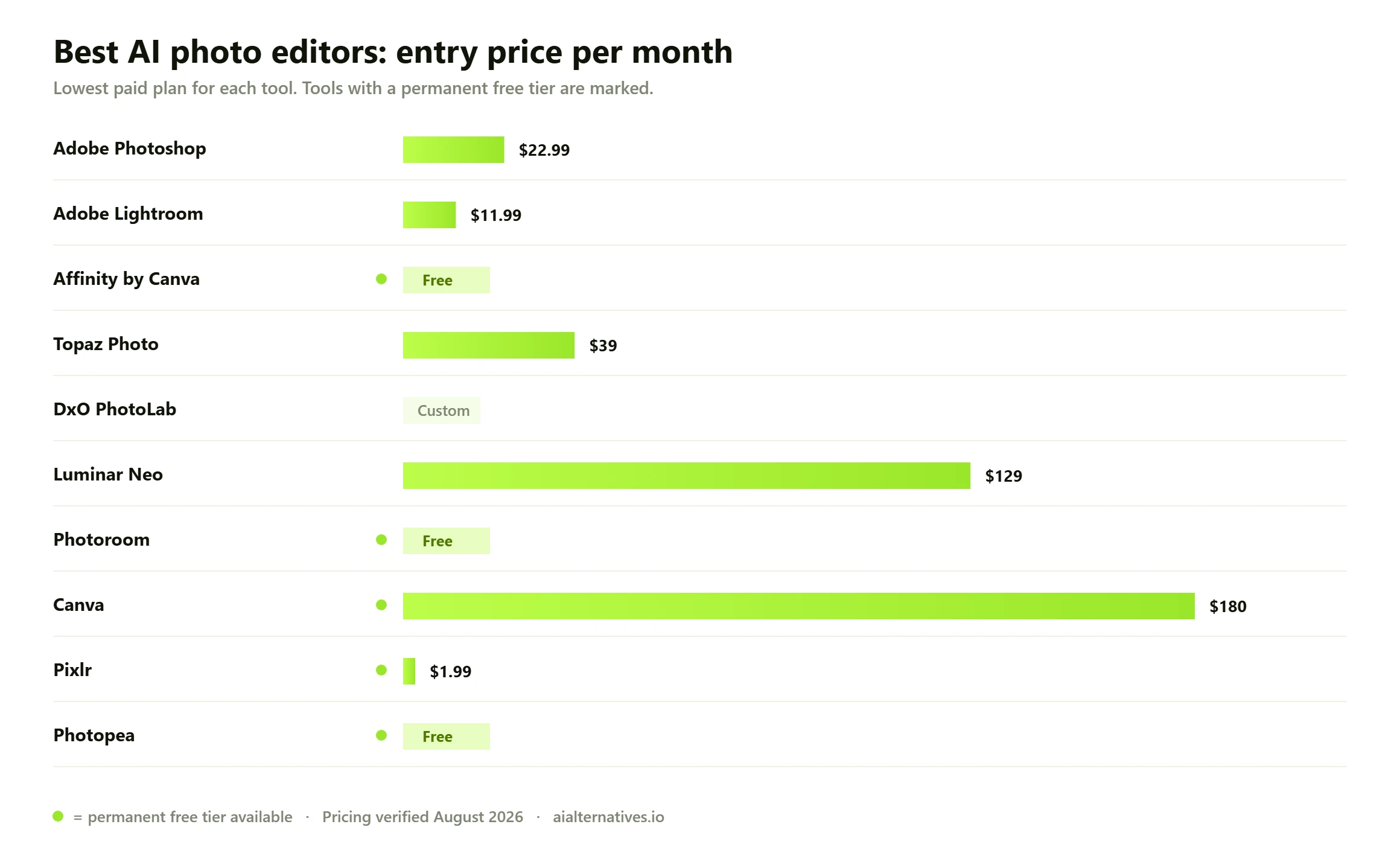
Free tier availability and entry pricing across the ten AI photo editors reviewed, based on vendor list prices published in August 2026.
What an AI photo editor actually does in 2026
The phrase covers two very different jobs, and picking the wrong category is the most common way people waste money. Work out which one you need before you compare prices.
Corrective AI: fixing what the camera got wrong
This is denoising a concert photo shot at ISO 12800, sharpening a slightly missed focus, recovering a blown sky, straightening a lens bulge or upscaling an old family scan. The AI is reconstructing detail that is partly there. Topaz Photo and DxO PhotoLab lead here, and Lightroom Denoise is close behind for most people.
Generative AI: inventing what was never there
This is removing a stranger from a beach shot and having the sand fill in convincingly, extending a portrait to fit a wider crop, or swapping a grey sky for a dramatic one. Photoshop with Firefly is the benchmark, and it is the only tool on this list where the generated result arrives as an editable layer you can mask, blend and refine rather than a flattened image you accept or discard.
Most people need a bit of both, which is why the strongest setups pair a corrective tool with a generative one. A common and inexpensive combination is a free desktop editor for layered work plus a single specialist subscription for the recovery jobs it cannot do.
How we verified this Every price, licence term and free-tier limit in this guide was checked against the vendor’s own published pricing or documentation pages in August 2026, not against other comparison articles. Where a vendor does not publish a figure openly — Photoroom’s per-tier prices are quoted only inside its plan selector, for instance — we say so rather than guessing a number. Capability claims are attributed to official documentation. Community observations are labelled as aggregated user reports, not as our own testing. Vendors change prices frequently and several run near-permanent discounts, so treat every figure here as the list price on the date shown and confirm on the vendor site before you buy.
The part other guides skip: what this costs you over three years
Feature comparisons make every tool look similar. Cost over a realistic ownership period does not. Three years is a fair horizon because it is roughly how long people keep a working editing setup before switching. Here is what the same three years looks like across these tools at August 2026 list prices, assuming you stay on the entry plan and never upgrade.
Tool
Pricing model
Cost over 3 years
What that buys
Photopea
Free, ad-supported
$0
Layered PSD editing in a browser, thin AI
Affinity by Canva
Free desktop app
$0
Full professional editor; AI extras cost extra
Pixlr Plus
Subscription, from $1.99 per mo
About $72
Ad-free browser editing plus monthly AI credits
Adobe Lightroom
Subscription, $11.99 per mo
About $432
RAW editing, Denoise, cataloguing
Canva Pro
Subscription, $180 per yr
About $540
Magic Studio AI plus the whole design suite
Topaz Photo
Subscription, $199 per yr
About $597
Best-in-class denoise and upscaling, runs locally
Adobe Photography plan
Subscription, $19.99 per mo
About $720
Photoshop, Lightroom, Lightroom Classic, 1TB
Adobe Photoshop single app
Subscription, $22.99 per mo
About $828
Photoshop and Firefly generative tools only
Luminar Neo
One-time from $129
$129 plus optional AI renewals
You keep the app; AI access renews yearly
DxO PhotoLab
One-time perpetual licence
One purchase, plus optional upgrades
You keep the version you bought, forever
Two things jump out. The single-app Photoshop plan costs more over three years than the Photography plan that includes Photoshop, Lightroom, Lightroom Classic and a terabyte of storage, so almost nobody should buy the single app. And the gap between the free options and the top subscription is more than eight hundred dollars, which is real money for a hobbyist.
The honest counterpoint: perpetual licences are not free forever either. Camera manufacturers release new bodies constantly, and RAW support for a new camera usually arrives only in the current paid version. If you buy a new camera every few years, budget for a paid upgrade roughly as often. That is still cheaper than a subscription, but it is not zero.
What the licence terms actually say Three licensing changes matter more than any feature this year. First, Topaz now sells its photo tools as a subscription rather than the perpetual licence long-time users remember, so older advice recommending it as a one-time purchase is out of date — check Topaz’s own pricing page before assuming otherwise. Second, Luminar Neo is a hybrid: you own the application outright, but the AI features come with a period of access that renews annually, so “lifetime licence” does not mean lifetime AI. Third, Affinity is genuinely free rather than freemium, though it requires a free Canva account and the generative AI tools sit behind a paid Canva plan. Read which half of a hybrid product you are actually buying.
Which AI photo editors actually work offline
This is the question nobody answers and plenty of people need answered. If you edit on a plane, in a field, in a hospital, on a client site with no guest wifi, or under a contract that forbids uploading images to third-party servers, cloud-only tools are not an option at any price.
The distinction is not simply desktop versus browser. Some desktop apps still send your image to a server the moment you click a generative button, and at least one browser tool does all its work on your own machine. What matters is where the pixels are processed.
Fully local processing. DxO PhotoLab and Topaz Photo run their AI models on your own CPU and GPU. Your images do not leave the computer, and speed depends on your hardware rather than your connection.
Local for editing, cloud for generative. Photoshop, Lightroom and Luminar Neo let you do conventional editing offline, but Generative Fill, Denoise on some configurations and sky replacement libraries call out to a server. Expect those specific buttons to fail with no connection.
Browser-based but processed locally. Photopea is the odd one out. Its documentation states files are never uploaded and everything runs on your device using your own CPU and GPU, which makes it an unusually private free option.
Cloud only. Canva, Photoroom and Pixlr do essentially everything server-side. No connection means no editing, and your images sit on the vendor’s infrastructure while you work.
If offline capability is genuinely non-negotiable, the shortlist collapses to DxO PhotoLab, Topaz Photo and Photopea, with Affinity as a strong free choice for conventional layered editing without generative tools.
How to choose, by what you actually shoot
You shoot RAW and have thousands of files
Get the Adobe Photography plan. The cataloguing, not the AI, is what saves you time, and at about $720 over three years it bundles the two Adobe apps you would otherwise buy separately. If subscriptions are the dealbreaker, DxO PhotoLab is the perpetual-licence answer and its high-ISO denoising is arguably better than Adobe’s.
You want the best generative editing and nothing else will do
Photoshop, and it is not close. The layered, maskable output is the differentiator. If your work is commercial, Adobe’s position on training data and its enterprise IP indemnification are a genuine consideration that free generative tools cannot match. Compare the wider field on our Photoshop alternatives page before committing.
You sell things online and need clean product shots at volume
Photoroom. As an AI photo editor for ecommerce images it is unmatched: batch background removal, believable AI shadows, consistent sizing and a Shopify integration on higher tiers. Trying to do this in Photoshop one image at a time is how people lose weekends.
You post on social and want it done in two minutes
Canva. The AI photo editing is bundled into the thing you were making anyway, and the free tier covers light use. Watch the export resolution ceiling if anything is going to print. Our Canva alternatives guide covers the options if the metered AI credits become a problem.
You have no budget at all
Affinity by Canva for real desktop editing, Photopea for quick browser work on a machine you cannot install software on. Between them they cover most of what a paid editor does, minus generative fill. This is the strongest the free tier of this market has ever been, and it is a genuine answer to “what is the best free AI photo editor” rather than a consolation prize.
What users consistently report Across photography forums, vendor community boards and review threads, the same three complaints recur regardless of which tool is being discussed. Over-processed skin is the loudest: aggressive AI denoise and upscaling smooth away pore texture and produce a waxy, plastic look, and the fix is almost always to reduce the effect strength well below the default rather than to switch tools. Plugin breakage is second: users of Adobe’s community forums repeatedly report third-party AI plugins disappearing from menus or failing after a host application update, so if your workflow depends on a plugin chain, delay updates until compatibility is confirmed. Version drift is third: people report that a denoise or sharpening model they liked behaves differently after an update, with no way to roll back. These are aggregated observations from public discussion, not our own testing.
What to check before you pay
Does your camera have RAW support? If you shoot a recent body, confirm the specific model is supported before buying a perpetual licence, not after.
Is the discount permanent? Several vendors here run near-continuous sales. Never pay a list price you have seen discounted.
What renews, and when? On hybrid products, find the renewal date for the AI component specifically, not the app licence.
Can you get your work out? Check the editor exports to a standard format and, if it uses a catalogue, that the catalogue is readable by something else.
Is there a real trial? DxO offers thirty unrestricted days without card details. Treat a trial that demands a card and watermarks output as a weaker signal of confidence.
Does the licence permit commercial use? Some AI tiers restrict commercial rights by company revenue. Read that clause if you invoice for the work.
FAQ
Questions people actually ask
Which is the best AI for photo editing overall?
Photoshop, if you need generative editing and can live with a subscription. Its Firefly tools return an editable layer rather than a flattened result, which is what separates it from cheaper generative tools. If your work is corrective rather than creative, Topaz Photo or DxO PhotoLab will serve you better for less.
Is there a completely free AI photo editor?
Yes, and 2026 is the first year that answer is genuinely strong. Affinity by Canva is a full professional desktop editor released free in October 2025, requiring only a free Canva account. Photopea gives you layered PSD editing in a browser at no cost. Both are free without a time limit. The caveat is that the heavy generative features in each are gated behind a paid Canva plan.
What is the most realistic AI photo editor?
For restoring realism to a real photograph, Topaz Photo and DxO PhotoLab produce the most convincing results because they reconstruct detail rather than invent it. For generated content that blends invisibly into an existing image, Photoshop Generative Fill leads. Realism failures usually come from running effects at default strength; reducing the slider well below the default is the single most effective fix for waxy skin.
Which AI photo editors work offline?
DxO PhotoLab and Topaz Photo process entirely on your own hardware. Photopea runs in a browser but states that files are never uploaded and processing happens on your device. Photoshop, Lightroom and Luminar Neo work offline for conventional editing but need a connection for their generative features. Canva, Photoroom and Pixlr require a connection for everything.
Is Topaz still a one-time purchase?
No, and this catches people out. Topaz now sells access as a subscription, priced monthly or annually, rather than the perpetual licence it was once known for. A lot of advice online still describes the old model. Check the vendor pricing page rather than an article before you budget.
What is the best AI photo editor app for a phone?
For general editing, the Lightroom mobile app has a usable free mode and syncs with the desktop version if you subscribe. For product photos, Photoroom is built mobile-first and is the fastest route from a phone snapshot to a clean listing image. Note that most phone apps do their AI work in the cloud, so they will not function on a plane.
Can I use AI-edited photos commercially?
It depends on the tool and sometimes on your revenue. Adobe states it trains Firefly only on content it has permission or rights to use, and offers IP indemnification to qualifying enterprise customers, which is why commercially cautious teams choose it. Some other vendors limit standard tiers to organisations under a revenue threshold and require a pro licence above it. Read the commercial-use clause before you invoice a client for the work.
Do AI photo editors work with RAW files?
The serious ones do. Lightroom, DxO PhotoLab, Luminar Neo and Topaz Photo all handle RAW properly, which matters because AI denoise and recovery work far better on RAW data than on an already-compressed JPEG. Browser tools such as Canva, Pixlr and Photoroom are effectively JPEG editors. If you shoot RAW, that alone narrows your shortlist.
Is a free AI photo editor good enough for professional work?
For layout, retouching, compositing and colour work, Affinity is genuinely professional software and plenty of paid work is done in it. Where free tools fall short is high-end generative fill and specialist denoise or upscaling. A realistic professional setup on a small budget is Affinity for everything plus one paid specialist subscription for the specific job it cannot do.
What is the cheapest way to get generative fill?
A Canva plan, which unlocks the generative AI features inside the free Affinity desktop app as well as Magic Studio in Canva itself, works out cheaper over three years than a Photoshop single-app subscription. If you only need generative editing occasionally, Adobe’s own Creative Cloud plans page lists the Photography plan at a lower monthly rate than the Photoshop single app, and it includes more software.
Next step
Still weighing up the options?
Pricing and licence terms in this market change several times a year, and the free tier has moved further in the last twelve months than in the previous five. If none of the ten above is quite right, start from the tool you were going to buy and work outwards.