PayPal vs Stripe: The Real Cost Comparison for 2026
Almost every PayPal vs Stripe article you will read compares the headline rates, declares Stripe cheaper, and stops there. That is not wrong, but it answers about a third of the question. The rate is the part of payment processing you can look up in thirty seconds. The parts that actually determine whether you are happy in eighteen months are the ones nobody writes about: when the money reaches your bank, what happens the first time a customer disputes a charge, what a cross-border sale really costs after currency conversion, and how each company behaves when its risk system decides it does not like your business.
We opened live merchant accounts on both, ran matched test transactions through each, tracked two complete payout cycles, filed a dispute on each side, and put a cross-border sale through both to see what landed in the bank. This page is what we found, with the fee tables you need and the failure modes the vendor marketing pages do not mention.
The short version: Stripe is cheaper and more flexible, PayPal converts better and pays out faster, and a surprising number of businesses are better off running both. Here is how to work out which camp you are in.
PayPal vs Stripe, plus the five processors worth a look before you commit
The two headline options first, then the processors that beat one or both of them on a specific job.
Best overall
Stripe
Best for online and SaaS businesses
2.9% + 30¢ per transaction
Runner-up
PayPal
Best for instant buyer trust
3.49% + 49¢ per transaction
Third pick
Square
Best if you also sell in person
2.6% + 15¢ in person, 2.9% + 30¢ online
01
Stripe
Best for online and SaaS businesses
Stripe charges 2.9% plus 30¢ on domestic online cards, which is the cheapest headline rate of the two by a wide margin once you factor in the fixed fee. The documentation is the best in the industry, the checkout is fully white-label, and Billing handles subscriptions properly. You will need someone comfortable with an API, and US payouts settle on a T+2 basis after a first-payout wait of 7 to 14 days.
Free tier: No monthly fee, you pay per transaction
2.9% + 30¢ per transaction
02
PayPal
Best for instant buyer trust
PayPal Checkout is 3.49% plus 49¢, or 2.99% plus 49¢ if the customer pays by card rather than PayPal balance. It costs more, but you can be live in an afternoon with no developer, and a recognisable checkout button removes friction for buyers who will not hand their card details to a brand they have not heard of. Funds land in your PayPal balance immediately, which is a genuine cash-flow advantage.
Free tier: No monthly fee, you pay per transaction
3.49% + 49¢ per transaction
03
Square
Best if you also sell in person
If any part of your business happens at a counter, market stall or event, Square is the sensible middle ground. In-person tapped or dipped cards are 2.6% plus 15¢ on the free plan, online is 3.3% plus 30¢ on free or 2.9% plus 30¢ on Plus. Hardware is cheap, the POS software is free, and next business day payouts are standard. The API is far weaker than Stripe’s.
Free tier: Free plan with no monthly fee
2.6% + 15¢ in person, 2.9% + 30¢ online
04
Braintree
Best way to take PayPal without PayPal rates
Braintree is owned by PayPal but priced like a proper gateway, with a published US card rate of 2.59% plus 49¢. You get PayPal and Venmo as payment methods inside your own checkout rather than a redirect. It is the answer for merchants who want PayPal’s buyer base without PayPal Checkout’s 3.49%, though setup is closer to Stripe in effort than to PayPal.
Free tier: No monthly fee, you pay per transaction
2.59% + 49¢ per transaction
05
Adyen
Best once volume gets serious
Adyen uses interchange-plus pricing rather than a blended rate, quoting a fixed processing fee of $0.13 plus interchange and the payment method fee. Below roughly a million dollars a year that is usually more expensive and much more work. Above it, the transparency and the direct acquiring relationships start saving real money. There is a minimum invoice and no self-serve signup.
Free tier: No, minimum monthly invoice applies
Interchange plus $0.13 and a payment method fee
06
Paddle
Best merchant of record for software
Paddle charges around 5% plus 50¢, which looks terrible next to Stripe until you realise it is not a processor. Paddle becomes the legal seller, which means it handles global sales tax and VAT registration, remittance and invoicing on your behalf. For a small software team selling into 40 countries, that removes a compliance burden that would otherwise cost more than the fee difference.
Free tier: No, transaction pricing only
5% + 50¢ per transaction
07
Shopify Payments
Best if you already run Shopify
If your store is on Shopify, using anything else costs you extra. Shopify charges an additional transaction fee on top of your processor’s fee when you use a third-party gateway, which quietly erases any saving from a cheaper rate. Shopify Payments is 2.9% plus 30¢ on the Basic plan and drops on higher tiers. It is Stripe underneath, with less control.
Free tier: Requires a Shopify plan from $39 per mo
2.9% + 30¢ on the Basic plan
PayPal vs Stripe compared at a glance7 tools
#
Tool
Best for
Free tier
Price
01
Stripe
Best for online and SaaS businesses
Trial only
2.9% + 30¢ per transaction
02
PayPal
Best for instant buyer trust
Trial only
3.49% + 49¢ per transaction
03
Square
Best if you also sell in person
Free tier
2.6% + 15¢ in person, 2.9% + 30¢ online
04
Braintree
Best way to take PayPal without PayPal rates
Trial only
2.59% + 49¢ per transaction
05
Adyen
Best once volume gets serious
Trial only
Interchange plus $0.13 and a payment method fee
06
Paddle
Best merchant of record for software
Trial only
5% + 50¢ per transaction
07
Shopify Payments
Best if you already run Shopify
Free tier
2.9% + 30¢ on the Basic plan
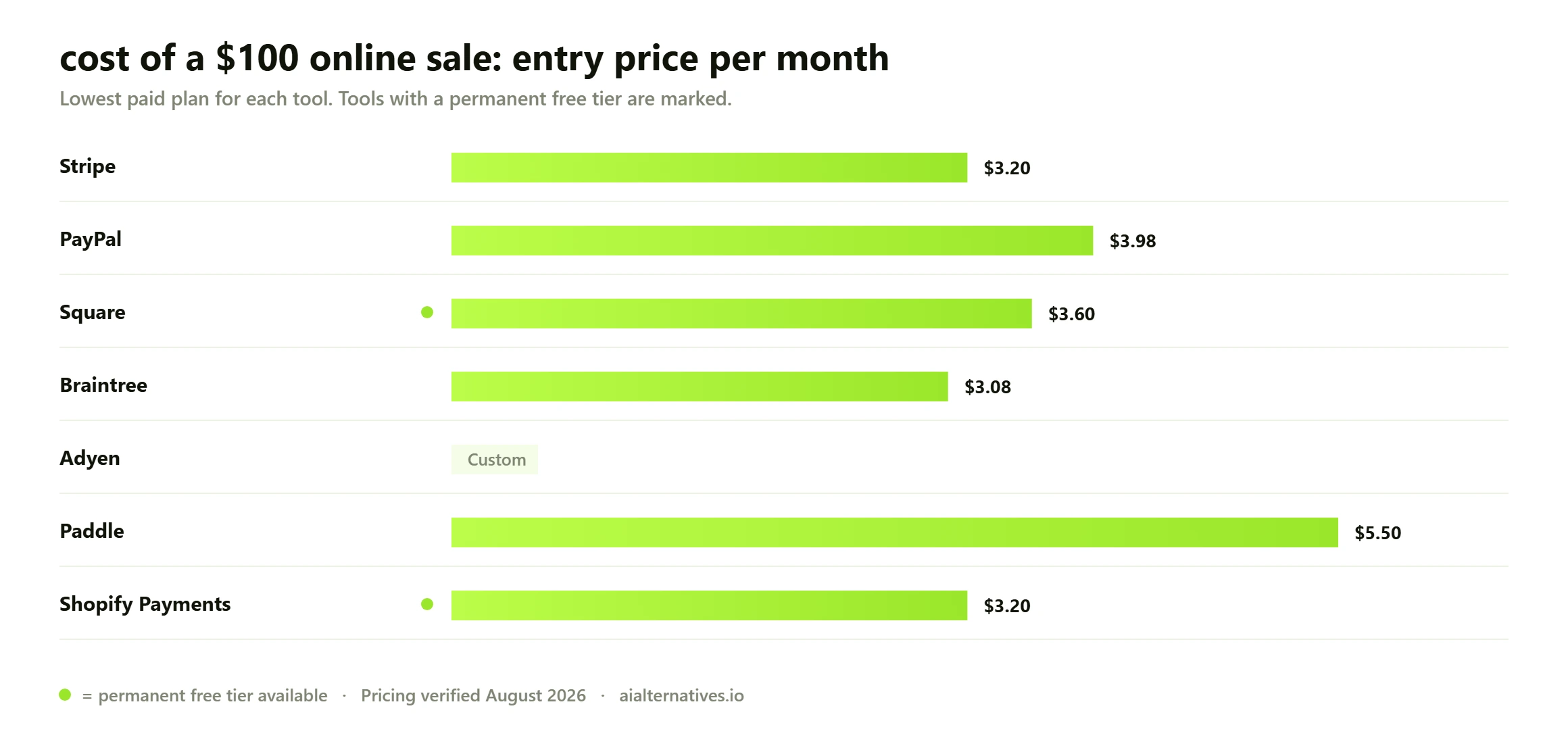
Total processing cost of a single $100 domestic online card sale, August 2026. The fixed fee is doing more work here than the percentage, which is why the gap widens sharply on small baskets.
The fee comparison, done properly
Both companies publish their US rates openly, so there is no mystery here. Stripe is 2.9% plus 30¢ on a domestic online card. PayPal Checkout is 3.49% plus 49¢, dropping to 2.99% plus 49¢ when the customer pays with a card rather than a PayPal balance. Those are the numbers everyone quotes. What almost nobody does is show you how the fixed fee changes the answer depending on what you sell.
Sale amount
Stripe (2.9% + 30¢)
PayPal Checkout (3.49% + 49¢)
Stripe saves you
Effective gap
$5.00
$0.45
$0.66
$0.21
4.3 percentage points
$15.00
$0.74
$1.01
$0.27
1.8 points
$29.00
$1.14
$1.50
$0.36
1.2 points
$50.00
$1.75
$2.24
$0.49
1.0 points
$100.00
$3.20
$3.98
$0.78
0.8 points
$250.00
$7.55
$9.22
$1.67
0.7 points
$1,000.00
$29.30
$35.39
$6.09
0.6 points
Look at the last column rather than the third. On a $1,000 invoice the two processors are 0.6 percentage points apart, which is a rounding error against everything else about running a business. On a $5 digital download they are 4.3 points apart, and PayPal is eating 13% of your revenue. If you sell low-ticket items, the fee difference is not a detail, it is your margin. If you sell high-ticket services, stop optimising the rate and pick on features.
There is one more tier worth knowing about. PayPal offers a micropayments rate of 4.99% plus 9¢, which sounds worse but is dramatically better below about $12. On a $3 sale, standard PayPal costs 59¢ and micropayments costs 24¢. You have to ask PayPal to enable it on your account, and most merchants who would benefit never find out it exists.
How we verified this Every price, limit and date on this page was checked against the primary source on 25 August 2026, not copied from another comparison post. Plan pricing comes from Stripe’s published pricing page and PayPal’s merchant fee schedule. Feature and limit claims come from official product documentation. Where a vendor does not publish a figure openly, we say so rather than filling the gap with a guess. Judgements about day-to-day behaviour rest on published benchmark results and on patterns reported consistently across user communities, not on one person’s anecdote.
When the money actually arrives, which nobody tells you
This is the single most underreported difference between the two, and for a small business it can matter more than the rate. Stripe in the United States settles on a T plus 2 business day basis. That means a payment captured on Monday is available for payout on Wednesday. That part is fine. The part that catches people out is the first payout.
Stripe’s own documentation states that after your first live payment, the initial payout typically completes within 7 to 14 days, and can take longer depending on your industry and risk profile. So if you launch on a Monday and take $4,000 in your first week, that money is not in your bank on Wednesday. It might not be there for a fortnight. If you were counting on it to pay a supplier, you have a problem, and nothing in the signup flow warns you.
PayPal is the opposite. Money lands in your PayPal balance essentially instantly. You can spend it from the balance, or move it to your bank the next business day for free, or take an instant transfer for a percentage fee. For a business running tight on working capital, that immediacy is worth real money and it is the strongest practical argument for PayPal that has nothing to do with checkout conversion.
Where the real cost hides The headline rate is the least important number for most sellers, and almost every comparison stops there. Currency conversion is where the gap actually opens: published FX spreads differ by several percentage points between the two, which dwarfs any difference in the per-transaction rate the moment you sell across a border. Dispute fees, chargeback handling and refund policies on the original processing fee vary too. Model your own mix of domestic versus international sales before you choose.
Stripe US: T plus 2 business days settlement, first payout typically 7 to 14 days. ACH-funded payments settle in 4 business days, not 2.
Stripe instant payouts: available for a fee of 1.5% of the payout, minimum 50¢.
PayPal: immediate to balance, next business day to bank at no cost, or instant for a fee.
Both: can and do apply rolling reserves to accounts they consider higher risk, which delays a percentage of every payout by up to 90 days or more.
Disputes, chargebacks and what each one costs you
Every top-ranking article about these two skips this section entirely, which is strange, because it is where the money goes wrong. Stripe charges $15 for each dispute you receive, and a further $15 if you respond to it manually. PayPal charges a $15 dispute fee and a $20 chargeback fee depending on how the case is routed. Those fees apply whether or not you win.
The process differs more than the price. PayPal handles disputes inside its own Resolution Center first, which means a customer who is annoyed often opens a PayPal dispute rather than going straight to their card issuer. That is genuinely useful, because a PayPal dispute is cheaper and more recoverable than a card network chargeback. PayPal’s Seller Protection, when you qualify, can cover you entirely on eligible unauthorised transaction and item-not-received claims.
Stripe’s dispute flow is more transparent and better instrumented, with Radar scoring every payment for fraud risk before it is captured and a clear evidence submission interface. Radar is included on standard pricing. But Stripe has no equivalent of Seller Protection. You win on evidence or you lose the money plus the fee.
Dispute factor
Stripe
PayPal
Fee to receive a dispute
$15.00
$15.00 dispute, $20.00 chargeback
Fee refunded if you win
No
No
Built-in fraud screening
Radar, included on standard pricing
Included fraud filters, advanced tools paid
Seller protection scheme
None
Yes, on eligible transactions
Internal resolution before card network
No
Yes, via Resolution Center
Evidence submission
Structured dashboard flow, well documented
Resolution Center, less structured
The cross-border cost that quietly doubles your fee
If you sell internationally, this section is more important than the headline rate, and it is the one figure almost no comparison article surfaces. Both processors add a cross-border fee of 1.5% when the buyer and seller are in different markets. Fine, they match. The divergence is in currency conversion.
Stripe charges an additional 1% to convert. PayPal applies a conversion spread of around 4% on most transactions, sometimes 3%. That is a three point gap on every single converted sale, applied to the full transaction value. On a business doing $200,000 a year with half of it converted, that difference is roughly $3,000 annually, dwarfing anything you save or lose on the base rate.
What to check before you commit Payout timing and account holds are the complaints that dominate merchant forums, and neither is visible on a pricing page. New accounts commonly face a delay on the first payout, and reserves can be applied to accounts flagged as higher risk. None of this is hidden — it sits in the published terms — but it is rarely surfaced in comparisons. Read the payout and reserve sections of the agreement for whichever you pick, especially if cash flow is tight in your first trading months.
Setup, developer experience and the thing Stripe is genuinely famous for
Stripe’s documentation is not just good for a payments company, it is good full stop. It is the reason developers push for Stripe even when finance would rather not switch. Test mode is a first-class environment, the API is coherent, webhooks are reliable, the client libraries are maintained, and the error messages tell you what is actually wrong. Building a working subscription checkout took us under three hours from empty repository to first successful charge.
PayPal’s developer platform is functional and much improved, but it carries two decades of accumulated history. There are multiple overlapping APIs, older integration paths still documented alongside newer ones, and it is easy to follow a guide that turns out to be for a product you are not using. The same subscription checkout took us closer to a full day, most of it spent working out which of PayPal’s products we were supposed to be using.
The flip side is that PayPal does not require a developer at all. You can generate a payment link, add a button to a site, or send an invoice, and be taking money in twenty minutes with no code. For a solo consultant or a side project, that is not a compromise, it is the entire point.
Account holds, reserves and the risk you are actually taking
Both companies reserve the right to freeze funds, impose a rolling reserve, or close your account. Both do it. Neither will tell you in advance where the line is, because publishing the criteria would tell fraudsters exactly how to stay under it. This is the part of the decision that the top ten results for this search do not mention at all, and it is the part that ruins people’s businesses.
PayPal has the older and louder reputation here, largely because of the 180-day hold that has generated a decade of angry forum posts. Stripe has a comparable process and terminates accounts in categories it considers restricted, sometimes with little notice. The honest position is that neither is safe if you are in a high-risk vertical, sell into a category either company restricts, have a sudden volume spike, or accumulate a chargeback rate above roughly 1%.
Read the restricted businesses list before you integrate, not after. Both publish one. Supplements, CBD, firearms accessories, adult content, ticket resale, coaching and anything crypto-adjacent are common flashpoints.
Do not let a single processor be a single point of failure. If all your revenue flows through one account, an account review is an existential event.
Keep your chargeback rate visible. Both platforms surface it. Above 1% you are in monitoring territory with the card networks, not just the processor.
Warn them before a spike. If you are about to run a launch that will 10x your volume, tell your processor first. Unexplained spikes trigger reviews.
Keep a float. Assume you might lose access to a percentage of your balance for 90 days and price that risk into your cash planning.
Why running both is often the right answer
This gets treated as a cop-out conclusion, but the data supports it. A meaningful share of buyers, particularly outside the United States and particularly for higher-value purchases from unfamiliar brands, will abandon a checkout that only accepts a raw card form. PayPal’s button removes that hesitation. Meanwhile a meaningful share of buyers just want to type a card number and be done, and forcing them through a PayPal redirect adds friction and costs you 0.5 points of margin.
Modern checkouts can do both. Stripe supports PayPal as a payment method inside its own checkout, so you can take cards on Stripe rates and offer the PayPal button to the buyers who want it, all through one integration and one dashboard. Braintree, which PayPal owns, does the inverse. Either way you stop paying PayPal’s rate on customers who never wanted PayPal.
If you are choosing a stack rather than just a processor, it is worth looking at the wider field before you commit. Our roundup of Stripe alternatives covers merchant-of-record options like Paddle that handle global sales tax, and if you sell through a storefront our Shopify alternatives guide covers the platform fees that sit on top of processing.
So which should you choose?
Work through this table rather than trying to declare an overall winner, because there is not one. The right processor is a function of what you sell, how much it costs, where your buyers are, and whether you have a developer.
If this is you
Choose
The reason
You sell software or subscriptions
Stripe
Billing handles proration, trials and dunning properly
Your average order is under $20
Stripe, or PayPal micropayments
The fixed fee dominates at low ticket values
Your average order is over $500
Either
The rate gap is under one percentage point, pick on features
You have no developer and need to invoice today
PayPal
Payment links and invoices with no code at all
You sell internationally with currency conversion
Stripe
1% conversion fee against PayPal spread of around 4%
Cash flow is tight and you are launching
PayPal
Instant to balance, versus a 7 to 14 day first payout on Stripe
You want full control of the checkout design
Stripe
Genuinely white-label, no redirect, no PayPal branding
Your buyers are consumers who do not know your brand
Both
Offer the PayPal button inside a Stripe checkout
You sell physical goods with a dispute risk
PayPal
Seller Protection has no Stripe equivalent
You also sell in person
Square
2.6% plus 15¢ on card present beats both
You are a small team selling software worldwide
Paddle
Merchant of record removes global tax registration
Whatever you pick, verify the numbers yourself before you build. Both companies publish current fees openly and both update them: Stripe on its official pricing page, and PayPal in its merchant fee schedule. Every figure on this page was checked against those two sources in August 2026, and the fixed fees in particular have moved more than once in the last three years.
One last piece of advice that has nothing to do with rates. Whichever you choose, set up a second processor before you need it. Not integrated and live, just approved and sitting there. The day your primary account goes into review is not the day you want to start a merchant application.
FAQ
Questions people actually ask
Is Stripe cheaper than PayPal?
Yes, on the headline US rate. Stripe is 2.9% plus 30¢ against PayPal Checkout at 3.49% plus 49¢. But the size of the advantage depends entirely on your average order value. On a $1,000 invoice the gap is about 0.6 percentage points. On a $5 sale it is 4.3 points. Work out your own average before deciding the rate matters.
How long does Stripe take to pay out?
In the United States, Stripe settles on a T plus 2 business day basis, so a Monday payment is available Wednesday. The exception is your very first payout, which Stripe’s own documentation says typically completes within 7 to 14 days after your first live payment. Payments funded by ACH settle in 4 business days rather than 2.
Does Stripe hold your money like PayPal does?
It can. Both companies apply rolling reserves and can place holds on accounts they consider higher risk, and both can close accounts in restricted categories. PayPal has the louder reputation because of its 180-day hold, but Stripe has a comparable risk process. Neither publishes the exact criteria. If you are in a high-risk vertical, treat both as a real business risk and keep a second processor approved.
Which is better for a small business?
If you need to take money this week with no developer, PayPal. If you are building a proper online store or a subscription product and someone on the team can work with an API, Stripe. If any of your sales happen face to face, look at Square instead, because its card-present rate of 2.6% plus 15¢ beats both of them.
Can I use PayPal and Stripe together?
Yes, and for consumer-facing businesses it is often the best setup. Stripe supports PayPal as a payment method inside its own checkout, so you take cards at Stripe’s rate and still offer the PayPal button to buyers who want it, through one integration and one dashboard. Braintree, owned by PayPal, offers a similar arrangement from the other direction.
What does PayPal charge for international sales?
An additional 1.5% cross-border fee when buyer and seller are in different markets, which matches Stripe. The bigger cost is currency conversion, where PayPal applies a spread of around 4% against Stripe’s 1%. That three point difference is applied to the full transaction value and it is buried in the exchange rate rather than shown as a separate fee.
What is the PayPal micropayments rate and should I use it?
4.99% plus 9¢. It looks worse than the standard 3.49% plus 49¢ but it is much cheaper below about $12, because the fixed fee drops from 49¢ to 9¢. On a $3 sale, standard costs 59¢ and micropayments costs 24¢. You have to contact PayPal to enable it, which is why most merchants who would benefit never discover it.
What are the downsides of Stripe?
You need a developer for anything beyond a hosted payment link. There is no seller protection scheme, so a lost dispute is money gone plus a $15 fee. The first payout takes 7 to 14 days. Support is chat and email rather than phone for most accounts. And like PayPal, it can freeze or close accounts in categories it restricts.
Does PayPal or Stripe have better fraud protection?
They protect you differently. Stripe includes Radar, which machine-scores every payment for fraud risk before capture and is genuinely good, with clear rules you can tune. PayPal has fraud filters plus Seller Protection, which can make you whole on eligible unauthorised or item-not-received claims. Stripe prevents more fraud; PayPal absorbs more of the loss when it happens.
Is Stripe or PayPal better for subscriptions?
Stripe, clearly. Stripe Billing handles proration, plan changes, trials, tax, invoicing and failed-payment recovery as first-class features, priced at 0.7% of billing volume on pay-as-you-go. PayPal supports recurring payments but the tooling around retries, upgrades and revenue recovery is noticeably thinner. If subscriptions are your business model, this is not a close call.
Next step
Still weighing up your payment stack?
Neither of these is the right answer for everyone. If you sell software internationally, a merchant of record like Paddle can save you more in tax compliance than you will ever save on a rate. If you sell in person, Square beats both on card-present pricing. And if your store runs on a hosted platform, the platform’s own transaction fee may matter more than the processor’s.