
The Best Photoshop Alternatives in 2026 (Free and Paid)
Photoshop keeps getting more expensive for you. The single app now runs $22.99 a month. The old $9.99 Photography plan is gone if you’re a new buyer. And Adobe now pushes a $69.99 Creative Cloud Pro tier on you.
Meanwhile the best Photoshop alternatives got cheaper. One of them dropped to $0. In October 2025, Canva made the entire Affinity suite free forever. GIMP finally shipped non-destructive editing in March 2026.
We tested and priced 9 options for you below. Every price here was verified on official pricing pages in August 2026. You’ll find free picks, one-time purchases, browser tools, and Mac-only options.
The best Photoshop alternatives at a glance
Ranked by testing, current pricing and free-tier value. Details on every pick below the list.
Affinity
Professional work, zero cost
FreePhotopea
Editing PSDs in a browser
Free / from $5 per moGIMP
Open-source desktop editing
FreeAffinity
Professional work, zero cost
Canva relaunched Affinity as one app with photo, vector and layout studios, then made it free forever. It opens your PSD, AI, PDF and IDML files and runs on Mac and Windows.
Free tier: Everything is free. AI tools need a paid Canva plan.
Photopea
Editing PSDs in a browser
It’s a near clone of the Photoshop interface that runs right in a browser tab. Same shortcuts, same layers and masks, and your files never leave your machine.
Free tier: Fully usable, ad-supported, no account needed.
GIMP
Open-source desktop editing
GIMP 3.2 added non-destructive editing and vector layers, closing the two gaps that probably kept you away. Runs on Windows, macOS and Linux.
Free tier: Entirely free. No account, no upsell, no telemetry.
Pixelmator Pro
Mac users who hate subscriptions
Now owned by Apple, it’s the most Mac-native editor you can buy. Metal-accelerated, with machine-learning upscaling, denoise and tight Photos integration.
Free tier: No free tier. 30-day trial via Apple Creator Studio.
Krita
Digital painting and illustration
It’s built for drawing rather than retouching, with serious brush engines, stabilizers and frame-by-frame animation. It’s weak on RAW and photo correction.
Free tier: Full app, free. Store versions only fund development.
Pixlr
Fast AI edits in a browser
It leans hard on AI: background removal, generative fill and text-prompt editing. Good for your social posts, not for layer-heavy compositing.
Free tier: Ad-supported with limited AI credits.
Darktable
Non-destructive RAW workflow
It’s the closest free thing to Lightroom rather than Photoshop. You get cataloguing plus a deep non-destructive RAW pipeline, with a steep learning curve.
Free tier: Free and open source, no limits.
Paint.NET
Lightweight Windows editing
It opens instantly, handles layers and effects, and never gets in your way. No CMYK, no RAW pipeline, no Mac or Linux build.
Free tier: Free from the official site; Store version is optional support.
Luminar Neo
One-time-purchase photo AI
It’s a photo editor rather than a Photoshop clone, with sky replacement, relight and portrait tools. You get perpetual licenses, but new AI features renew through Luminar Prime.
Free tier: No free tier. 30-day money-back guarantee.
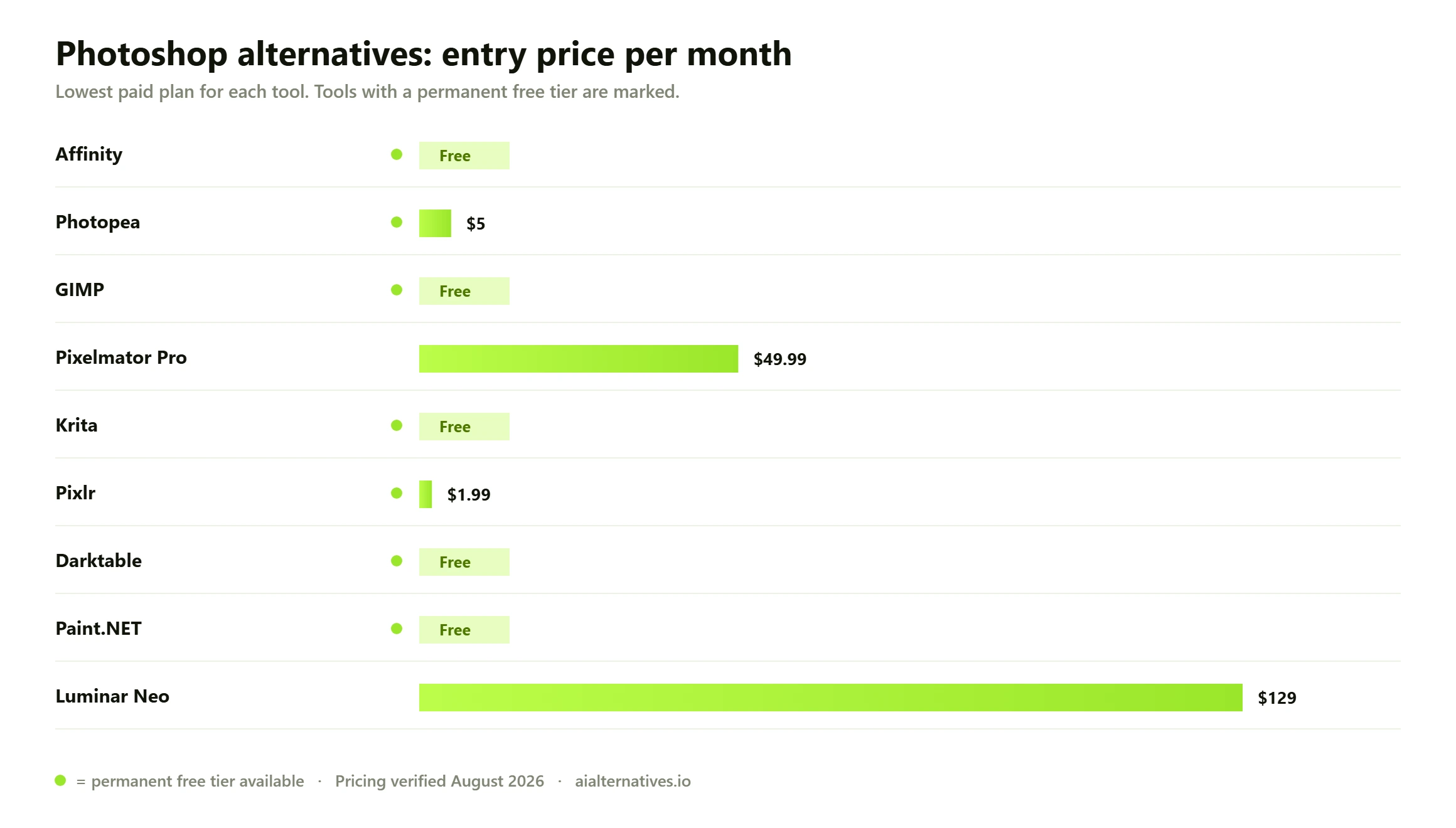
| # | Tool | Best for | Free tier | Price |
|---|---|---|---|---|
| 01 | Affinity | Professional work, zero cost | Free tier | Free |
| 02 | Photopea | Editing PSDs in a browser | Free tier | Free / from $5 per mo |
| 03 | GIMP | Open-source desktop editing | Free tier | Free |
| 04 | Pixelmator Pro | Mac users who hate subscriptions | Trial only | $49.99 one-time |
| 05 | Krita | Digital painting and illustration | Free tier | Free |
| 06 | Pixlr | Fast AI edits in a browser | Free tier | Free / from $1.99 per mo |
| 07 | Darktable | Non-destructive RAW workflow | Free tier | Free |
| 08 | Paint.NET | Lightweight Windows editing | Free tier | Free (Windows only) |
| 09 | Luminar Neo | One-time-purchase photo AI | Trial only | From $129 one-time |
Why people are leaving Photoshop
Adobe changed the math, twice. On January 15, 2025, the Creative Cloud Photography plan with 20GB storage went from $9.99 to $14.99 a month on the annual, billed-monthly option, according to Adobe’s own pricing FAQ. That cheap tier is no longer sold to new customers. The Photography plan now starts at $19.99 a month with 1TB.
Then came the repackaging. In June 2025 Adobe renamed Creative Cloud All Apps to Creative Cloud Pro at $69.99 a month, and added a Creative Cloud Standard tier at $54.99 that caps you at 25 generative credits a month. Photoshop on its own will run you $22.99 a month, or $275.88 a year.
Two smaller changes probably annoy you just as much. Photoshop Elements is sold as a three-year term license now, not a true perpetual one. And Adobe’s commercial VIP price list gets another update on June 1, 2026 that cuts volume discounts if you’re a team with 10 to 49 licenses.
The complaint you’ll see most often isn’t the headline price. It’s the feeling of renting a tool you already know, forever, while the credits meter runs. That’s what’s pushed so many people toward alternatives to Photoshop in the last 18 months.
Photoshop alternatives compared
| Tool | Best for | Starting price | Free plan |
|---|---|---|---|
| Affinity | Professional work, zero cost | Free | Yes, everything |
| Photopea | Editing PSDs in a browser | Free / from $5 per mo | Yes, with ads |
| GIMP | Open-source desktop editing | Free | Yes, fully |
| Pixelmator Pro | Mac users who hate subscriptions | $49.99 one-time | No, trial only |
| Krita | Digital painting and illustration | Free | Yes, fully |
| Pixlr | Fast AI edits in a browser | Free / from $1.99 per mo | Yes, limited AI credits |
| Darktable | Non-destructive RAW workflow | Free | Yes, fully |
| Paint.NET | Lightweight Windows editing | Free | Yes, Windows only |
| Luminar Neo | One-time-purchase photo AI | From $129 one-time | No, 30-day refund |
The best free Photoshop alternatives
This is where the interesting stuff happened for you. The free alternatives to Photoshop used to mean compromise. In 2026 two of them are genuinely professional tools, and one of those was a $169 paid suite ten months ago.
1. Affinity — the best free alternative to Photoshop, full stop
On October 30, 2025, Canva relaunched Affinity as a single app with Pixel, Vector and Layout studios, and made it free forever. More than a million people signed up in the first four days. Canva funds it from its own subscription business.
What it does better than the old paid version: one app instead of three, live filters, real CMYK output, and clean import of your PSD, AI, PDF and IDML files. What you won’t get: generative AI. Gen fill, background removal and super resolution require a paid Canva plan, which is $180 a year.
Two caveats worth knowing. You’ll need a Canva account to download it. And Affinity V2 perpetual licenses still work but are no longer actively maintained. Mac and Windows are live; iPad is still listed as coming.
2. Photopea — Photoshop’s interface, in a tab
Photopea is the fastest way for you to open a PSD when you don’t have Photoshop. The panel layout, the shortcuts, the layers-and-masks model all match what you already know. It also reads RAW formats like CR3, NEF and ARW, plus SVG and AI.
It runs locally in your browser using your own CPU and GPU, so your files don’t get uploaded anywhere. The trade-offs are ads on the free tier, no real plugin ecosystem, and sluggishness on very large documents. Premium starts around $5 a month and removes the ads.
3. GIMP — free with no strings at all
GIMP 3.2 shipped on March 14, 2026 and fixed the two things you probably complained about for a decade: it now has non-destructive editing and vector layers. The current stable build is 3.2.4, released April 17, 2026.
It’s free on Windows, macOS and Linux, with no account, no cloud, and nothing to upsell you. The interface still won’t feel like Photoshop, and CMYK handling is partial. Pick GIMP if you’re on Linux, or if you want a tool no company can take away from you.
4. Krita — free, and better than Photoshop at painting
Krita is aimed at illustrators, not retouchers. You get proper brush engines, stroke stabilizers, wrap-around mode for seamless textures, and frame-by-frame animation. Version 5.3.3 landed on July 29, 2026.
It’s poor at RAW processing and photo correction, so treat it as a companion tool rather than a full swap. Paid copies on Steam, the Microsoft Store and the Mac App Store are identical to the free download; they just fund development.
5. Pixlr — quick AI edits with no install
Pixlr is the one to open when you need a background gone in 20 seconds. Text-prompt editing, generative fill and one-click cleanup all work right in the browser. It’s built for social and ecommerce images.
The free plan is ad-supported with limited AI credits. Plus is $1.99 a month billed annually, Premium is $7.99. It won’t replace your layered compositing workflow.
Two more worth a mention among photoshop alternatives free of charge: Darktable, if what you actually want is a Lightroom replacement with a serious RAW pipeline, and Paint.NET, if you’re on Windows and want something that opens instantly for crops, layers and quick fixes.
Best Photoshop alternatives for Mac and one-time buyers
Pixelmator Pro
Apple acquired Pixelmator in November 2024 and closed the deal in February 2025. The app survived. It’s still a one-time $49.99 purchase on the Mac App Store, or bundled into Apple Creator Studio at $12.99 a month or $129 a year. It requires macOS 26.
It’s the most Mac-native editor you can get: Metal-accelerated, with machine-learning upscaling, denoise and deep Photos integration. It lacks Photoshop’s depth for complex compositing and there’s no Windows build. The subscription version adds the Warp tool; the one-time purchase doesn’t include it.
Luminar Neo
Skylum’s Luminar Neo is a photo editor with heavy AI, not a Photoshop clone. Sky replacement, relight, portrait retouching, structure controls. Licenses are one-time: $129 desktop-only, $159 all platforms, $199 for Max with a year of Luminar Prime included.
Read the fine print. The apps are yours forever, but new AI features arrive through Luminar Prime, which renews annually. It’s the strongest pick if you shoot a lot and edit little.
If you’re searching for photoshop alternatives mac specifically, the shortlist is short: Affinity if you want free and professional, Pixelmator Pro if you want native and instant, Photopea if you just need to open someone’s PSD today.
How to choose
Match the tool to your job, not to the feature list.
- You do client work and need CMYK, print and vector. Affinity. It’s free and it covers all three.
- You just need to open PSDs occasionally. Photopea. Nothing to install.
- You’re on Linux, or you want no vendor at all. GIMP.
- You draw and paint. Krita, with Affinity alongside it for layout.
- You shoot RAW and mostly correct photos. Darktable if free matters to you, Luminar Neo if speed matters.
- You’re on a Mac and want it to feel like a Mac app. Pixelmator Pro.
One practical test: export three of your real files to the new tool before you cancel anything. PSD import is good in Affinity and Photopea, but smart objects, layer styles and text can shift on you.
Is switching worth it?
For most individuals, yes. A free Affinity license against $275.88 a year for Photoshop isn’t a close call, and Affinity does 90% of what you actually use as a solo designer or photographer.
Stay on Photoshop in three cases. If you work in a studio where PSD files move between people and layer fidelity has to be exact. If you depend on Generative Fill, Select Subject and Neural Filters daily. Or if plugins like Portraiture, Nik or specific retouching panels are in your workflow, since third-party plugin support outside Photoshop is thin.
The honest middle ground: drop to the $19.99 Photography plan, install Affinity next to it, and see how often you still open Photoshop over three months. Plenty of people find the answer is almost never. You might find it’s every day, and that’s a real answer too.
Photoshop alternatives FAQs
The questions people actually ask on Google, Reddit and Quora — answered with what we verified this month.
How we test01 Is Affinity really free, or is there a catch?
It’s genuinely free. Canva relaunched Affinity on October 30, 2025 as a free app with no time limit and no feature stripping. The catch is narrow: you need a Canva account to download it, and the AI tools (generative fill, background removal, super resolution) require a paid Canva plan at $180 a year. Canva says your Affinity work isn’t used to train AI models.
02 What is the best free Photoshop alternative in 2026?
Affinity, for most people. It’s the only free option that covers photo editing, vector work and page layout in one professional app. If you’d rather not create an account, GIMP 3.2 is your strongest fully independent option, and it finally has non-destructive editing as of March 2026.
03 How much does Photoshop cost in 2026?
Photoshop on its own will run you $22.99 a month on an annual plan, or $275.88 a year. The Photography plan with Lightroom and 1TB is $19.99 a month. Creative Cloud Pro with 20+ apps is $69.99 a month at the regular rate. All individual plans include a 7-day free trial.
04 Can any alternative open and save PSD files properly?
Affinity and Photopea both open and save PSD reliably for standard layers, masks and text. GIMP opens PSDs but exports to PSD less cleanly. Expect drift on smart objects, adjustment layers and layer styles in any non-Adobe tool, so test with your own files before you commit.
05 What is the best Photoshop alternative for Mac?
Pixelmator Pro if you want a native Mac app with no subscription, at $49.99 one-time on the Mac App Store. Apple now owns it and also bundles it into Apple Creator Studio at $12.99 a month. Affinity is the better pick if you need vector and layout tools too, and it costs you nothing.
06 Is GIMP good enough to replace Photoshop now?
It’s much closer than it used to be. GIMP 3.2, released March 14, 2026, added non-destructive editing and vector layers, which were the two long-standing dealbreakers for you. It’s still less polished than Photoshop, CMYK support is partial, and the interface takes real adjustment. For personal and web work, it’s enough.
Still comparing?
See how the top picks square off head to head, or browse every alternative guide we publish.